Programming Menu
Over Speed
You can set the Over Speed alert to notify you when you are traveling over a specified speed. When
you travel above the speed that you have set, the background display for your current speed will turn
red and a voice prompt will announce “Over Speed”.
When connected to the Drive Smarter app or a mobile Wi-Fi hotspot, the Over Speed setting is
automatically set to the speed limit showing on the display. If no speed limit data is available and the
display shows --, the Over Speed setting is used.
Over Speed Limit
Note: this setting only applies when MAXcam 360c is connected to a Wi-Fi hotspot with internet
connectivity.
When the speed limit is exceeded by the set speed, the background for your current speed will
change to red and a voice prompt will announce “Over Speed”. If no speed limit data is available and
the display shows --, the Over Speed setting is used.
Meter Mode
MAXcam 360c offers five different settings for displaying information about alerts.
Standard
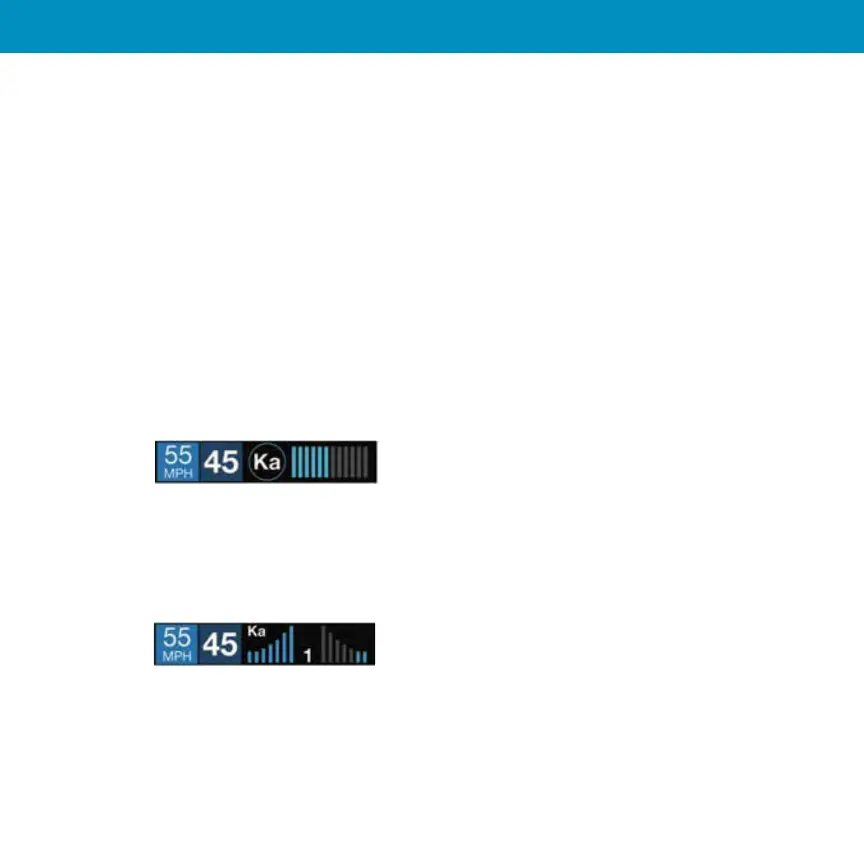
The Standard meter mode provides only the band information and front signal strength information
of a single alert. When radar is detected, the band (X, K or Ka) and a bar graph of the signal’s strength
are displayed. When laser is detected, the display will simply read “Laser.” If there are multiple alerts
present, only the highest priority threat is displayed. Laser is the highest priority threat, followed by
Ka, K, then X band radar.
Standard FR
The Standard FR1 meter mode (FR1 = Front and Rear signal strengths of 1 signal) displays the band of
the highest priority threat along with a front and rear bar graph of its signal strength. The left bar
graph shows the signal strength in front of the detector while the right bar graph shows the signal
strength from the rear. If there are multiple alerts present, only the signal strength of the highest
priority threat is displayed. Laser is the highest priority threat, followed by Ka, K, then X band radar.
The number in between the bar graphs is the total number of alerts that are being detected.
15


 To Next Page