Page 8 of 19 0455-0209 Rev C
ePhone4x
History Dir DND Menu
2 3 41
12:47
PM
23 J AN WED
KEY 1-1
KEY 1-2
KEY 1-3
KEY 1-4
KEY 1-5
KEY 1-6
KEY 1-7
KEY 1-8
KEY 1-9
DS S Pag e
View Key
Program
mable
Feature
Keys
Program
mable
Feature
Keys
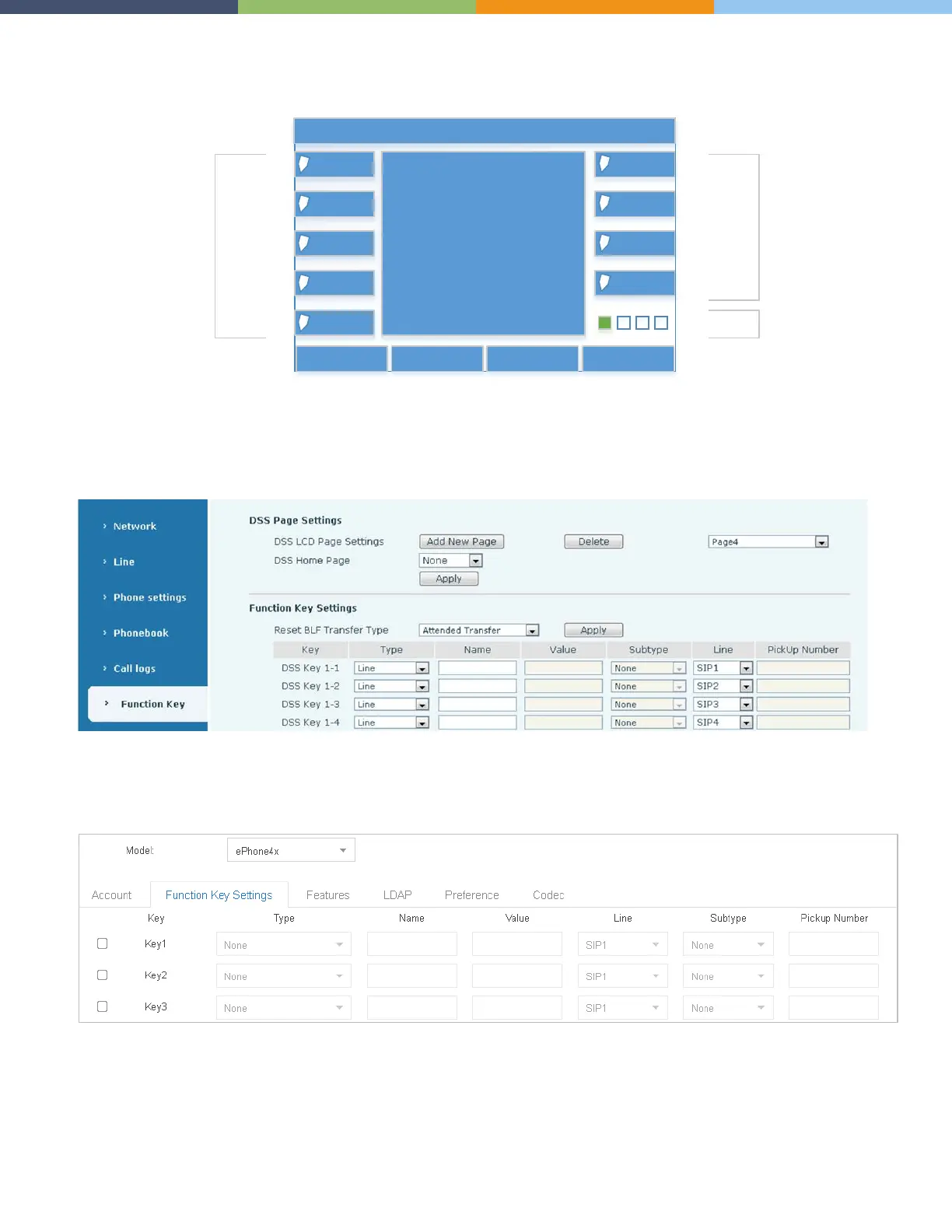
The bottom right DSS Key on each page of both phones is a pre-programmed that enables you to view additional
pages of DSS keys. This key cannot be changed. However you can use this key to delete and add pages (min: 1 page,
max: 4 pages).
Here’s how the key layout appears in the phone web interface.
Here’s how the key layout appears in the Auto Provisioning Application.
Note: In the Auto Provisioning Application the Feature/Function Keys are labeled as Key1 to Key36 (for the
ePhone4x). Therefore Key10 in the Auto Provisioning Application corresponds to DSS Key 2-1 in the Phone Interface.



 To Next Page