Page 9 of 19 0455-0209 Rev C
Programming a Line Key
Programming line keys to a specific SIP Account to make and receive calls.
The ePhone4x can have up to 6 separate SIP accounts provisioned, however in most cases you will only have one
configured.
1. Select Function Key from the left-hand menu options.
2. Select which key you want to program.
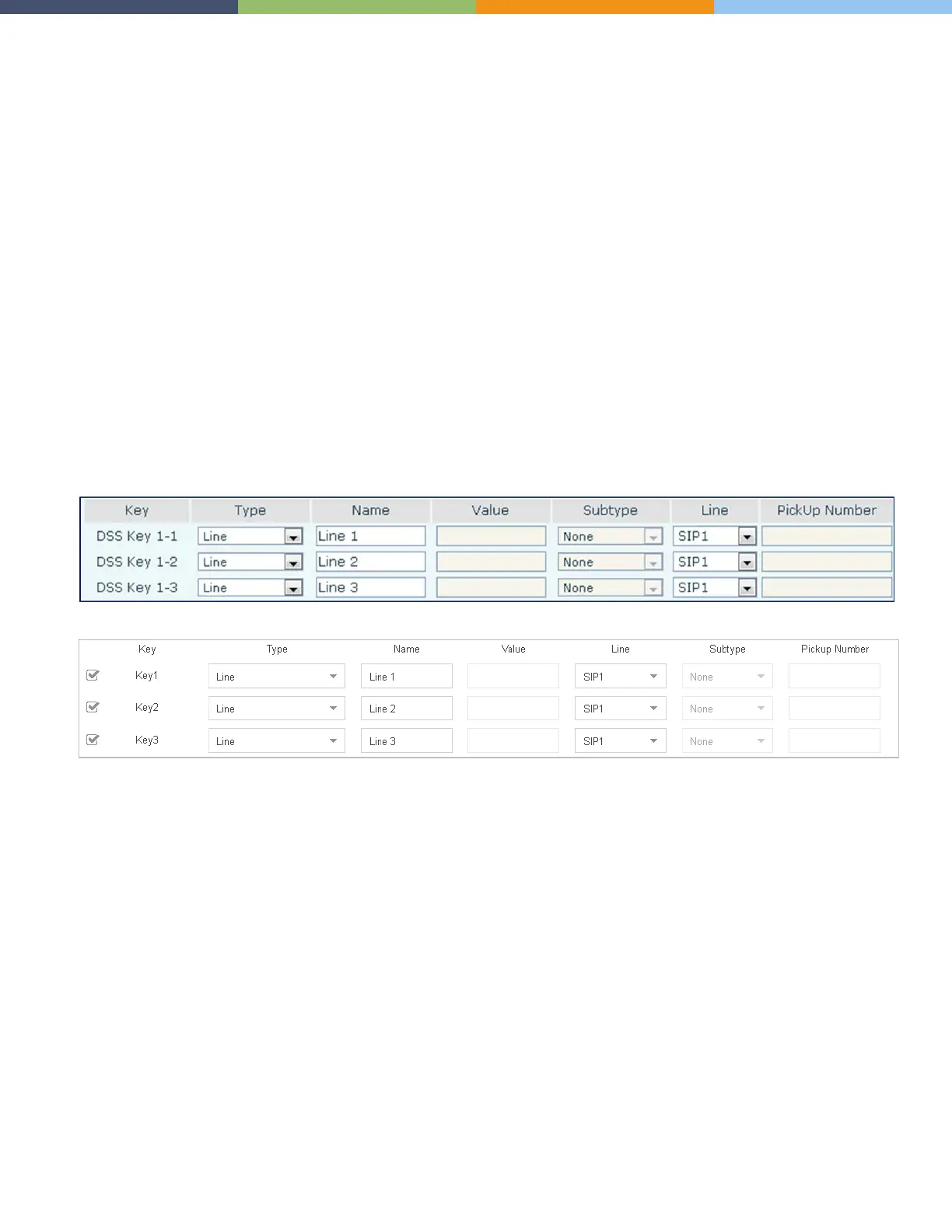
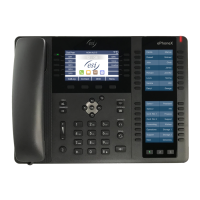
3. For that key enter the following information
• Type: Line
• Name: I chose “Line #” but you can use a different name
• Value: N/A
• Subtype: N/A
• Line: SIP1
• Pickup: N/A
Here we’ve programmed DSS Keys 1-1 through 1-3 as line keys. Once we save this programming any new calls to or
from this phone will use one of the three programmed line keys.
Phone Programming Interface View
Auto Provisioning Application View
Programming a Call Park Key
This key uses a feature code (or star code) so we will program it as a DTMF key type. This will send the DTMF star
code () to the system to perform the requested function.
1. Select Function Key from the left-hand menu options.
2. Select which key you want to program.
3. For that key enter the following information
• Type: DTMF
• Name: Call Park but you can choose something else
• Value: The default star code value for the eSIP Evolution
• Subtype: N/A
• Line: Auto
• Pickup: N/A



 To Next Page