7
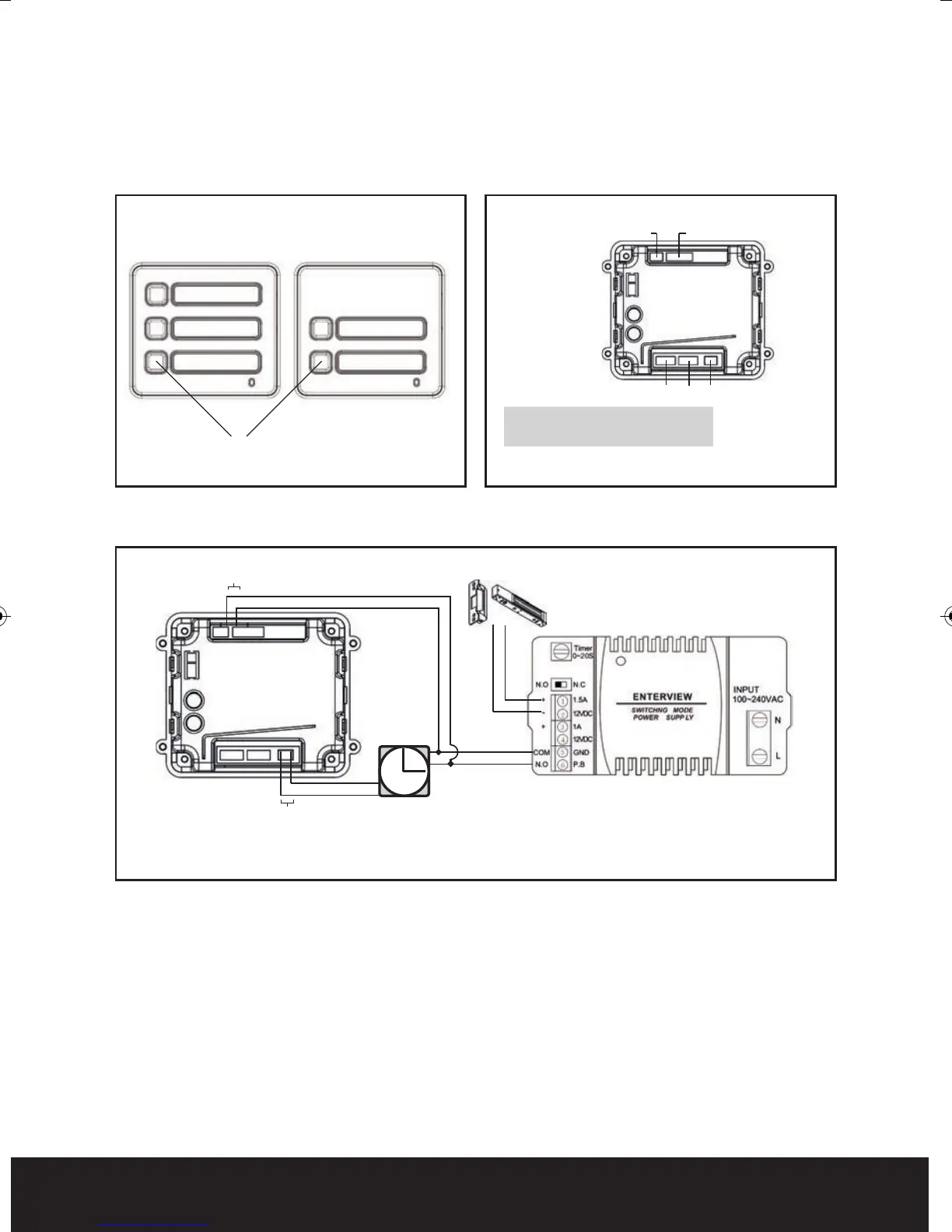
3 Button Version
2 Button Version
Trade Button
CN1- Trade button output (volt-free)
CN2 & CN3 -Connection for monitor
12vDC Input
(From EV-BPS)
for additional modules
CN1CN2CN3
Fig. 9
Trade Button
Trade button release module.
Trade Button Module Front View
Trade Button Operation Instructions
Once the trade button module has been wired to the power supply/lock, press the trade
button to release lock.
If the lock does not operate, please ensure that the Normally Open contact from the
dedicated output for the trade button switches to Normally Closed when trade button is
operated.
The trade button is designed to give a momentary N.C voltage-free contact when activated.
Please refer to manufacturers operational instructions when using a timer.
*Please Note: Timer for trade button is not included.
Trade Module
(Back)
Timer
Lock Release
Power Supply
Lock
Dedicated output for trade button
(Volt-free)
Dedicated output for handset/keypad
Fig. 10
Trade Button Timer Con guration
Trade Button Back View
Fig. 8
Enterview MX Manual_Layout 2 07/10/2013 14:59 Page 7



 To Next Page