MAGPRO16 Addressable Fire Alarm Panel – Installation and Programming Manual
34
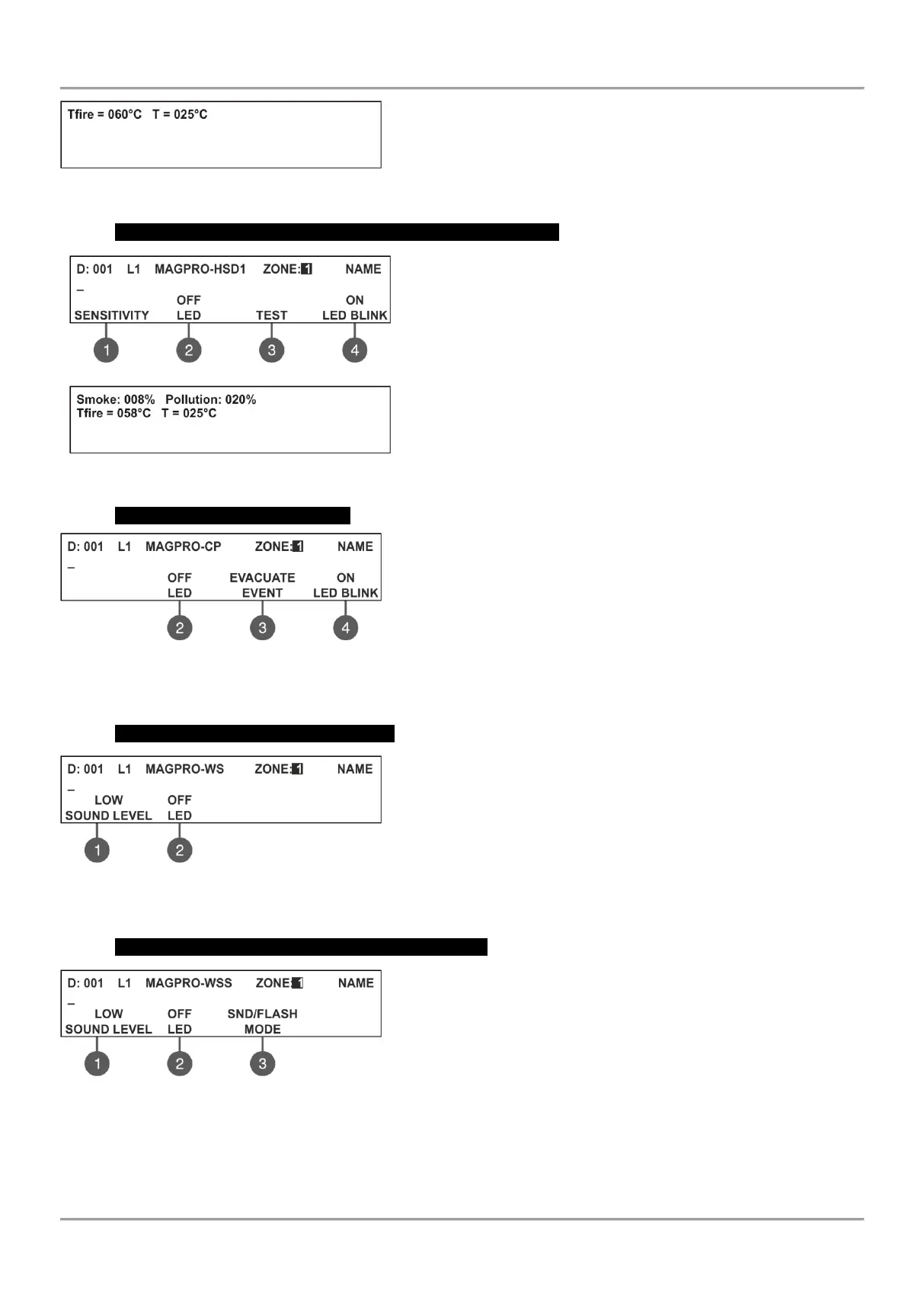
(3) TEST – Press the button to enter in a new screen for checking of
the following current parameters:
- T fire – Shows the operating temperature of the detector, in degrees
centigrade.
- Т – Shows the current temperature in the room, in degrees
centigrade. The selected class is confirmed with ENTER button.
MAGPRO-HSD1 – Combined optical-smoke and heat detector
Use the functional buttons to set the following parameters:
(1) SENSITIVITY – Press to set the sensitivity of the smoke
chamber for DAY and NIGHT alarm mode (see the description of
MAGPRO-SD1). The set sensitivity levels are confirmed wit ENTER
button.
(2) ON/ OFF LED – Press to switch on/ off the device LED.
(3) TEST – Press the button to enter in a new screen for checking
of the following current parameters: Smoke and Pollution (see the
description for MAGPRO-SD1) and Tfire and T (see the description
for MAGPRO-HD1).
(4) ON/ OFF LED BLINK – Alternatively changes the status of the
device LED indication.
The class for MAGPRO-HSD1 is fixed to A1R and could not be changed.
MAGPRO-CP – Manual call point
Use the functional buttons to set the following parameters:
(2) ON/ OFF LED – Press to switch on/ off the device LED.
(3) EVENT EVACUATION/ ALARM – Every pressing of the button
alternatively changes the type of the event generated with activation
of the manual call point:
- Event EVACUATION – The sounders will be activated immediately,
as the set time delays Т1 and Т2 are ignored.
- Event ALARM – The set time delays Т1 and Т2 are active and the manual call point operated as an automatic
detector.
(4) ON/ OFF LED BLINK – Alternatively changes the status of the device LED indication.
MAGPRO-WS – Wall mounted sounder
Use the functional buttons to set the following parameters:
(1) SOUND LEVEL – Every pressing of the button alternatively
changes the sound level between HIGH/ LOW – as this depends on
the number of the connected sounders to the loop:
- HIGH – Set in those cases when the number of the connected
sounders to the loop is up to 30 (sounders WS and WSS).
- LOW – Set in those cases when the number of the connected
sounders to the loop is up to 60 (sounders WS and WSS).
(2) ON/ OFF LED – Press to switch on/ off the device LED.
MAGPRO-WSS – Wall mounted sounder and strobe
Use the functional buttons to set the following parameters:
(1) SOUND LEVEL – Every pressing of the button alternatively
changes the sound level between HIGH/ LOW – as this depends on
the number of the connected sounders to the loop:
- HIGH – Set in those cases when the number of the connected
sounders to the loop is up to 30 (sounders WS and WSS).
- LOW – Set in those cases when the number of the connected
sounders to the loop is up to 60 (sounders WS and WSS).
(2) ON/ OFF LED – Press to switch on/ off the device LED.
(3) MODE – Press to choose the operation mode of the sounder:
SND – Sounder activation only;
FLASH – Flash indication only;
SND/ FLASH – Both sounder and flash indication are active;



 To Next Page