MAGPRO16 Addressable Fire Alarm Panel – Installation and Programming Manual
41
7.5. Panel Outputs Menus
This menu allows the installer to disable/ enable and to set time delay for some of the outputs of the control panel:
- Sounder Outputs (SND 1, SND 2)
- Extinguish Output (EXT)
- Fire Output (FIRE)
- Fault Output (FAULT)
- Four Relay Outputs
The menu is accessible from access levels 2 and 3.
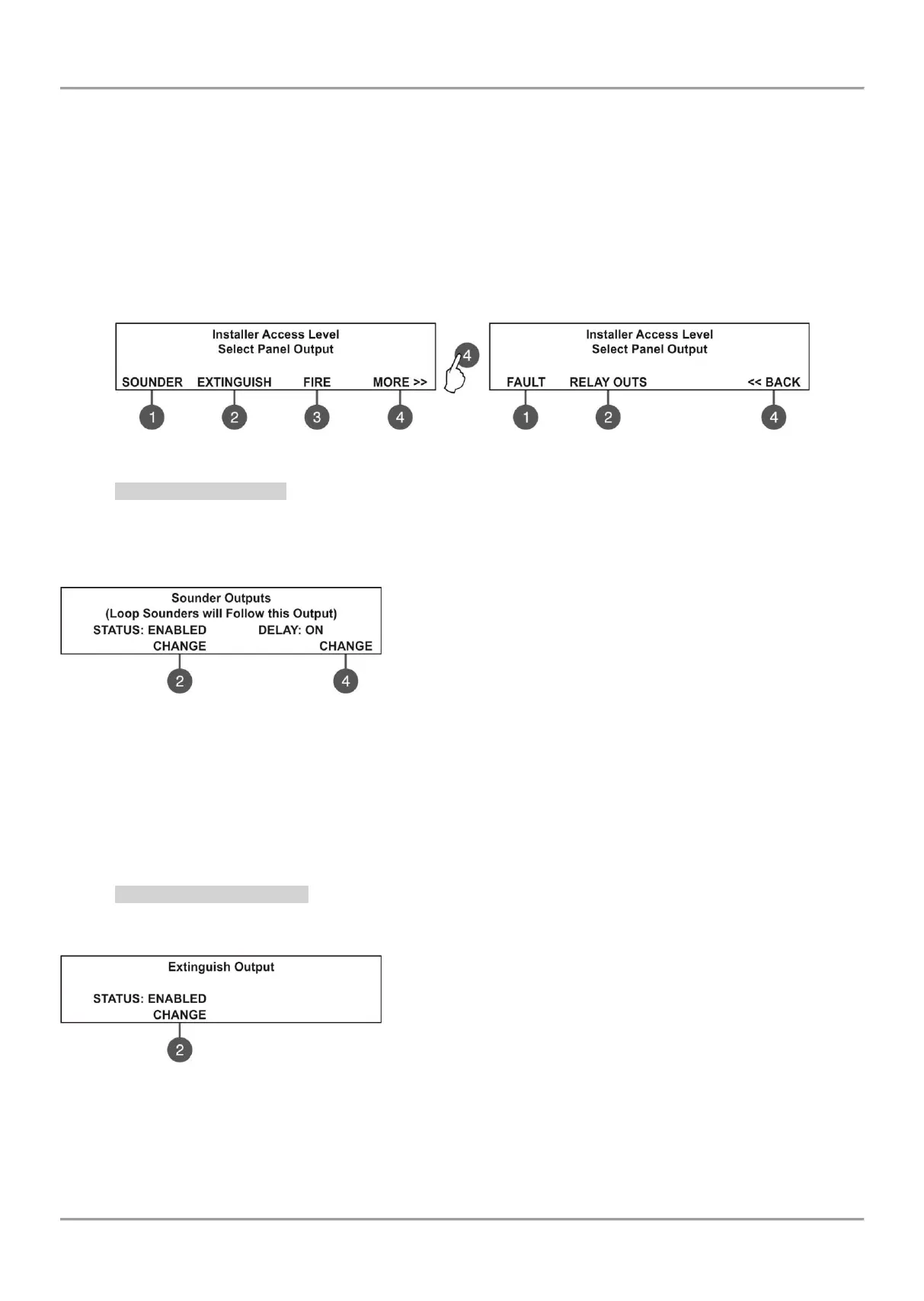
To set outputs parameters, enter in the installer’s menu - 5. PANEL OUTPUTS. The submenus are allocated in two
screens.
7.5.1 Sounders Outputs
In this submenu the installer can disable/ enable the sounders activation and the time delay operation.
To access the SOUNDER submenu, enter in the installer’s menu - 5. PANEL OUTPUTS - SOUNDER (1).
Attention: In access level 2 you can only review the set delay status (ON/ OFF), with no rights to change it!
The functional buttons have the following action:
(2) - Press to change the status of the sounder outputs. Every
pressing of the button changes alternatively the ENABLED -
DISABLED status. When the sounder outputs are disabled the LEDs
‘Sounder Output Fault/ Disable’ and ‘Disable’ light on permanently.
(4) - Press to set the time delay operation. Every pressing of the
button changes the ‘Delay’ setting:
• ON - The delay of sounder outputs will be active when DAY operation mode is set - see the description for
menu 6.3 DAY/ NIGHT operation modes.
• OFF - No delay of sounder outputs activation. The sounder outputs are activated immediately.
• SCHEDULE - The delay of sounder outputs will be active on schedule - see the description for menu 6.3
DAY/ NIGHT operation modes.
All set parameters are confirmed wit ENTER button.
7.5.2 Extinguishing Output
In this submenu the installer can disable/ enable the extinguish output activation. To access the EXTINGUISH
submenu, enter in the installer’s menu - 5. PANEL OUTPUTS - EXTINGUISH (2).
The functional button has the following action:
(2) - Press to change the status of the extinguish output. Every
pressing of the button changes alternatively the ENABLED -
DISABLED status. When the extinguish output is disabled the LED
‘‘Disable’ light on permanently.
All set parameters are confirmed wit ENTER button.



 To Next Page