Ext. Control: Ethernet (LAN) (OPTION)
ET System electronic GmbH 27
CONTROLLING THE DEVICE VIA TELNET
The device can be controlled directly via port 10001. After the console has been opened, a click on ‚Start‘ and
‚Ausführen‘ opens an input field. After the commands cmd or command have been entered, a DOS window opens
with: telnet xxx.xxx.xxx.xxx 10001.
Alternatively, many terminal programs offer the possibility to establish a TCP/IP or telnet connection.
When controlling the device via port 10001, the user i nterface
of the device must not be open in a browser!
TELNET CONNECTION WITH REALTERM
Realterm is a free OpenSource terminal program, which may be downloaded here: http://realterm.sourceforge.net/
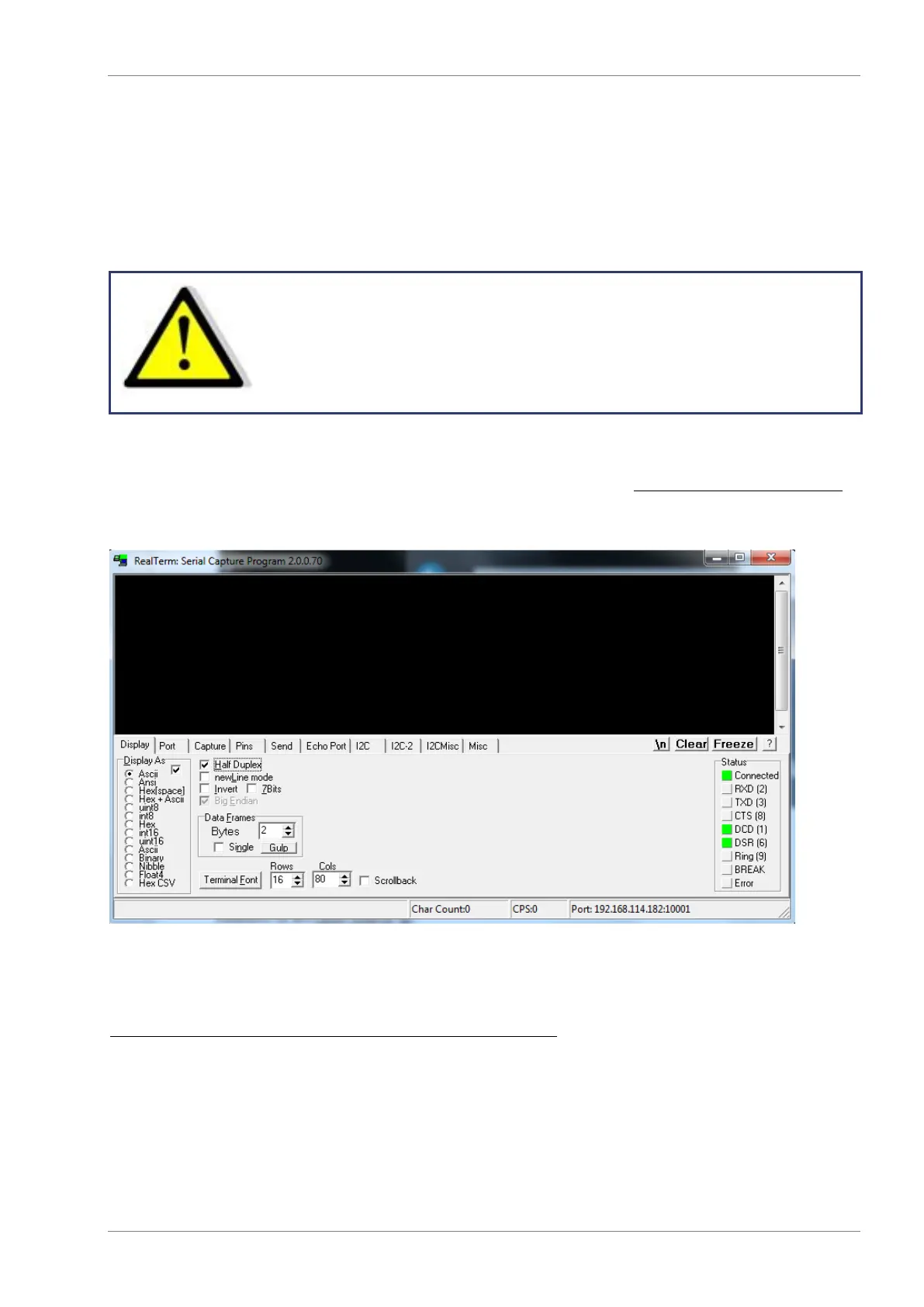
After the program was installed and executed, the box Half Duplex must be checked within the tab Display.
The IP address must be entered within the tab Port in the following format: xxx.xxx.xxx.xxx:10001. Afterwards the
button Open must be clicked. In the terminal box the desired commands can be sent to the device.
For more Information please look at:
http://www.et-system.de/en/produkte/applications-special-units.html


 To Next Page