12
Etac / Cross 6 / www.etac.com
A
B
A
9. Handling
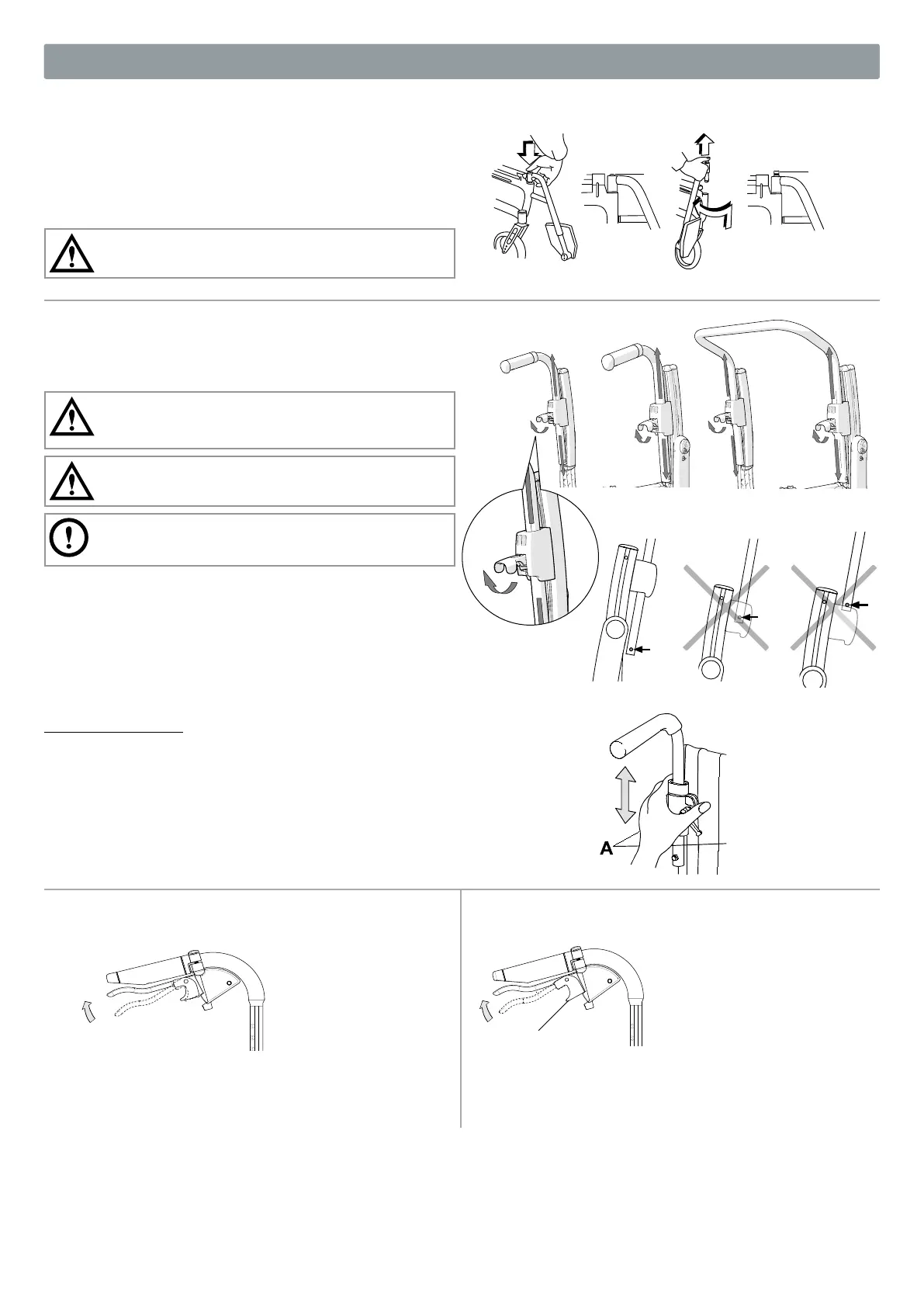
Leg supports
The leg supports can be lifted off/swung to the side if needed.
Lockable leg supports by pressing the red button (A).
When installing lockable leg supports, press the red button (A), place
the leg support in position and release the button. The leg support is
now locked (B).
Check that the leg supports are locked before lifting.
Push handles/bow handle, height adjustable
Release the locking handle. Set the desired height position. Make
sure the handles are in a “snap-in” position, lock the locking handle.
Make sure the locking handles are properly locked. This is
especially important when lifting the wheelchair with the user
in situ.
Make sure that the locking handle of the handle always snaps
out under the handle bracket.
The bow handle must be removed before the chair can be
collapsed.
Cross 2 back support
Release the knob (A), push in the red wedge. Then as above.
Attendant brake (service brake)
• Brake during travel by pulling the brake lever upwards.
Attendant brake (parking brake)
• To activate the parking brake, pull the brake lever upwards and
press the A button.
• Release by pulling the handle upwards.


 To Next Page