13 P-TS7 User Manual
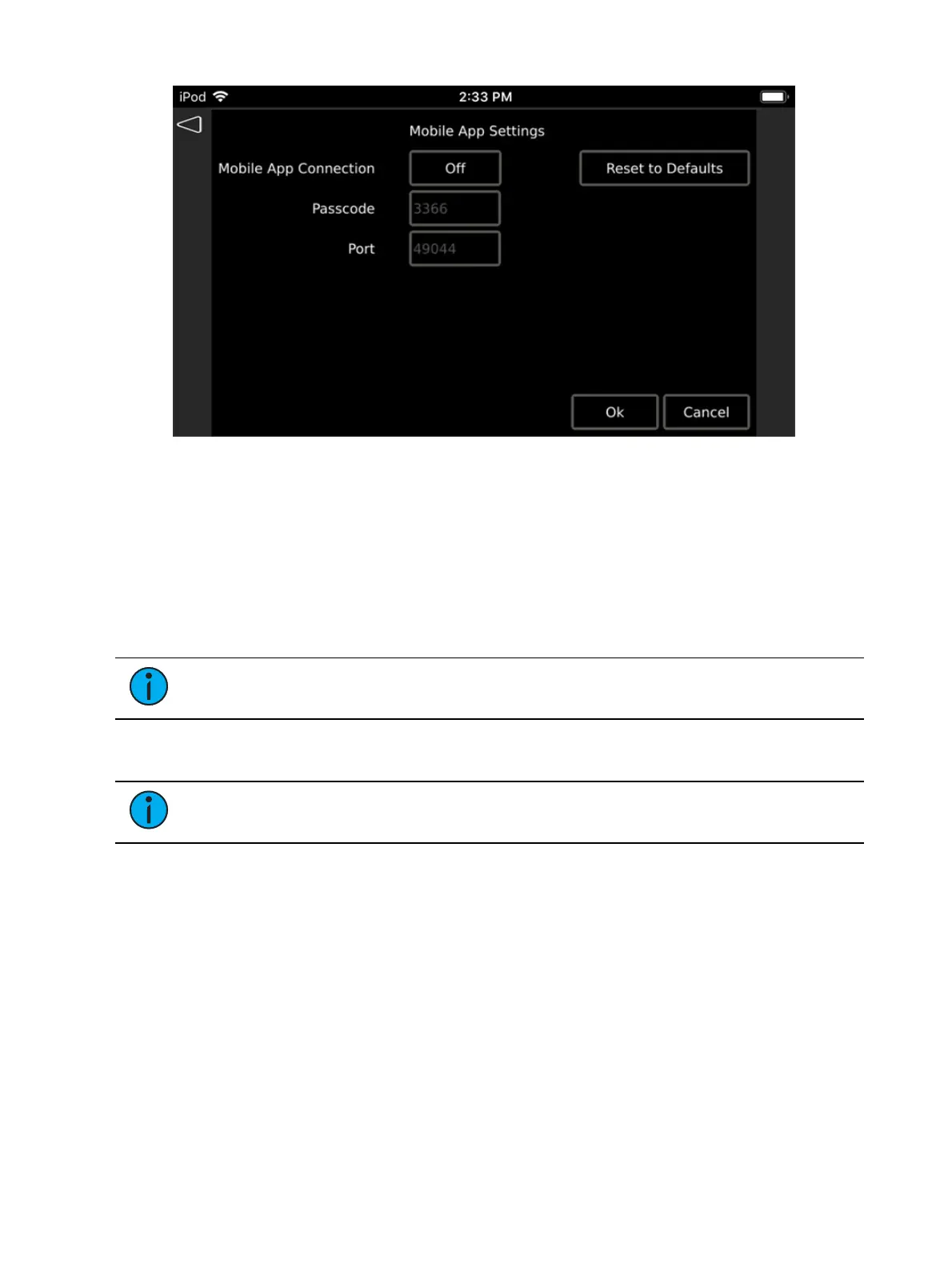
To configure a P-TS7 (Ethernet connected) for use with the Paradigm Touchscreen Remote App,
select the {Mobile App Settings} button located on the Comms page.
The Mobile App Settings page provides access to enable the touchscreen for connection via the
Touchscreen Remote App, as well as sets the passcode security and port address for the
connection.
When configured and connected, the Paradigm Touchscreen Remote App mimics all current
display activity for an online P-TS7 onto the remote mobile device and transmits touch events
from the remote mobile device back to the Paradigm system. Each touch event from the mobile
device tracks on the P-TS7, and vice versa.
Note:
Only one Paradigm Touchscreen Remote App connection is allowed per P-TS7
Touchscreen at any given time.
Mobile App Connection this setting toggles On or Off the ability for the Paradigm
Touchscreen Remote App to connect to this P-TS7. This setting is Off by default.
Note:
The following settings are available for configuration when the Mobile App
Connection setting is set to On.
Passcode is a four-digit numeric code used to secure a connection to the touchscreen from
the Touchscreen Remote App. On initial setup, the P-TS7 will automatically generate a
random four-digit code, alternatively you can choose your own four-digit code, or leave


 To Next Page