25809-02A
26 - Electrical Connections
Electrical Connections
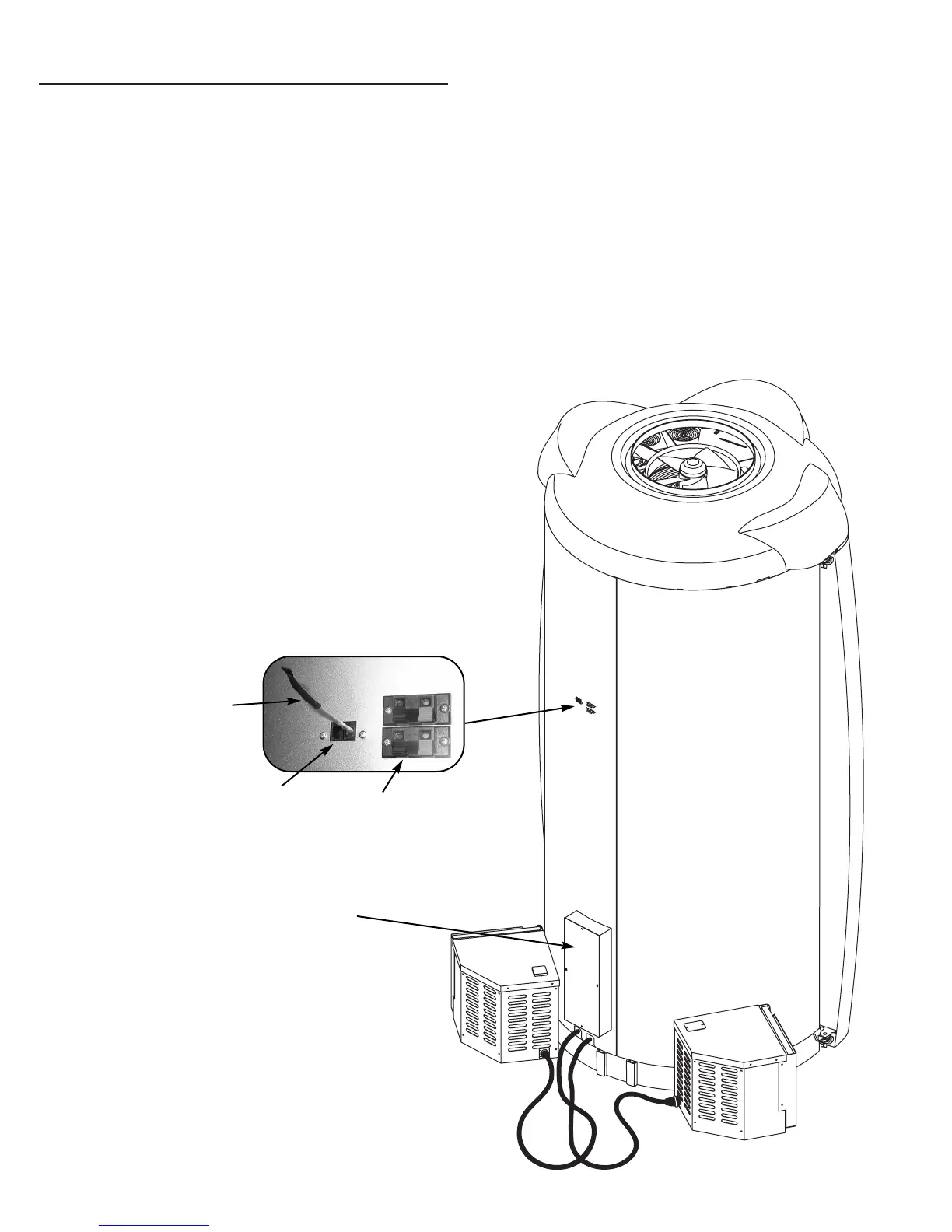
On the back of the booth is a junction box. Have
your electrician connect power directly into this
box as described in Pre-Installation Planning.
Again, a professional electrician is recommended.
Your booth is designed to work with a remote con-
trol device. If you choose not to use one, insert the
Remote Control Bypass plug into one of the
remote control ports as shown. It may be installed
in either port. Your booth will not operate without
the Remote Control Bypass plug or a remote sys-
tem connected. Your equipment is now ready for
use.
In the ceiling of the booth are two speakers capa-
ble of handling 25W of musical power, with a
maximum of 130W. Next to the remote control
ports are two speaker inputs to connect to a
stereo.
NOTE: Your unit is designed to accept an input
from a remote control device. The remote con-
trol is optional. If you plan on using a remote sys-
tem refer to Remote Connections.
ATTENTION: Although the Remote Control
Bypass plug provided with your unit will work
wherever a T-Max® terminator is called for in the
series, the T-Max® terminator will not work as a
bypass plug. A bypass plug is needed only when
your booth is operated without a remote system
connected.
REMOTE CONTROL
BYPASS PLUG
REMOTE CONTROL
PORTS
SPEAKER
INPUTS
JUNCTION BOX


 To Next Page