25809-02A
Using Your Booth - 31
Using Your Booth
When used as a stand alone unit or when connected to a remote system using a control relay.
1. Open the doors, step inside and close the
doors fully. For best results, position your body
in the center of the booth.
2. Put on your safety goggles.
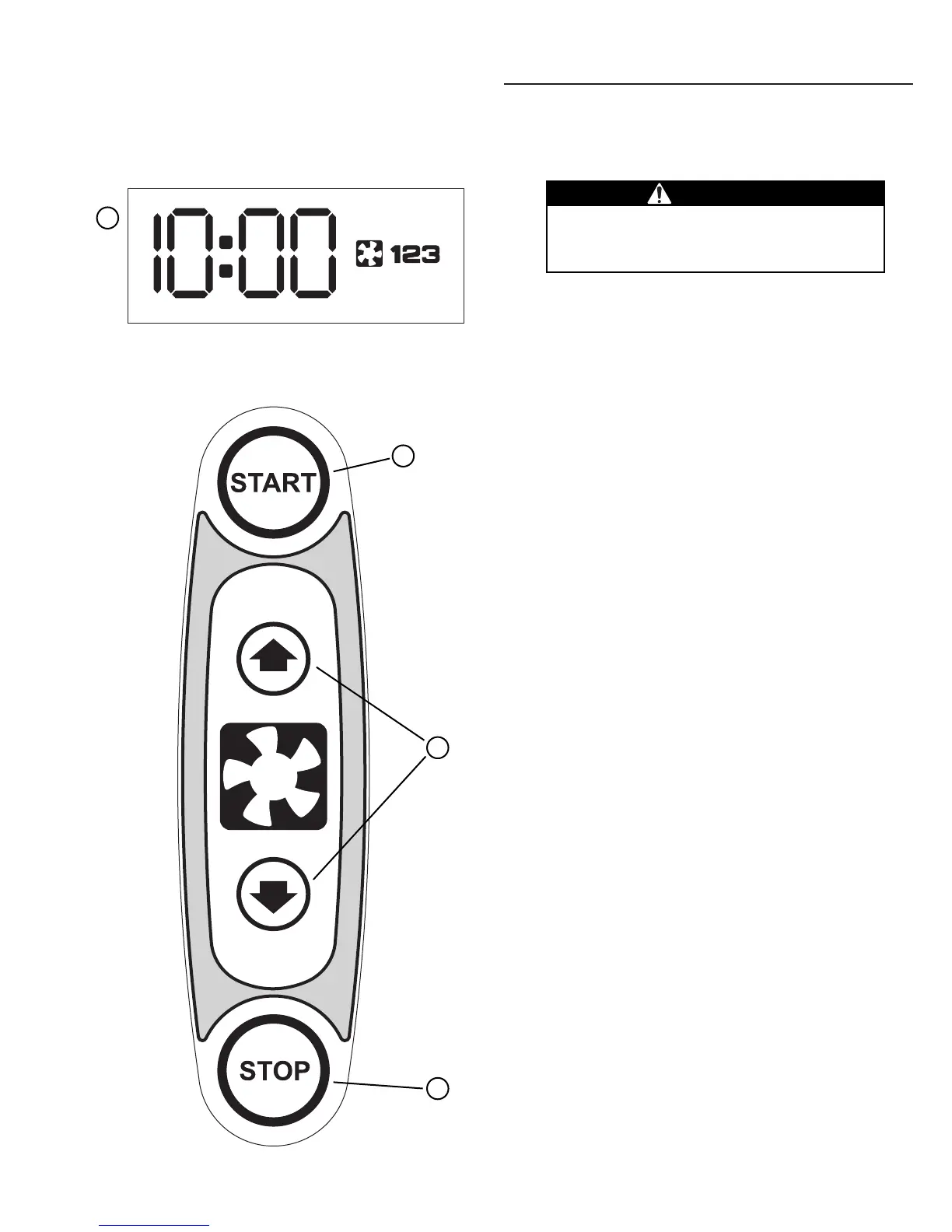
3. Press the START button (B) to begin the tanning
session. The lamps will turn on and the timer
will begin to count down.
4. If a tanning time less than the displayed time is
desired, repeatedly press the START button (B)
to decrease the remaining time.
5. When the timer reaches 0 the lamps turn off. If
you want to stop your session before time
expires, press the STOP button (C). You will
have ten seconds to restart with the remaining
time, otherwise the timer will reset to 0:00.
6. Exit the booth. The cooling fans run for a peri-
od of time after the lamps shut off to aid in
cooling the booth.
A Timer display - Displays remaining time and
fan status.
B START button - Turns unit on. Timer display
shows remaining time. If a lesser time is
desired, press START button until desired
time is displayed.
C STOP button - Interrupts tanning session.
D Body fan buttons - Adjusts body cooling fans.
Timer display shows intensity (1-2-3).
WARNING
Wear protective eyewear.
Failure to may result in severe burns or
longterm injury to the eyes.
A
B
C
D


 To Next Page