Update the robot vacuum cleaner's firmware version. Please make sure your robot
vacuum cleaner has the latest firmware version installed to ensure its optimal cleaning
performance.
Check for any potential physical damage. Please inspect the robot vacuum cleaner for
any visible signs of damage that could cause the robot vacuum cleaner to become stuck.
7. What should I do if my L60's dustbin always falls off during cleaning?
Troubleshooting steps:
Inspect the dustbin. Please remove the dustbin from the robot vacuum cleaner and
check for any visible signs of damage or cracks on the dustbin that may prevent it from
locking into place securely. Additionally, please check the installation location of the
dustbin for any debris, dust, or obstructions that may prevent the dustbin from inserting
into the robot vacuum cleaner.
Check the locking mechanism. Please inspect the locking mechanism on both the
dustbin and the robot vacuum cleaner to make sure the locking mechanism is not
damaged or broken.
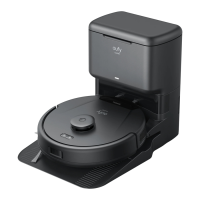
Reinsert the dustbin. Simply align both sides of the dustbin with the attachment area on
the robot vacuum cleaner, and then gently insert the dustbin into place until you hear a
clicking sound.








 To Previous Page