TimeFactor User Guide System Menu Tree
43
PLY – Looper Play
STP – Looper Stop
MT – Looper Empty
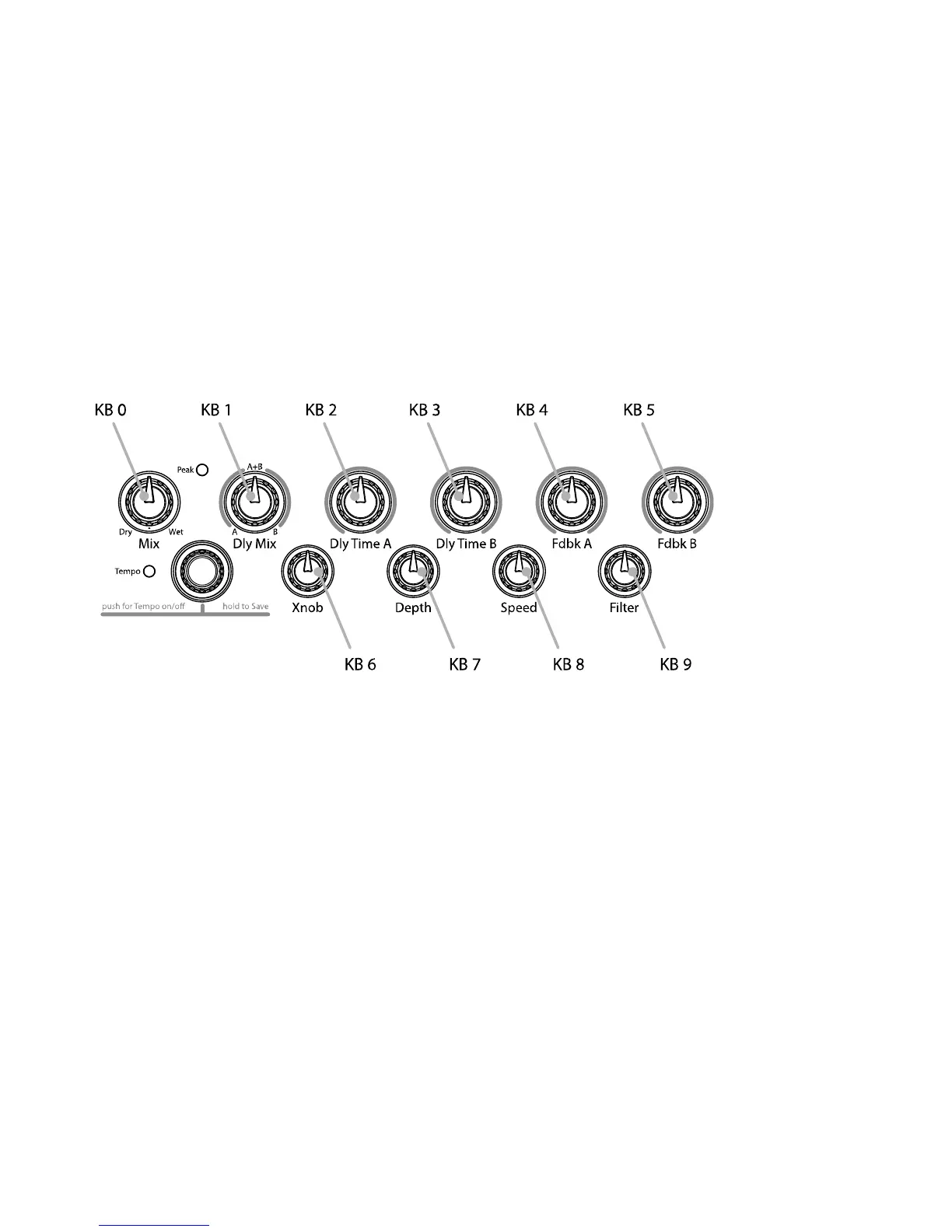
KB0…9 – Because of the limited space in the Billboard display, the Parameter
Control Knob names cannot be meaningfully displayed. Instead, for display
purposes, we’ve numbered the knobs from 0 to 9 shown in the image below.
FS1…3 – Alternate Mode (AUX Switches act as Play Switches when the Stompbox
is in Bank Mode, and Bank Switches when the Stompbox is in Play Mode)
PDL – Use AUX Switch to access full value of Preset’s Expression Pedal assignment
while the switch is held
The notion of using an On/Off control source like an Aux Switch to control a variable
parameter bears some explanation. Consider a variable parameter like Dly Mix. You may want
to be able to use a remote switch to instantly change from 100% Delay A to 100% Delay B.
Or consider Delay Time. You may want to be able to use a remote switch to instantly change
from 100 ms of delay to 250 ms.
After you’ve selected a Parameter Control Knob, you can set two values for the parameter; a
minimum value [MIN VAL] and a maximum value [MAX VAL]. Each time the assigned switch
is pressed, the parameter value instantly toggles between the minimum and maximum value.
When a Parameter Control Knob designator is displayed (KB0… KB9), pressing the Left
Footswitch will display [MIN VAL]. Turn the associated Parameter Control Knob to set the
minimum value. For example, if KB0 was selected, turn the Mix Control Knob to set the
minimum value. The Billboard displays the knob value while you’re turning the parameter
knob and times out to display the selected [MIN VAL] when the knob is idle.
Push the Left Footswitch again to set the maximum value for the selected Parameter Control
Knob. The Billboard will display [MAX VAL]. Turn the associated parameter knob to adjust the
maximum value. The Billboard displays the knob value while you’re turning the parameter
knob and times out to display the selected [MAX VAL] when the knob is idle.



 To Next Page