EasyManua.ls Logo

EverFocus EHN3261 - Page 15

EverFocus EHN3261
81 pages
Print Icon
To Next Page IconTo Next Page
To Previous Page IconTo Previous Page
Loading...
EHN3261/3361
9
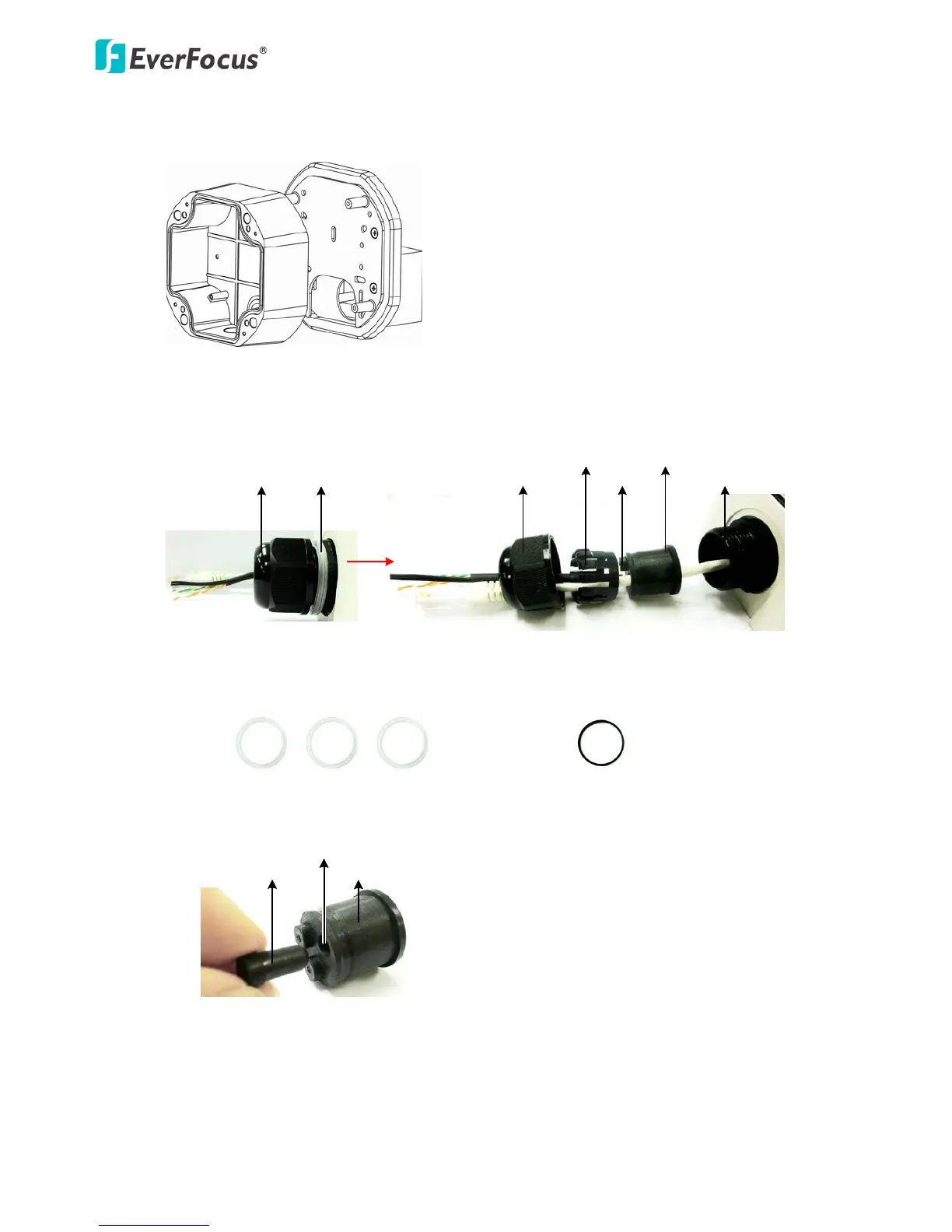
5. Screw the Camera Case back to the Base Plate.
Base Plate
Camera Case
6. Insert the network / PoE cable or the additional cables through the Cable Gland. Up to three
cables can be inserted. Note that except the network / PoE cable, additional wires have to be
bundled into a cable with diameter ranging from 5.3mm to 6.4mm (see Step d below).
Screw BodyScrew Cap
Stopper Claw
Plug
Stopper
Adjustment Ring(s)
Cable Gland Cable Gland
Screw Cap
a. Keep the supplied 6 Adjustment Rings for waterproofing.
Transparent x 5 (1 mm thickness)
Black x 1 (0.5 mm thickness)
b. Remove the Plug(s) from the Stopper (depends on the number of cables inserted). One
Cable Conduit can only be inserted with one cable.
Plug
Stopper
Cable Conduit

Other manuals for EverFocus EHN3261

Related product manuals