50
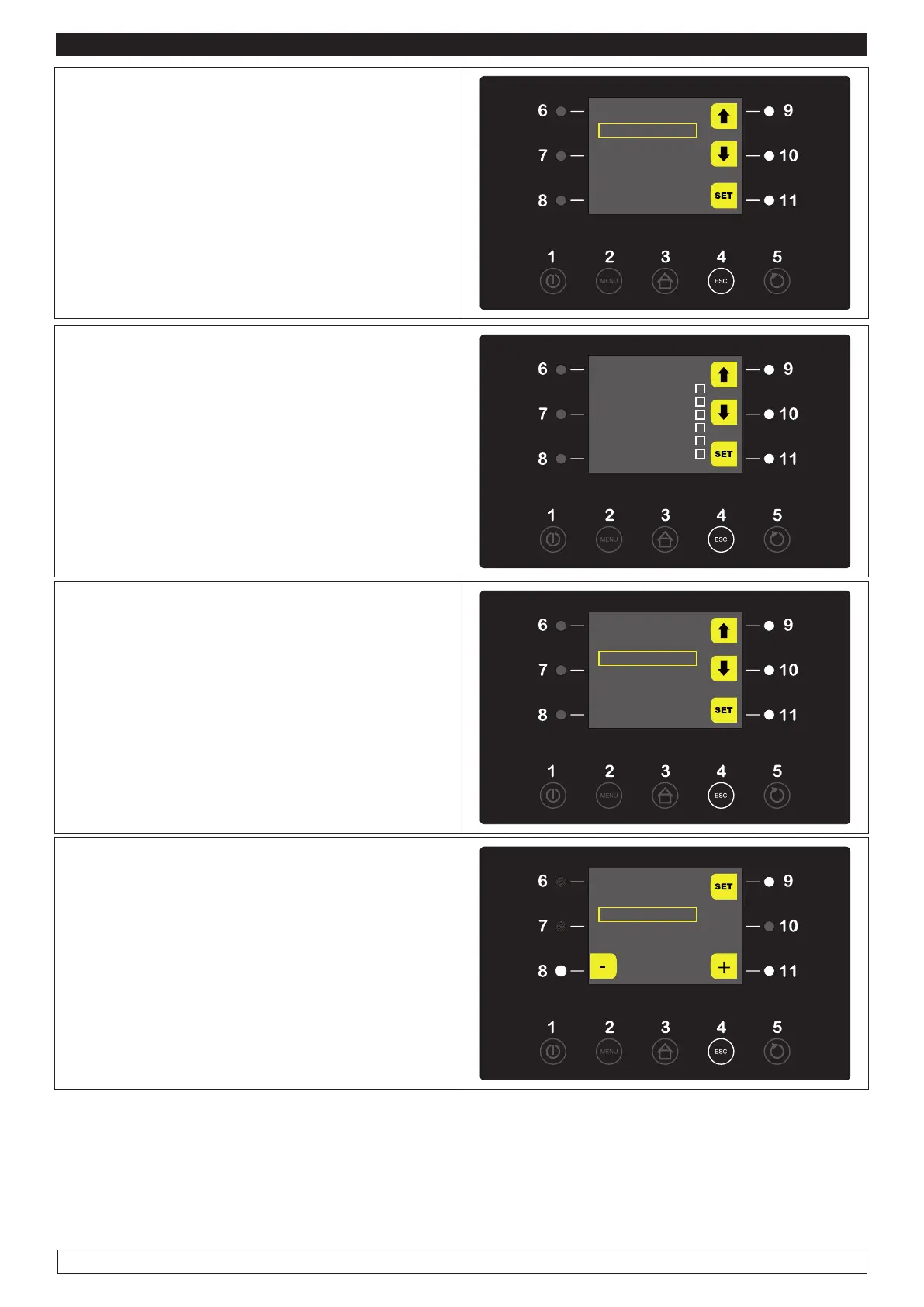
► Select with the UP-DOWN keys (9-10) the “SE-
TUP LOGGING” item
► Press the SET key (11) to confirm
HISTORICAL DATA
SETUP RECORDINGS
DELETE RECORDINGS
► Select with the UP-DOWN keys (9-10) the
menu item then press the SET key (11) to Se-
lect/Deselect the records of the variable item.
► Press the ESC key (4) to return to the previous
screen.
SETUP RECORDINGS
Cell Probe
v
Evaporator Probe
v
Condensator Probe
Humidity Probe
v
State cycle
v
Type cycle
► Select with the UP-DOWN keys (9-10) the “DE-
LETE RECORD” item then press the SET key
(11) to delete records.
HISTORICAL DATA
SETUP RECORDINGS
DELETE RECORDINGS
► Enter Password* (-19) with the – and + keys
(8-11) then press the SET key (9)
* In case of wrong password you should contact
the Technical Service Assistance.
DELETE RECORDINGS
PASSWORD
PA -19
► When the operation is over either press the ESC key (4) or do not work for 60 seconds.
NOTE: See what stated at Par. 10.12 to download data referring to effected cycles (History) on a USB
stick.








 To Next Page