7700 MultiFrame Manual
7700FC VistaLINK® Frame Controller
7700FC-10 Revision 1.4.7
6. CONFIGURING THE FRAME CONTROLLER
The 7700FC Frame Controller is configured by connecting its serial port to a computer running a readily
available terminal program such as HyperTerminal. The following procedure will guide you through each
step of the configuration process.
You will need the following equipment in order to configure the 7700FC Frame Controller
• PC with available communications port. The communication speed is 57600 baud, therefore a 486 PC
or better with a 16550 UART based communications port is recommended.
• “Straight-thru” serial extension cable (DB9 female to DB9 male) or (DB25 female to DB9 male)
• Terminal program such as HyperTerminal
• Special upgrade cable supplied with the 7700FR frame. This cable is normally in the vinyl pouch at
the front of this manual. (Evertz part #WA S76).
6.1. ESTABLISHING COMMUNICATION WITH THE FRAME CONTROLLER
6.1.1. Connecting the Computer to the Card Edge Serial Port
Connect the 7700 serial upgrade cable to the 2x3 header (J2) at the front edge of the 7700FC card. Note
that pins 1 and 5 on the header should be removed and pins 1 and 5 on the cable connector should also
be plugged. If the cable is not keyed, make sure that you install it so that the cable is away from the front
of the frame when the module is installed (i.e. so that it passes over the full length of the card). Pin 1 of the
ribbon cable is brown and will be facing the edge of the module with the card ejector when the cable is
correctly installed.
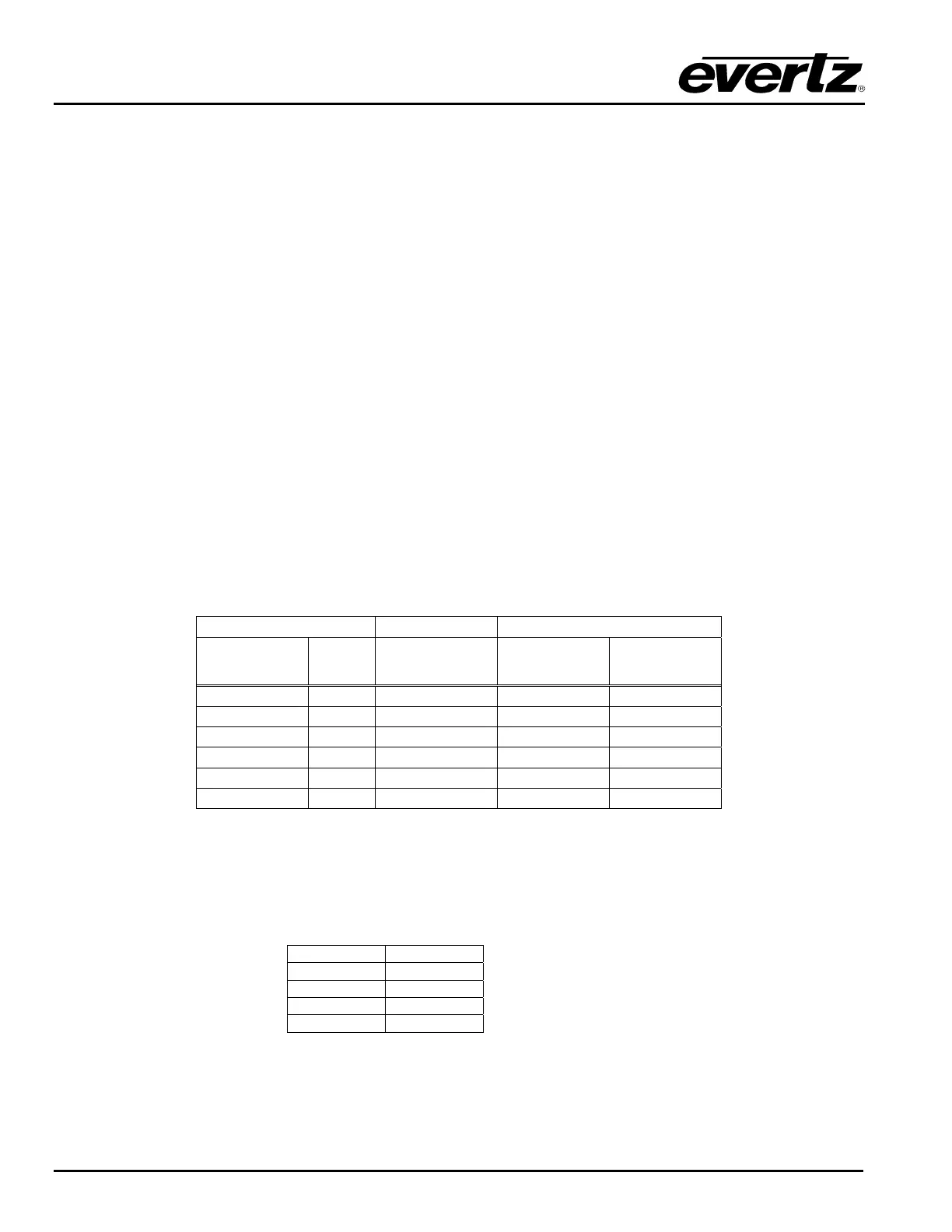
7700FC End PC End
2 row X
3 pin Berg
Pin 6 Conductor
Ribbon Cable
9 pin D
Female
Pin
Key 1 Blue 1
Rx 2 Green Tx 2
Tx 3 Yellow Rx 3
Tx Gnd 4 Orange Gnd 5
Key 5 Red
--- 6 Brown
Table 3: 7700 Upgrade Cable (WA-S76)
6.1.2. Terminal Program Setup
1. Start the terminal program and configure the port settings of the terminal program as follows:
Baud
57600
Data bits
8
Parity
no
Stop bits
2
Flow Control
no
2. Install the 7700FC card into the frame. After the card powers up and the boot-up messages are
finished, a “login” prompt will appear in the terminal window. (For future reference 7700FC software
version information is displayed prior to the “login” prompt and should be quoted to Service staff when
required.)


 To Next Page