SIM card Installation
The SIM card is not included in the package. A Micro SIM card is available from the user's local operator.
- Unscrew the back cover and remove the cover.
- Insert SIM card and make sure it’s activated with credits
- Put the cover back and tighten the screws.
Note: Before installing the SIM card, check if the SIM card has PIN code or not, if yes, please use a cell-phone to unlock the card's PIN code.
Device Charging
For the first time use, please fully charge the battery for around 2~3 hours
Using the USB charger or using docking station to charge
- Place the device on the docking station.
- Connect the Micro USB side of the cable to the docking station port and connect the other end of the cable to the designated AC power source (USB/AC
adaptor).
- When charging, the RED LED (on docking station) will be blinking (solid). After fully charging, the RED LED will solid.
Switching the device on and off
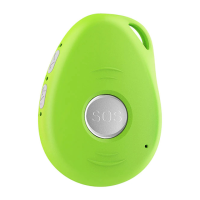
- To turn on the device: press the side power button for 1 second, all the LEDs will flash rapidly. Device can be also turned on automatically by charging
via USB or put it into the docking station.
※ To get an initial location, use outdoors or near a window so the device may fix onto the satellites.
- To turn off the device: press and hold the side button and SOS button together for 1 second until the LEDs off.


 To Next Page