Activating an SOS Alarm
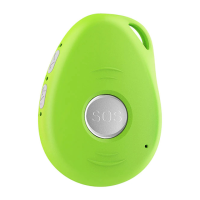
Press and hold the SOS button for 3 seconds until the device vibrates, and then green light will start to flash rapidly to confirm the request. After that, an SOS
Alarm "Help me!" will be sent to all authorized phone numbers by text message and to the platform by WCDMA network. It will also the dial the 5 authorized
numbers in sequence. If the tracker fails to connect to the first number, it will call the second number after delay of 10 seconds. (In this time, user can prevent
a possible false alarm by pressing SOS button). In case the second number fails to be connected as well, the system will connect to the third number etc.
Between each call, it will have 10 seconds delay, user can press SOS button to stop to call next number.
To end the call and sequence, user can press SOS button or the receiver of the call can press 1 on their mobile to stop it.
Making a Phone Call
To make a call, press and hold the side button for 3 seconds and you will hear a beep. The green light will flash rapidly to confirm the request, and then it will
dial the second number. To end the call, press the SOS button.
Configuration and Operation by SMS
1. To Set the Authorized Number
※ It is not mandatory for all three of the authorized numbers to be set, however a minimum of one must always be set.
a) Command: A1 or A1,phone number
Note: With no spaces in the text, case-insensitive.
Example: A1 or a1,123456789
The device will reply: Set mobile number 1 OK!


 To Next Page