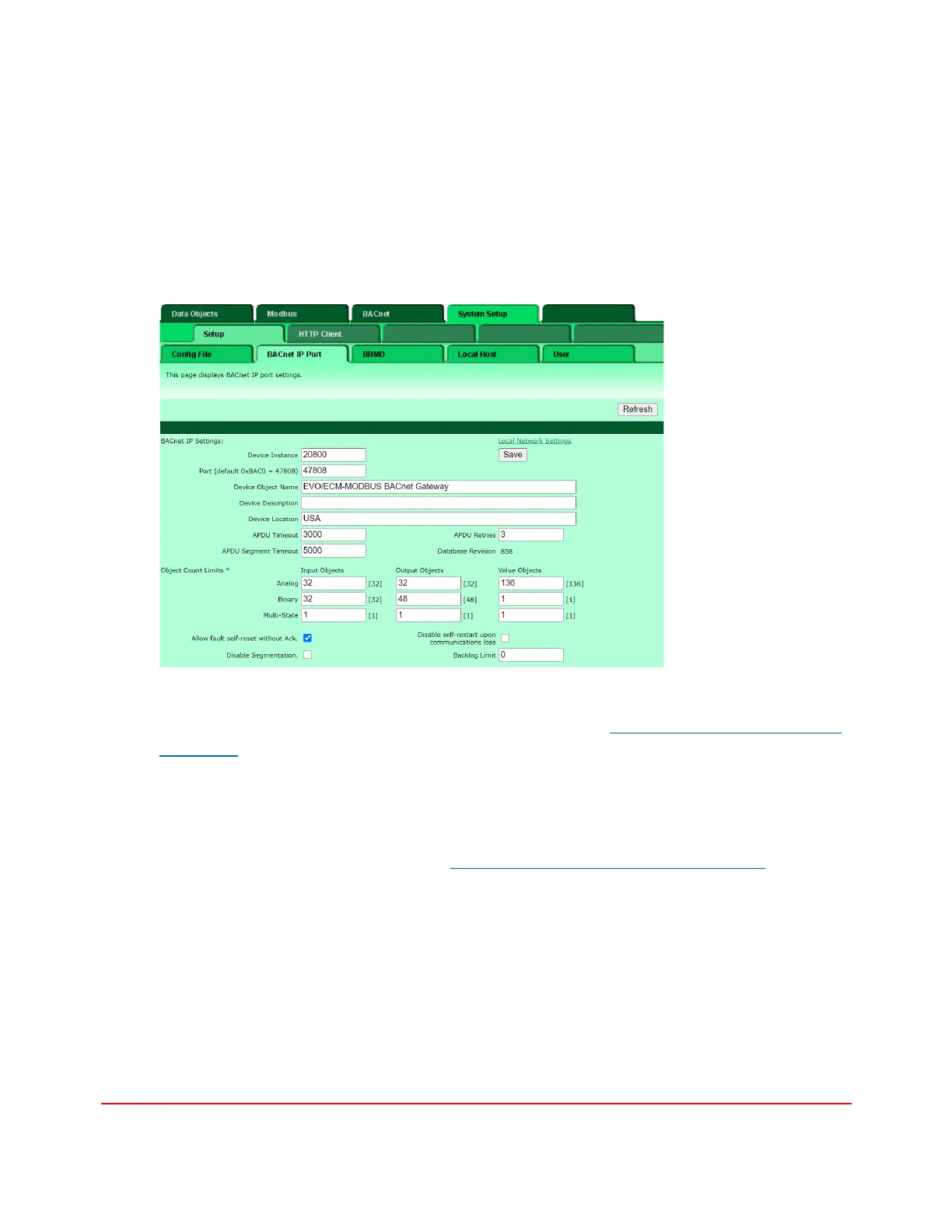
3. Configure the gateway’s BACnet IP port.
Obtain and configure the gateways’ BACnet device instances. Each gateway should have its
unique BACnet device instance number in the automation network. Select the System
Setup>BACnet IP Port to enter the Device Instance for each gateway. The default UDP
port for BACnet traffic is 47808 (0xBAC0) but depending on the project specification other
ports are also possible. You may also modify the Device Object Name, Device Description
and Device Location to make the gateways identifiable in the automation network.
The number of allocated Input Objects, Output Objects and Value Objects are set
automatically by the selected mapping file discussed in the Modbus to BACnet Integration
Procedure section below.
4. Configure the gateway’s Modbus port
Select Modbus>Modbus RTU Setup>Local Device tab to set up the Modbus Port as shown
here. The Baud Rate, Poll Rate, Timeout and Starting address are set automatically by the
selected mapping file discussed in the Modbus to BACnet Integration Procedure section
below.


 To Next Page