Evolution Dog Wash Owners/Operators Manual Page 25
5.0 Turn On & Setup
T
he EVOLUTION comes to you fully wet/electrically tested. The unit is then labeled, drained, and
prepped for shipping. The following topics will guide you through the turn on and setup.
5.1 Initial Turn On
P
rior to turn on inspect the unit to ensure that it is level and secure, electrical source has been
provided, water connections have been made, and sanitary sewer connection has been made.
5.1.1 Electrical
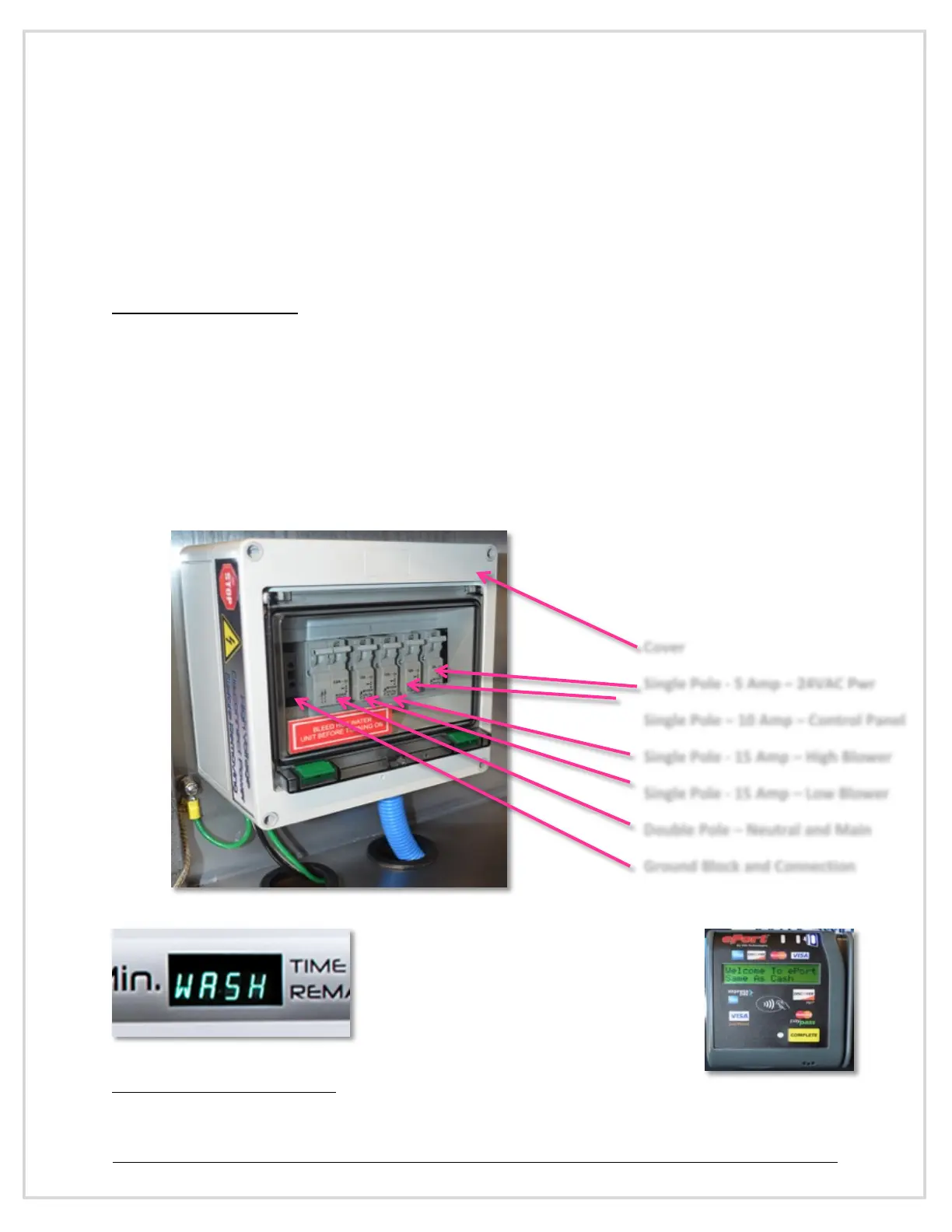
Turn the main breaker or disconnect on to the system (not part of the EVOLUTION). Open the
main door and lift the cover to the electrical panel located to the left of the cabinet and turn on
(up) each breaker
6
, if breakers are not in the off (down) position, turn off (down) then turn on
(up)
Y
ou should observe the digital timer display
light up and start scrolling. You will also hear
a low beep as the digital display powers up.
If equipped, you will see the (optional) credit
card display power up and also beep.
6
Due to manufacture change or redesign the pictures depicted may not fully represent your unit.
Single Pole - 5 Amp – 24VAC Pwr
Single Pole – 10 Amp – Control Panel
Single Pole - 15 Amp – High Blower
Single Pole - 15 Amp – Low Blower
Double Pole – Neutral and Main
Ground Block and Connection


 To Next Page