EXCELL PRECISION CO., LTD
02005159 ZSME300000350
2-1 General Function Setting
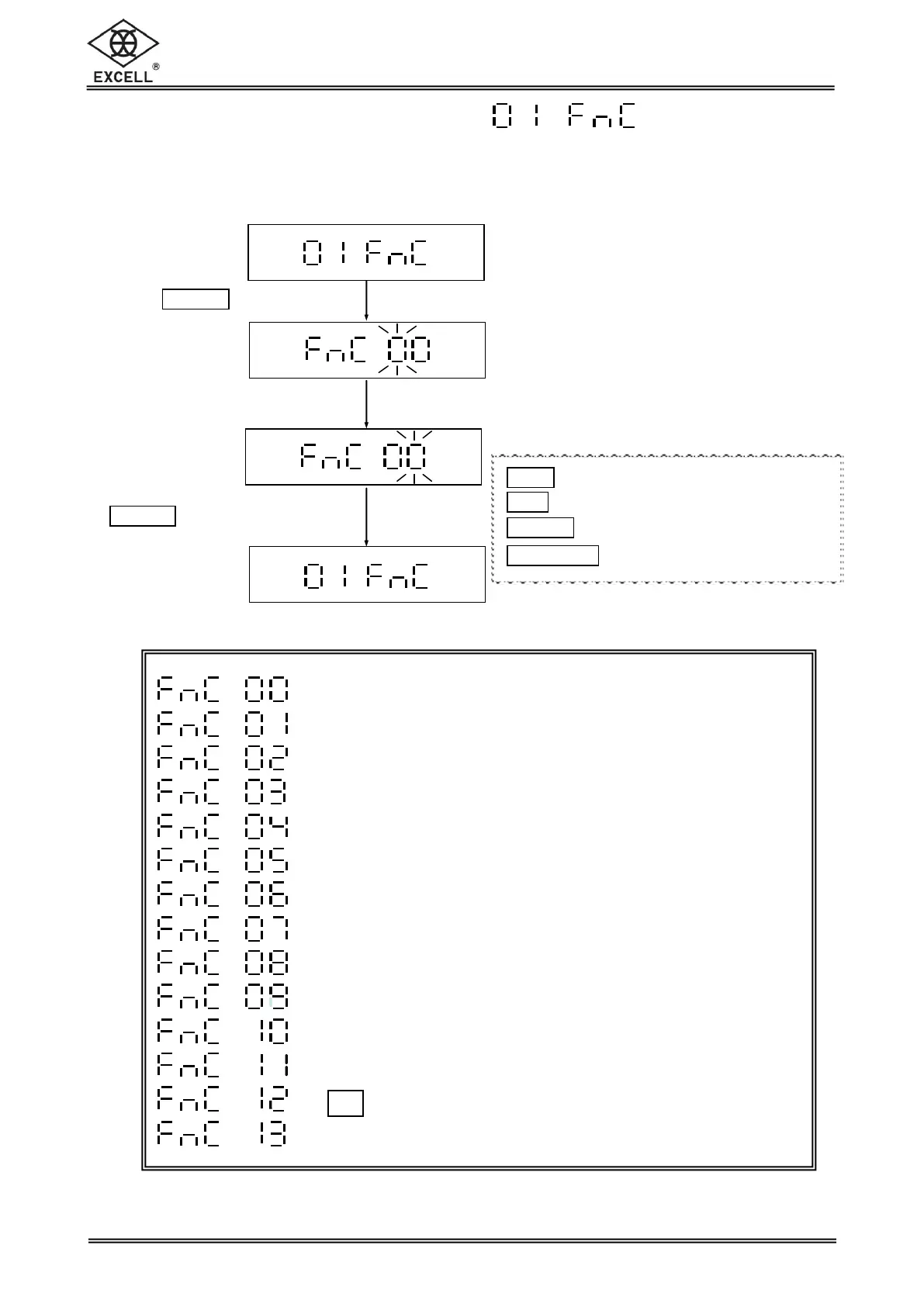
Workflow of the General Function setting:
Press
TA RE|PT
key
key in the parameter
“00 ~ 13”
Key in “00” and press
1
TARE|PT
key to return to
the Advanced function
setting menu
Return to the Advanced Function Setting Mode Menu
Automatic Backlight Function Settings
Automatic Power-off Timer Settings
Hi/Lo/OK Settings
Reserved
Reserved
Hold Function Settings
Auto Unit Weight Averaging Setting
Reserved
Reserved
Reserved
Foot switch on/off settings (Option)
F key function settings
Reserved
1
ZERO
key Upward key (0~9 digit entry)
1
UNIT
key Downward key (0~9 digit entry)
1
TARE
|
PT
key Move cursor rightward
1
NET
|
GROSS
key Move cursor leftward


 To Next Page