EXCELL PRECISION CO., LTD
02005159 ZSME300000350
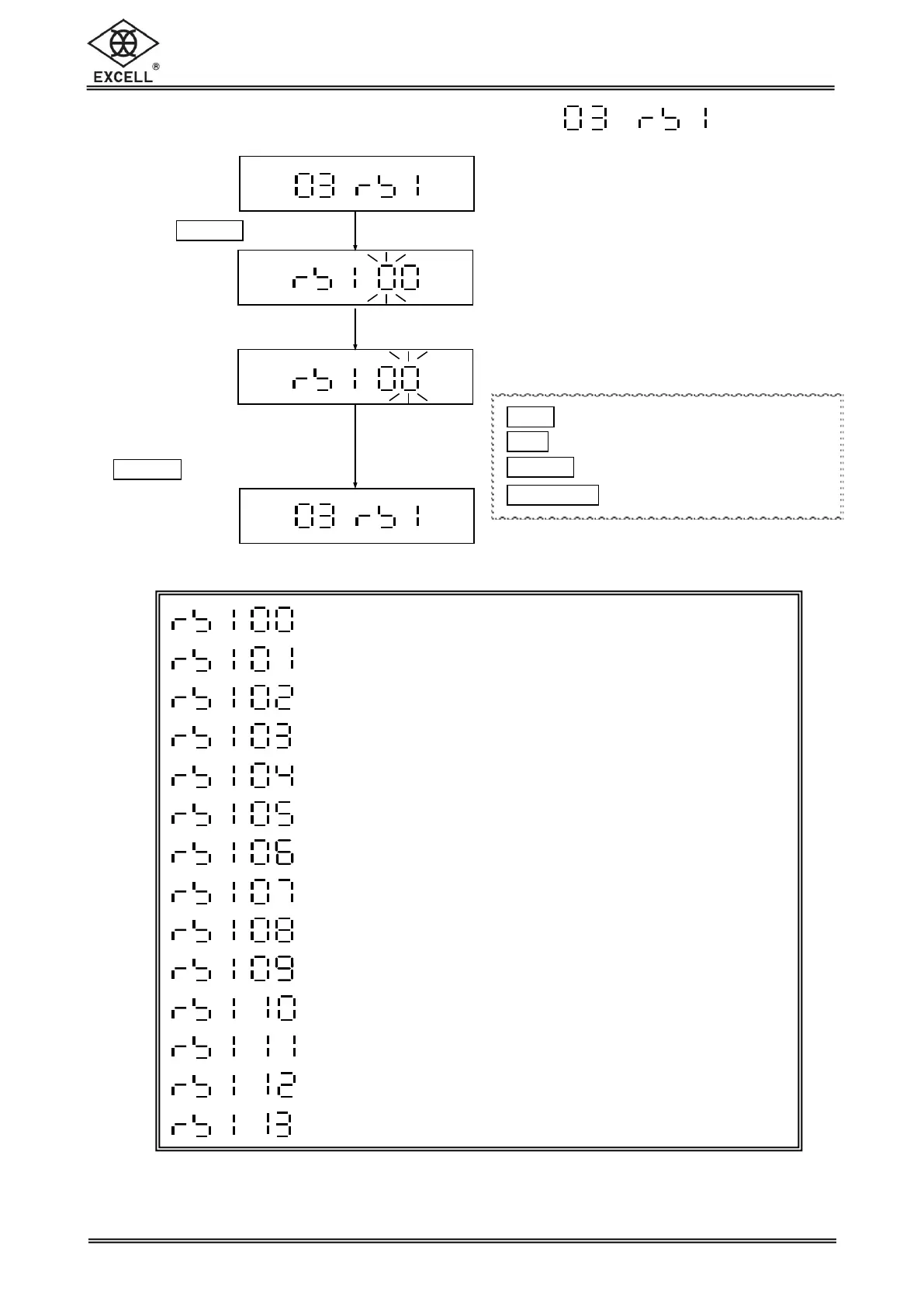
2-2 RS232 Serial Interface Settings
Exit the RS232 Serial Interface Setting Mode
Baud Rate Settings
Communication Protocol Settings
Output Format Settings
Transmission method setup
The Selection of Continuous Transmission Rate
Auto Transmission at Zero
Reset of Auto Transmission
Output Condition Settings
RS232 6/7 digits setting
RTC adjustment
Y/M/D Print Format Selection
RS485 ID Input (Option)
Line Feed Input
Key in the parameter
00 ~ 08
Key in the parameter
“00”, then press
1
TARE
|
PT
key to exit
1
ZERO
key Upward key (0~9 digit entry)
1
UNIT
key Downward key (0~9 digit entry)
1
TARE
|
PT
key Move cursor rightward
1
NET
|
GROSS
key Move cursor leftward


 To Next Page