EXCELL PRECISION CO., LTD
02005159 ZSME300000350
Use
ZERO
or
UNIT
key to
key in the parameters
Use
ZERO
or
UNIT
key to
key in the parameters
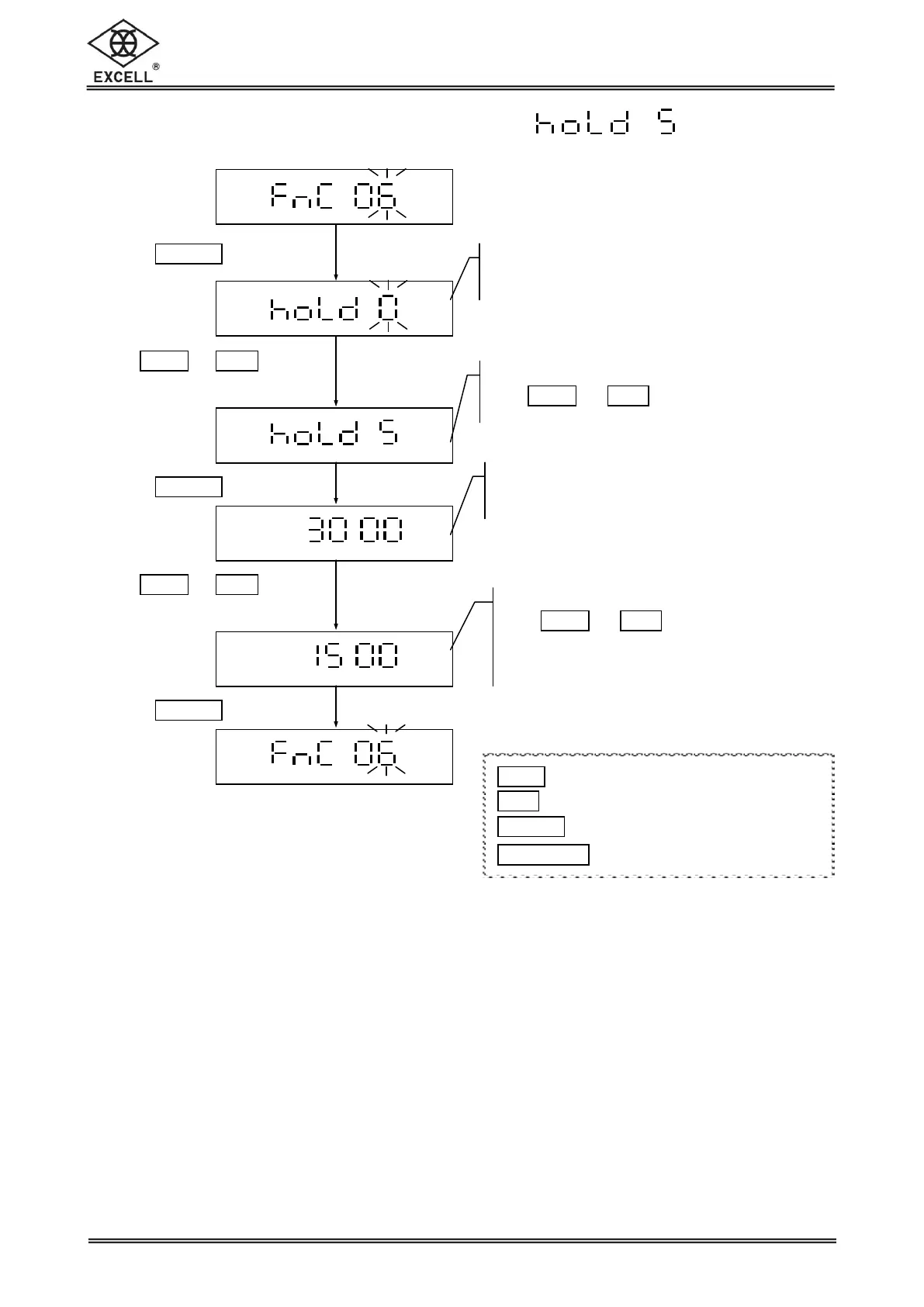
Hold Function Setting (Animal scale)
Hold function setting
Use
ZERO
or
UNIT
keys to key in 5
Hold function setting
LCD displays the last parameter setting
Release Hold range setting
Use
ZERO
or
UNIT
keys to key in the
parameters (0 ~ full scale )
Default setting = full scale
Release Hold range setting
LCD displays the last parameter setting
1
ZERO
key Upward key (0~9 digit entry)
1
UNIT
key Downward key (0~9 digit entry)
1
TARE
|
PT
key Move cursor rightward
1
NET
|
GROSS
key Move cursor leftward


 To Next Page