15
Console Functions:
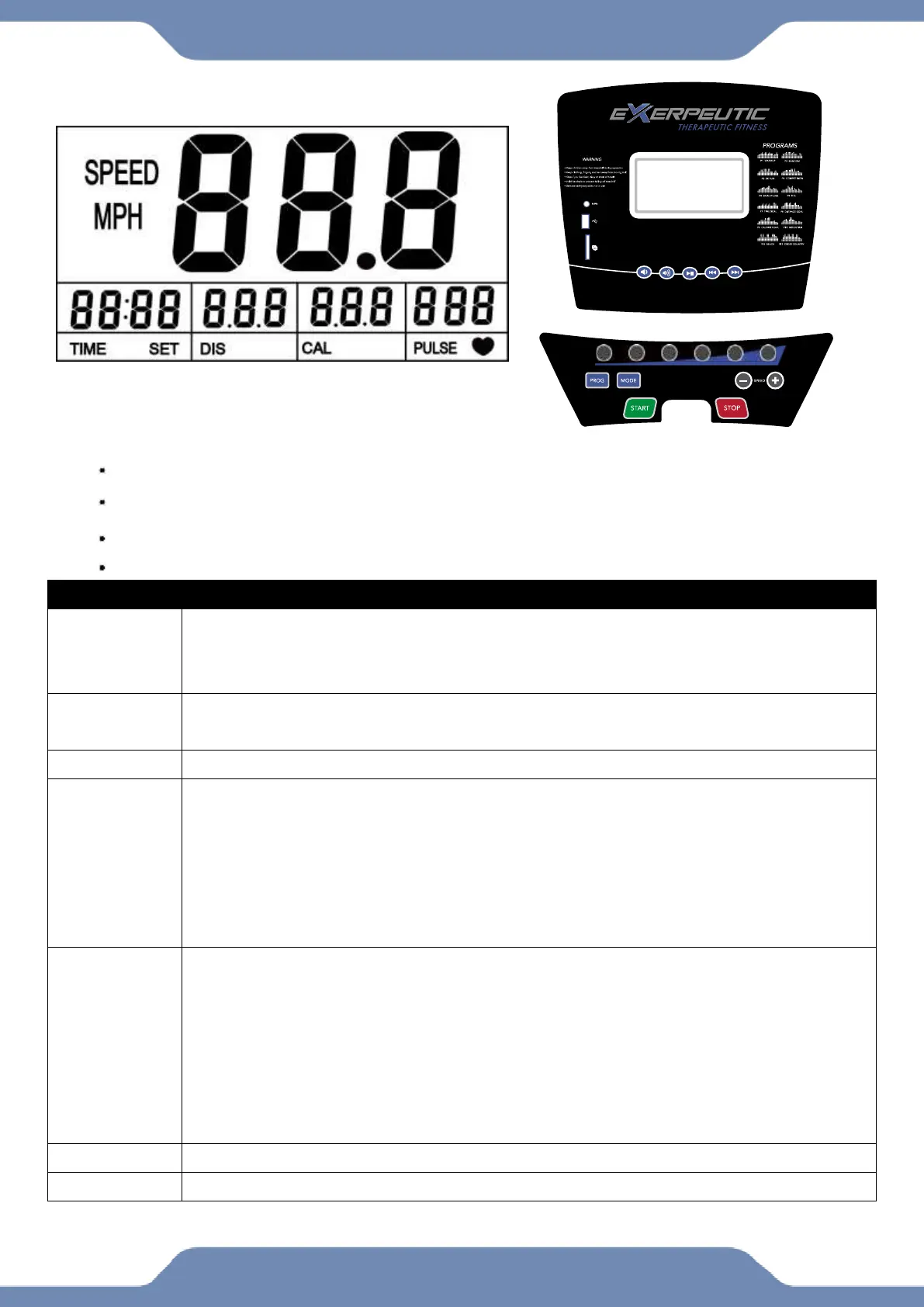
The display shows: SPEED, TIME, DISTANCE, CALORIES, and PULSE.
Speed Range: 0.4-8.0 MPH
12 preset Programs.
Audio Play back by Aux Cable, USB, or SD Card.
1. Press at the main screen to begin a QUICK START a workout.
2. Press after setting up a program
3. The Console will beep and count down from 5 before the belt starts moving.
1. Ends the workout.
2. Acts as a back button during a workout set up.
1. Are quick speed keys for quickly changing the treadmill speed.
1. Scroll through the 12 available workout programs.
2. A work out time goal can be set before starting the program workout.
3. The default time goal is 30 minutes.
4. Use the PLUS and MINUS buttons to change the goal value before pressing
START.
5. See the program profiles printed next to the console display.
1. Press MODE before starting a QUICK START workout to set a workout
goal.
2. There are 3 workout goal options TIME, DISTANCE, and CALORIE.
3. The number above TIME, DISTANCE, or CALORIE will flash to show which
option is being set.
4. Use the PLUS and MINUS buttons to change the goal value before pressing
START.
1. Press to increase the speed or workout goal setting.
1. Press to increase the speed or workout goal setting.


 To Next Page