FOT-10A, FOT-20A, & FOT-30A 5
If the received signal is too low to be measured, a dashed line is displayed. If the
received signal is too high to be measured, the display flashes.
3.5 Reference Procedure (FOT-20A and FOT-30A)
When the FOT is in reference mode, the reference value is subtracted from the
power received so that the value displayed only refers to the loss created by the fiber
under test.
To store a reference value,
1. If necessary, calibrate the FOT.
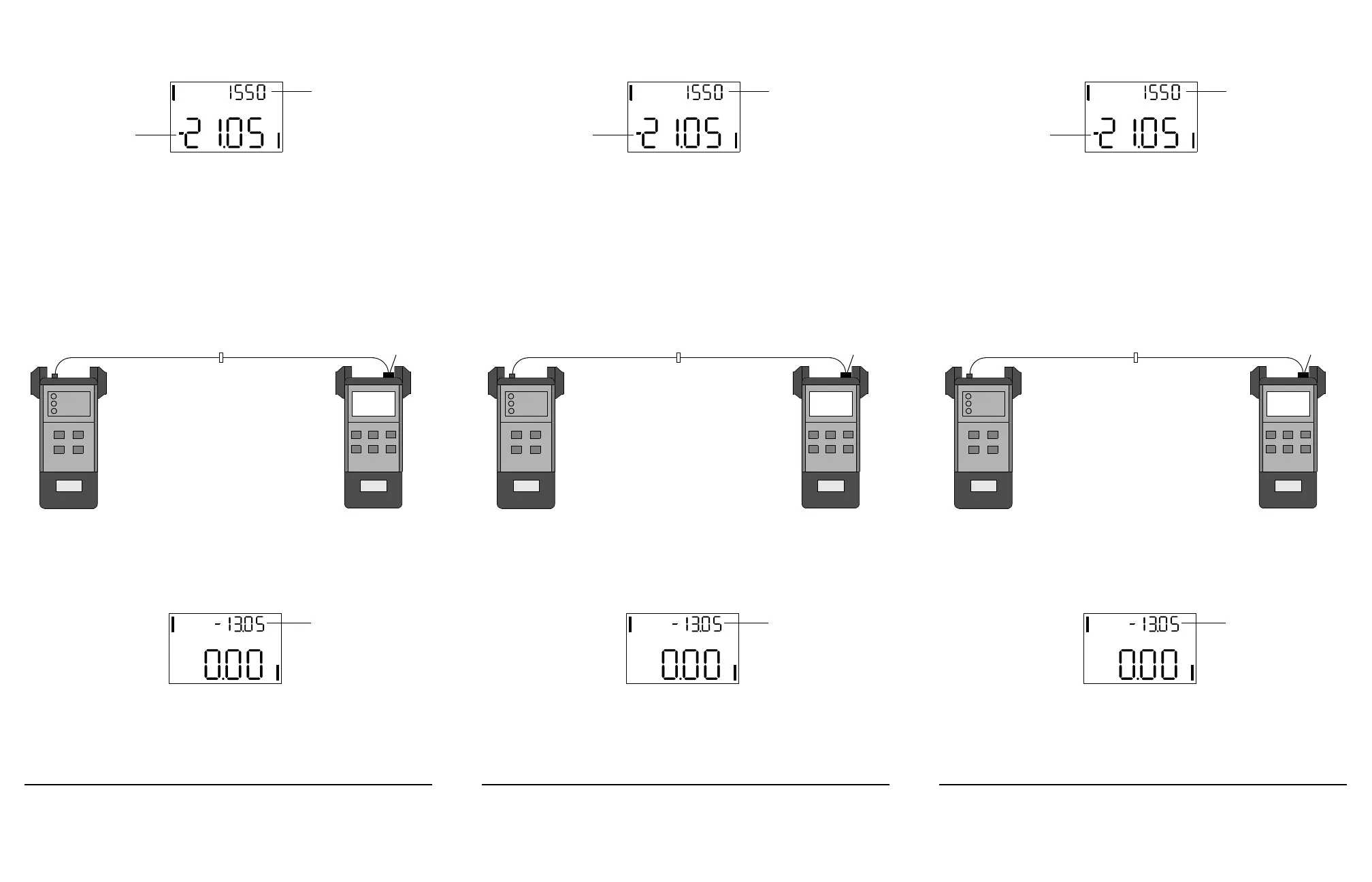
2. Connect the light source to the FOT as shown below.
3. Power on the light source and activate the first wavelength.
4. Press dBm/W to select absolute mode.
5. Press
λ select to match the FOT and source wavelengths.
6. Press ref to access reference mode.
7. Press and hold ref until the display reads 0.00 dB and the new reference value
appears in small digits.
The reference value just stored applies only to measurements taken at the current
wavelength. If you are using a dual-wavelength source, select the second wavelength
and repeat steps 4 to 7.
dBm
Power reading
nm
Power meter wavelength
EXFO
Test jumper
FOTLight source
Bulkhead connector
Connector
adapter
Tes t ju mp er
EXFO
dBm
dB
Reference value (in dBm)
FOT-10A, FOT-20A, & FOT-30A 5
If the received signal is too low to be measured, a dashed line is displayed. If the
received signal is too high to be measured, the display flashes.
3.5 Reference Procedure (FOT-20A and FOT-30A)
When the FOT is in reference mode, the reference value is subtracted from the
power received so that the value displayed only refers to the loss created by the fiber
under test.
To store a reference value,
1. If necessary, calibrate the FOT.
2. Connect the light source to the FOT as shown below.
3. Power on the light source and activate the first wavelength.
4. Press dBm/W to select absolute mode.
5. Press
λ select to match the FOT and source wavelengths.
6. Press ref to access reference mode.
7. Press and hold ref until the display reads 0.00 dB and the new reference value
appears in small digits.
The reference value just stored applies only to measurements taken at the current
wavelength. If you are using a dual-wavelength source, select the second wavelength
and repeat steps 4 to 7.
dBm
Power reading
nm
Power meter wavelength
EXFO
Test jumper
FOTLight source
Bulkhead connector
Connector
adapter
Tes t ju mp er
EXFO
dBm
dB
Reference value (in dBm)
FOT-10A, FOT-20A, & FOT-30A 5
If the received signal is too low to be measured, a dashed line is displayed. If the
received signal is too high to be measured, the display flashes.
3.5 Reference Procedure (FOT-20A and FOT-30A)
When the FOT is in reference mode, the reference value is subtracted from the
power received so that the value displayed only refers to the loss created by the fiber
under test.
To store a reference value,
1. If necessary, calibrate the FOT.
2. Connect the light source to the FOT as shown below.
3. Power on the light source and activate the first wavelength.
4. Press dBm/W to select absolute mode.
5. Press
λ select to match the FOT and source wavelengths.
6. Press ref to access reference mode.
7. Press and hold ref until the display reads 0.00 dB and the new reference value
appears in small digits.
The reference value just stored applies only to measurements taken at the current
wavelength. If you are using a dual-wavelength source, select the second wavelength
and repeat steps 4 to 7.
dBm
Power reading
nm
Power meter wavelength
EXFO
Test jumper
FOTLight source
Bulkhead connector
Connector
adapter
Tes t ju mp er
EXFO
dBm
dB
Reference value (in dBm)
Artisan Technology Group - Quality Instrumentation ... Guaranteed | (888) 88-SOURCE | www.artisantg.com












 To Next Page