OPERATION 6
3.6 Loss Testing (FOT-20A and FOT-30A)
To perform loss testing,
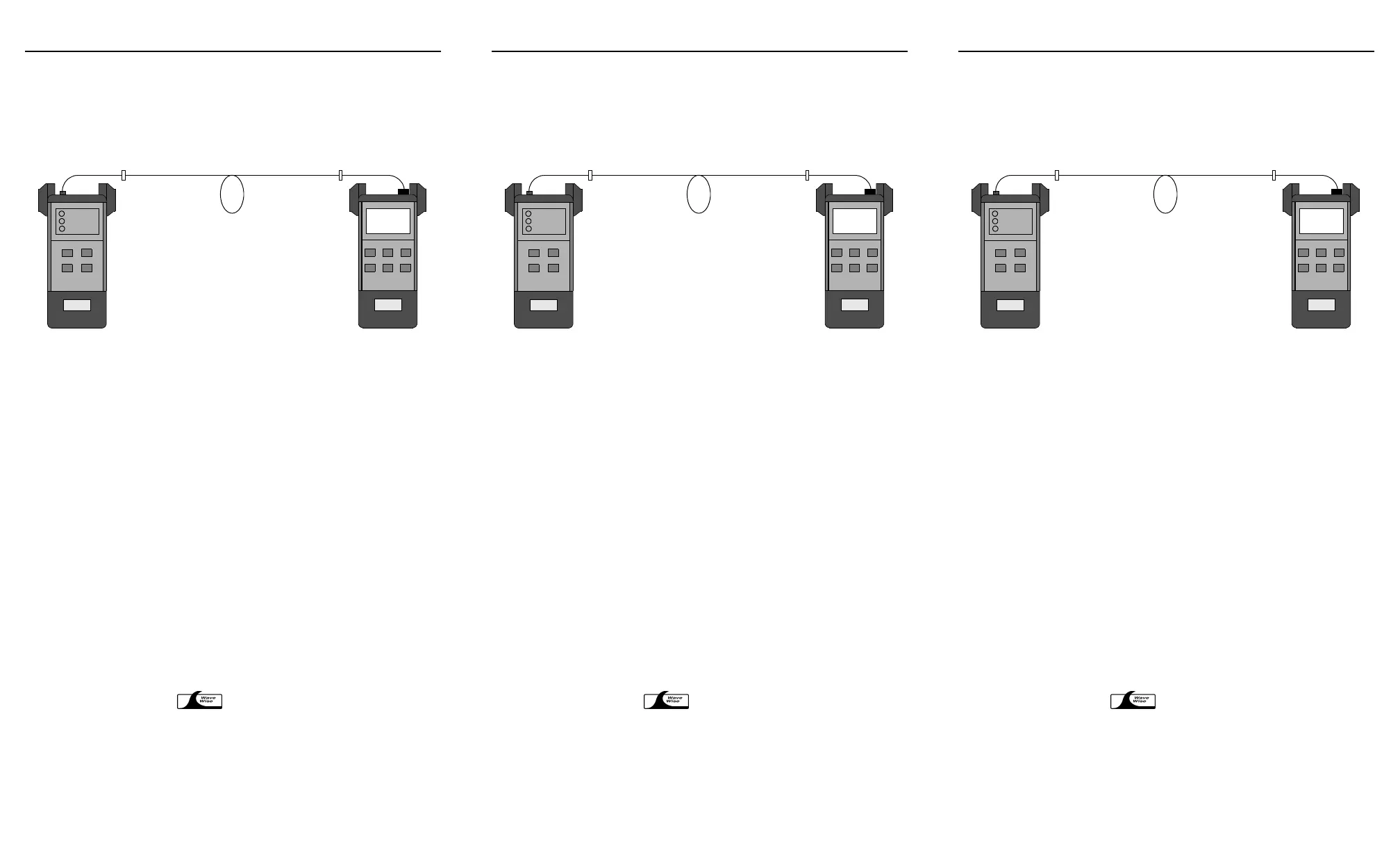
1. Reference the FOT to the light source.
2. Power off the source unit.
3. Connect the reference test jumpers to the fiber under test as shown below.
4. Power on the light source and activate the first wavelength.
5. Press dBm/W to select absolute mode.
6. Press
λ select to match the FOT and source wavelengths.
7. Press ref to access reference mode. The actual insertion loss of the fiber under
test is displayed.
8. To test at a second wavelength, select a wavelength on the source unit, and
repeat steps 5 to 7.
3.7 Source Operation (FOT-30A)
3.7.1 Turning the Source On or Off
1. Turn the source on by pressing and holding source until the source
wavelength and the
2kHz or CW marker are displayed.
2. Press CW/2 kHz to toggle between continuous and modulated signal output.
3. Turn the source off by pressing and holding source until the source
wavelength and the
2kHz or CW marker disappear.
3.7.2 Selecting the Source Wavelength
If your FOT-30A features a dual-wavelength source, press source to toggle between
the two wavelengths.
3.7.3 WaveWise Feature
The WaveWise feature allows accurate wavelength matching between two
FOT-30As, one used as a source and the other as a power meter while testing power
and loss. It requires no user-intervention. The source incoming wavelength is
automatically detected by the destination power meter.
EXFO
EXFO
Light source
FOT
Fiber under test
Test jumper
Test jumper
OPERATION 6
3.6 Loss Testing (FOT-20A and FOT-30A)
To perform loss testing,
1. Reference the FOT to the light source.
2. Power off the source unit.
3. Connect the reference test jumpers to the fiber under test as shown below.
4. Power on the light source and activate the first wavelength.
5. Press dBm/W to select absolute mode.
6. Press
λ select to match the FOT and source wavelengths.
7. Press ref to access reference mode. The actual insertion loss of the fiber under
test is displayed.
8. To test at a second wavelength, select a wavelength on the source unit, and
repeat steps 5 to 7.
3.7 Source Operation (FOT-30A)
3.7.1 Turning the Source On or Off
1. Turn the source on by pressing and holding source until the source
wavelength and the
2kHz or CW marker are displayed.
2. Press CW/2 kHz to toggle between continuous and modulated signal output.
3. Turn the source off by pressing and holding source until the source
wavelength and the
2kHz or CW marker disappear.
3.7.2 Selecting the Source Wavelength
If your FOT-30A features a dual-wavelength source, press source to toggle between
the two wavelengths.
3.7.3 WaveWise Feature
The WaveWise feature allows accurate wavelength matching between two
FOT-30As, one used as a source and the other as a power meter while testing power
and loss. It requires no user-intervention. The source incoming wavelength is
automatically detected by the destination power meter.
EXFO
EXFO
Light source
FOT
Fiber under test
Test jumper
Test jumper
OPERATION 6
3.6 Loss Testing (FOT-20A and FOT-30A)
To perform loss testing,
1. Reference the FOT to the light source.
2. Power off the source unit.
3. Connect the reference test jumpers to the fiber under test as shown below.
4. Power on the light source and activate the first wavelength.
5. Press dBm/W to select absolute mode.
6. Press
λ select to match the FOT and source wavelengths.
7. Press ref to access reference mode. The actual insertion loss of the fiber under
test is displayed.
8. To test at a second wavelength, select a wavelength on the source unit, and
repeat steps 5 to 7.
3.7 Source Operation (FOT-30A)
3.7.1 Turning the Source On or Off
1. Turn the source on by pressing and holding source until the source
wavelength and the
2kHz or CW marker are displayed.
2. Press CW/2 kHz to toggle between continuous and modulated signal output.
3. Turn the source off by pressing and holding source until the source
wavelength and the
2kHz or CW marker disappear.
3.7.2 Selecting the Source Wavelength
If your FOT-30A features a dual-wavelength source, press source to toggle between
the two wavelengths.
3.7.3 WaveWise Feature
The WaveWise feature allows accurate wavelength matching between two
FOT-30As, one used as a source and the other as a power meter while testing power
and loss. It requires no user-intervention. The source incoming wavelength is
automatically detected by the destination power meter.
EXFO
EXFO
Light source
FOT
Fiber under test
Test jumper
Test jumper
Artisan Technology Group - Quality Instrumentation ... Guaranteed | (888) 88-SOURCE | www.artisantg.com












 To Next Page