FOT-10A, FOT-20A, & FOT-30A 3
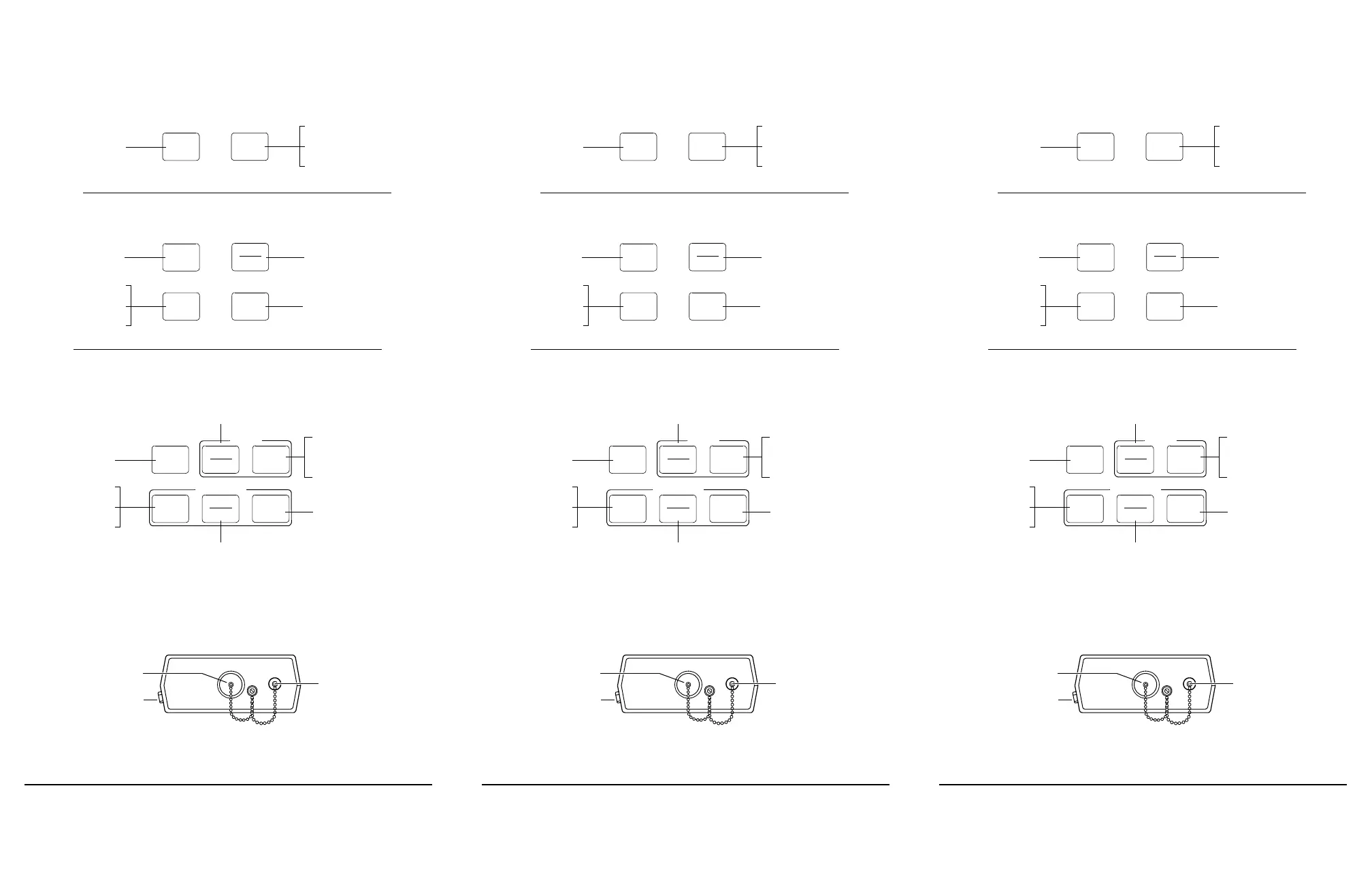
2.2 Keypad
2.3 Connectors
Note: Two source ports can be provided on a dual-wavelength FOT-30A (option).
dBm
W
λ
select
Powers unit on or off
Selects operating
wavelength
Deactivates auto-off
Initiates calibration
on / off
FOT-10A
Accesses reference
(dB) mode
Powers unit on or off
Selects operating
wavelength
Accesses absolute mode,
and toggles between
dBm and W
Deactivates auto-off
Initiates calibration
on / off
ref
λ
select
FOT-20A
SOURCE
Toggles between CW and
2 kHz signal output
Accesses reference
(dB) mode
Powers unit on or off
Selects operating
wavelength
Accesses absolute mode, and
toggles between dBm and W
Deactivates auto-off
Initiates calibration
Powers source on or off
Toggles between the two
source wavelengths (dual-
wavelength FOT-30A)
on / off
source
ref
CW
2 kHz
λ
select
dBm
W
POWERMETER
FOT-30A
Detector port
Source port (FOT-30A)
AC adapter/charger input
FOT-10A, FOT-20A, & FOT-30A 3
2.2 Keypad
2.3 Connectors
Note: Two source ports can be provided on a dual-wavelength FOT-30A (option).
dBm
W
λ
select
Powers unit on or off
Selects operating
wavelength
Deactivates auto-off
Initiates calibration
on / off
FOT-10A
Accesses reference
(dB) mode
Powers unit on or off
Selects operating
wavelength
Accesses absolute mode,
and toggles between
dBm and W
Deactivates auto-off
Initiates calibration
on / off
ref
λ
select
FOT-20A
SOURCE
Toggles between CW and
2 kHz signal output
Accesses reference
(dB) mode
Powers unit on or off
Selects operating
wavelength
Accesses absolute mode, and
toggles between dBm and W
Deactivates auto-off
Initiates calibration
Powers source on or off
Toggles between the two
source wavelengths (dual-
wavelength FOT-30A)
on / off
source
ref
CW
2 kHz
λ
select
dBm
W
POWERMETER
FOT-30A
Detector port
Source port (FOT-30A)
AC adapter/charger input
FOT-10A, FOT-20A, & FOT-30A 3
2.2 Keypad
2.3 Connectors
Note: Two source ports can be provided on a dual-wavelength FOT-30A (option).
dBm
W
λ
select
Powers unit on or off
Selects operating
wavelength
Deactivates auto-off
Initiates calibration
on / off
FOT-10A
Accesses reference
(dB) mode
Powers unit on or off
Selects operating
wavelength
Accesses absolute mode,
and toggles between
dBm and W
Deactivates auto-off
Initiates calibration
on / off
ref
λ
select
FOT-20A
SOURCE
Toggles between CW and
2 kHz signal output
Accesses reference
(dB) mode
Powers unit on or off
Selects operating
wavelength
Accesses absolute mode, and
toggles between dBm and W
Deactivates auto-off
Initiates calibration
Powers source on or off
Toggles between the two
source wavelengths (dual-
wavelength FOT-30A)
on / off
source
ref
CW
2 kHz
λ
select
dBm
W
POWERMETER
FOT-30A
Detector port
Source port (FOT-30A)
AC adapter/charger input
Artisan Technology Group - Quality Instrumentation ... Guaranteed | (888) 88-SOURCE | www.artisantg.com












 To Next Page