12 382100-en-US_V2.8 02/22
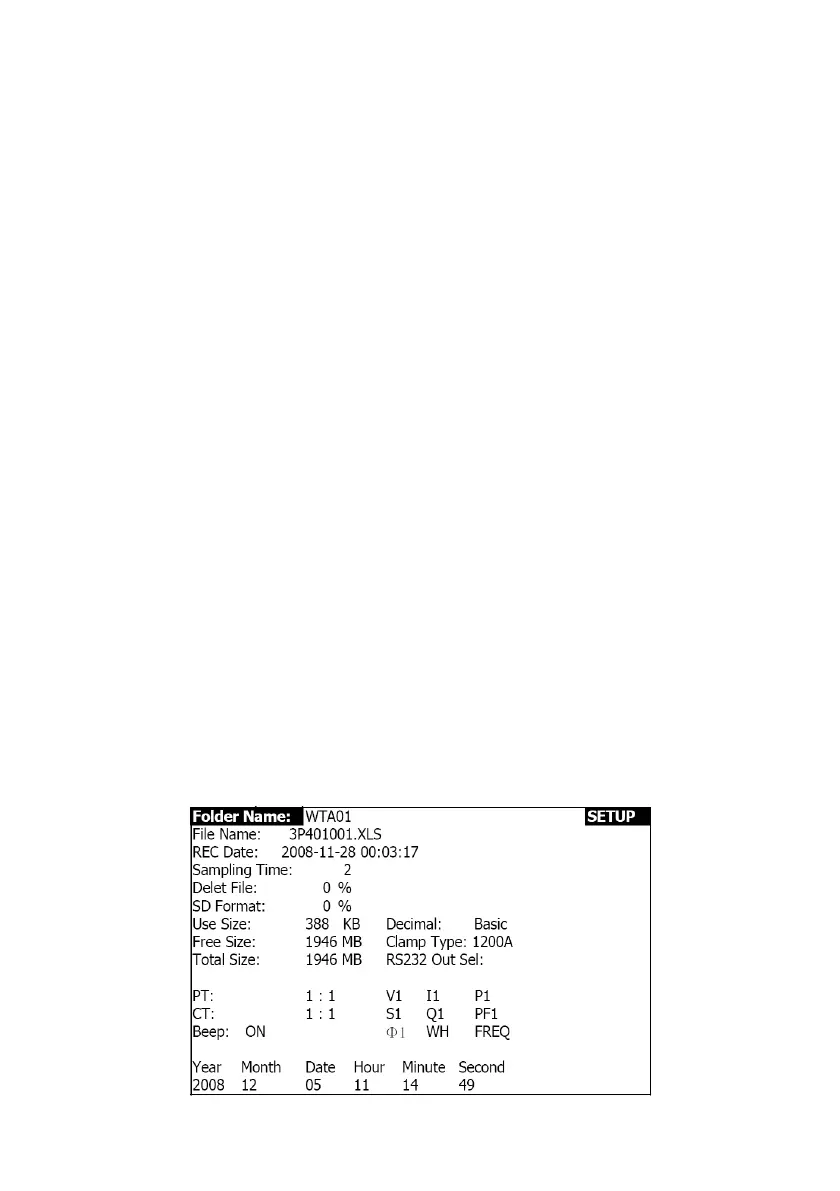
4.4.2 The Setup Function Menu
• Folder Name: Select a name on the SD CARD; the range is WTA01 to WTA10
• File Name: Set a file name on the SD CARD (50 filenames are permitted)
• REC Date: Show a file’s date-time stamp (Year / Month / Date / Hour / Min / Sec)
• Sampling Time: Set the sampling rate from 2 to 7200 seconds
• Delete File: Delete an existing data file from the SD CARD
• SD Format: Format the SD CARD
• PT: Set the Potential Transformer from 1 to 1000
• CT: Set the Current Transformer from 1 to 600
• Audible Tone: Set ON or OFF
• Clamp Type: Select 200A or 1200A
• RS232 out Select: RS232 output function (up to nine items can be output)
• Year: Set the year
• Month: Set the month
• Date: Set the date
• Hour: Set the hour
• Minute: Set the minute
• Second: Set the second
4.5 Meter Setup Functions
Press SETUP to enter the Function screen, selected items will appear as highlighted.
4.5.1 Folder name: Set a folder name in the SD Memory Card
1. The Folder Name range is “WTA01” to “WTA10”
2. Press ▲ or ▼ to select a folder number, the available numbers are "01 to 10"
3. Press ▲ or ▼ continuously for at least two seconds to scroll quickly.
4. Press SHIFT once, the symbol " SHIFT1" will appear (See Fig. 4-5-1b).Then press▼ to
highlight (Folder Name →File Name) (See Fig 4-5-2a).
Figure 4-5-1a: Folder Name (Screen 1)



 To Next Page