EXTEL - CONNECT 2 - 720324
fr - 5
E - MONITOR USER MANUAL
3
Screen off: Access to the time and then the menu by pressing again
Screen off – button flashing: Access to photos of visitors when absent
Menu: OK (selection button)
Call in progress: Takes a photo
4
Call in progress: Opens electric strike plate
5
Call in progress: Opens dry contact (gate motor drive)
Menu: Back/Exit (back button to parent menu)
2 - NAVIGATING THE MENU
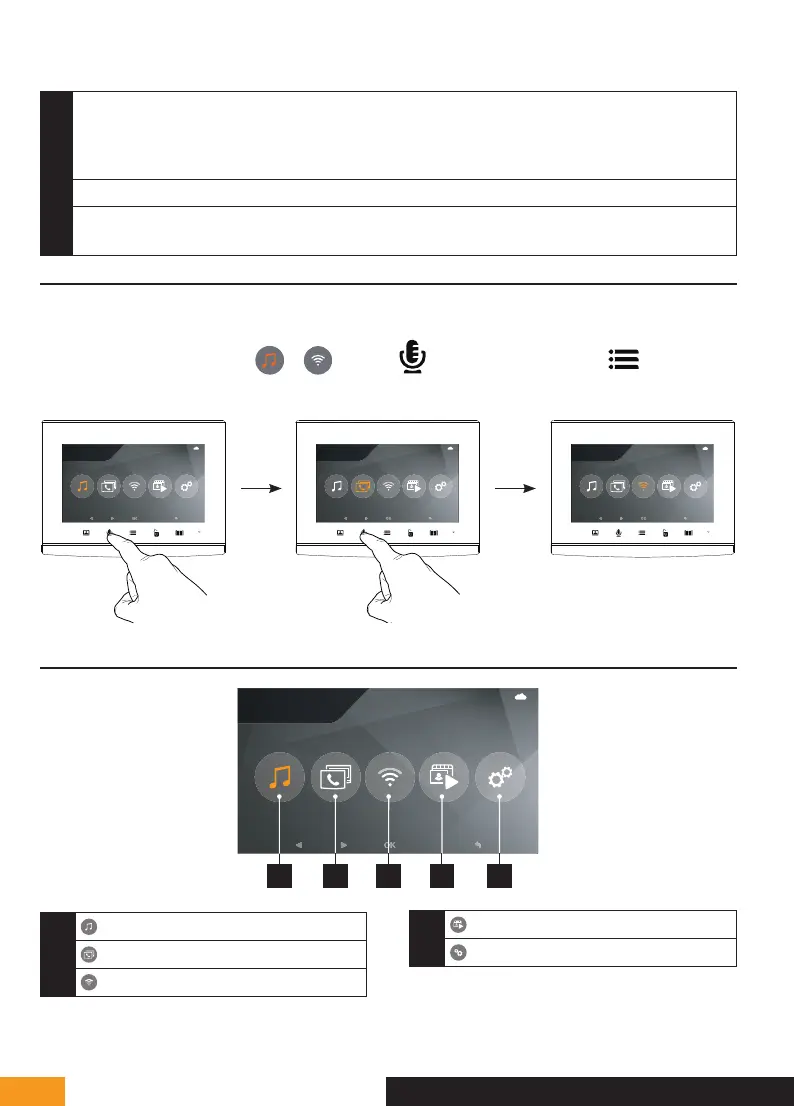
The Extel Connect 2 monitor screen is not a touchscreen. To navigate the settings menus, you need to move the
orange selection cursor using the touch-sensitive buttons below the direction arrows.
Example: To move the cursor from
to , press the
button twice and then press
to enter the
menu:
25/11/2021
16 : 18
25/11/2021
16 : 18
25/11/2021
16 : 18
3 - GENERAL MENU
25/11/2021
16 : 18
1 2 43 5
1
Sound adjustment
2
Intercom mode
3
WiFi setting
4
Viewing and managing photos/videos
5
Advanced settings



 To Next Page