EXTEL - CONNECT 2 - 720324
fr - 2
A - KIT CONTENTS
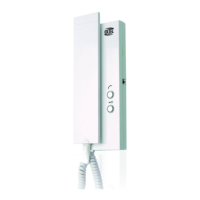
B - DESCRIPTION OF MONITOR
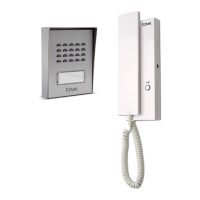
C - DESCRIPTION OF THE INTERCOM PANEL
1 Monitor
2 Intercom panel
3 Surface mounting bracket
4 Monitor fixing bracket
5 Plug
1 7″ colour screen
2 Microphone
3
Intercom panel preview (surveillance mode)
Left arrow or down arrow
4
During communication: Starts/ends a call
In surveillance mode: Initiates communication
Menu: Right arrow or up arrow
5
Screen off: Enables touch keys and access
to the time and then the menu by pressing
again
Screen off – button flashing: Access to
photos of visitors when absent
Menu: OK (selection button)
Call in progress: Takes a photo
6
In call or surveillance mode: Opens electric
strike plate
1 Protective mirrored façade
2 Camera and infrared LEDs
3 Loudspeaker
4
Name holder (the transparent plastic can be
peeled back to write on the label)
6
Fixing screws for monitor bracket and surface
mounting bracket
7 Mains adapter
8 Hexagonal screwdriver 1.5 mm
7
In call or surveillance mode: Opens dry
contact (gate motor drive)
Menu: Back/Exit (back button to parent menu)
8 Loudspeaker
9 Power supply connectors
10
Intercom panel and/or secondary monitor
communication connectors
5 Microphone
6 When on: Call button
7
Dawn-to-dusk cell capable of detecting
ambient brightness
8
Monitor, electric strike plate and gate motor
drive connectors (for details, see Fig. 7)
Fig. 1
Fig. 2
Fig. 3



 To Next Page