EXTEL - CONNECT 2 - 720324
fr - 12
F - CONNECTING YOUR EXTEL CONNECT 2 VIDEOPHONE TO YOUR SMARTPHONE
11.
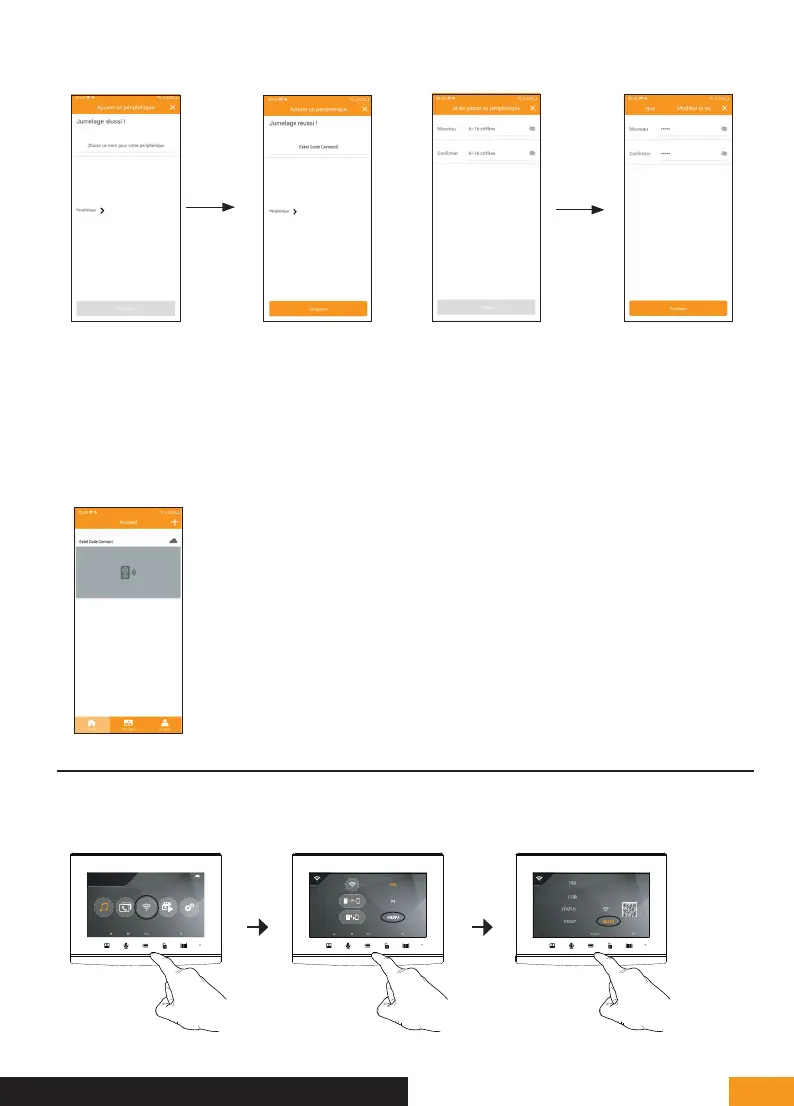
Once the connection has been established
between the Extel Connect 2 monitor and your
router, the message “Jumelage réussi” [Pairing
successful] should appear. Enter a name to
identify your video doorkeeper and press
“Enregistrer” [Save].
You will be immediately asked to change
the secret connection code for your video
doorkeeper. Please enter a personal password
of at least 6 digits (123456 is the device’s
default password and cannot be used).
12.
13.
To finish the procedure, open
the live image from your video
doorkeeper by clicking on its
thumbnail.
3. PAIRING YOUR DOORKEEPER WITH A SMARTPHONE WHEN IT IS ALREADY CONNECTED
If your video doorkeeper is already connected to your WiFi network and the Internet, set-up is different In this
case, there’s no need to reset the video doorkeeper, simply go to the WiFi sub-menu to display the doorkeeper
QR code:
cg05167913
UID57478850
25/11/2021
16 : 18
1.
2. 3.



 To Next Page