EXTEL - CONNECT 2 - 720324
fr - 9
1. PREPARING THE VIDEOPHONE
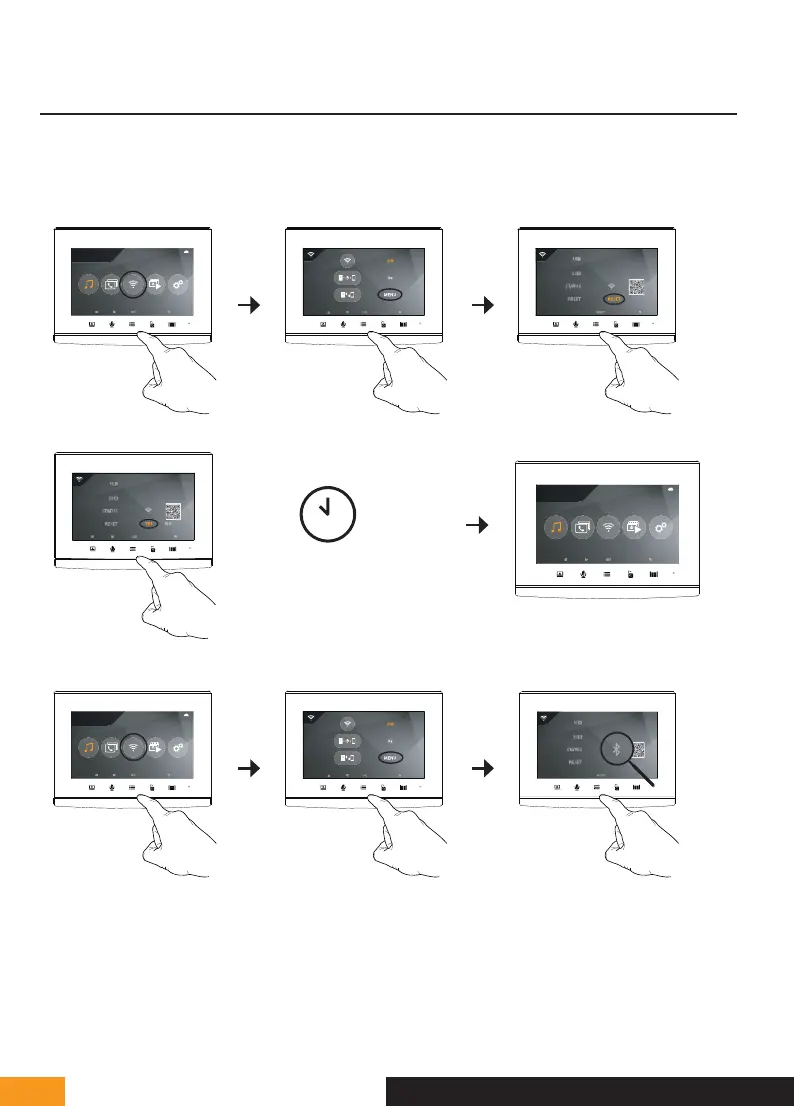
When your doorkeeper is first connected to your Extel Connect 2 video, you need to pair it with your smart-
phone.
To pair it, go to the WiFi sub-menu then reset the WiFi settings:
cg05167913
UID57478850
cg05167913
avidsenisolated*2G*
25/11/2021
16 : 18
1 2 3
4
20 secs
5
6
25/11/2021
16 : 18
Once the reset is finished, return to the WiFi sub-menu.
cg05167913
25/11/2021
16 : 18
1 2 3
The monitor is now ready for pairing.
F - CONNECTING YOUR EXTEL CONNECT 2 VIDEOPHONE TO YOUR SMARTPHONE



 To Next Page