EXTEL - CONNECT 2 - 720324
fr - 15
11.
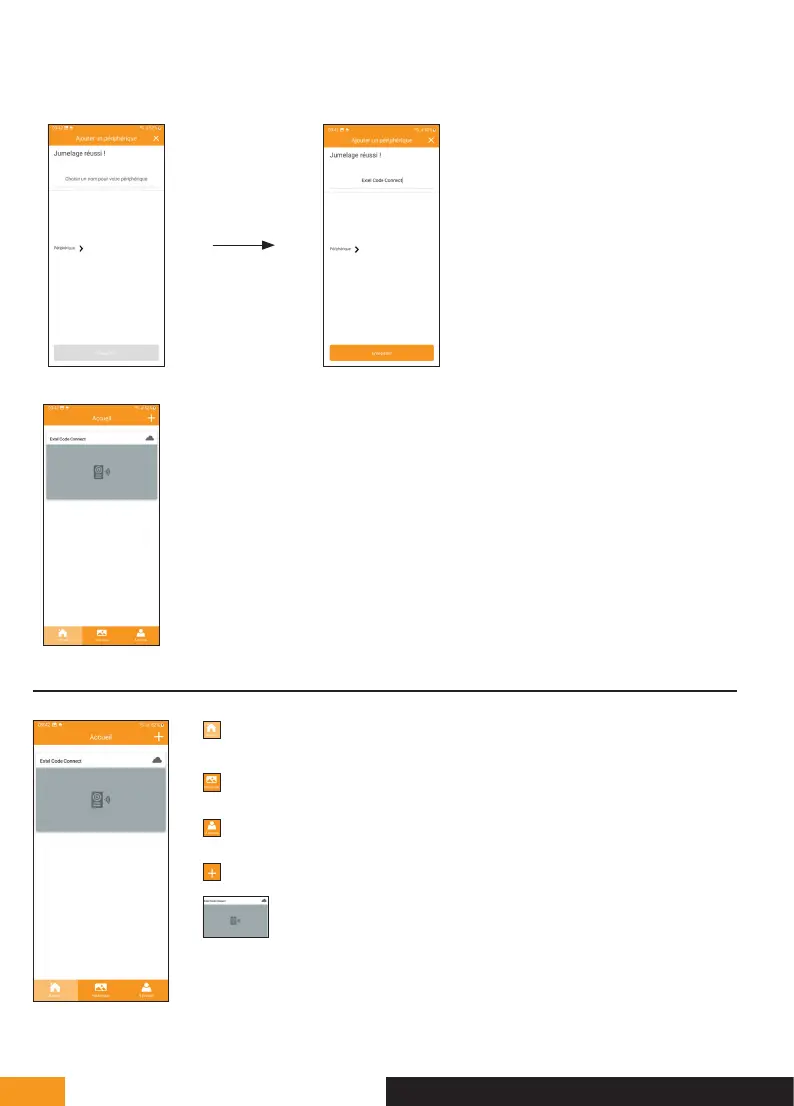
The message “Jumelage réussi” [Pairing
successful] should appear. Enter a name
to identify your video doorkeeper and
press “Enregistrer” [Save].
12.
To finish the procedure, open
the live image from your video
doorkeeper by clicking on its
thumbnail.
4. INTERFACE FUNCTIONS
Contains the different devices and enables
switching to monitoring mode
Retrieves intercom activity and calls made
“A propos” [About] tells you the application’s
software version
Enables you to add a device
Click the image to enter monitoring mode
F - CONNECTING YOUR EXTEL CONNECT 2 VIDEOPHONE TO YOUR SMARTPHONE



 To Next Page