EXTEL - CONNECT 2 - 720324
fr - 11
F - CONNECTING YOUR EXTEL CONNECT 2 VIDEOPHONE TO YOUR SMARTPHONE
5. Then scan the QR code on your doorkeeper’s monitor screen.
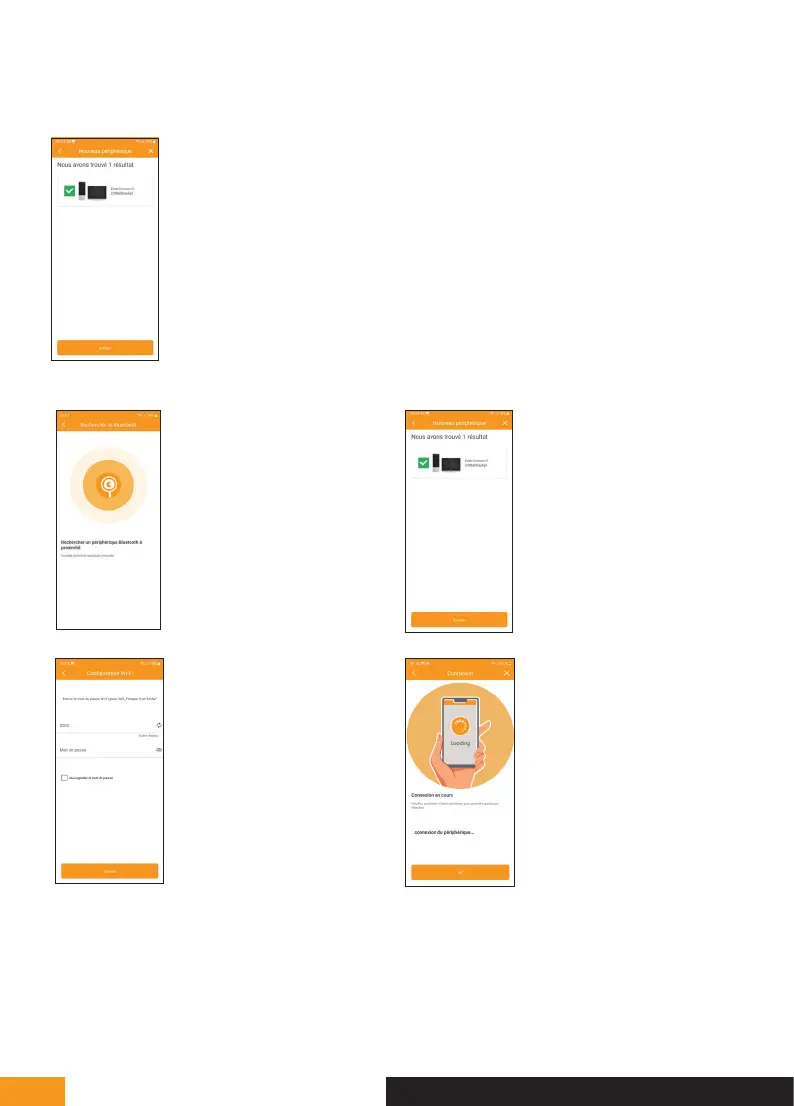
6. If the scan of the QR code is correct, the application should find the Extel Connect 2
monitor. Press “Ajouter” [Add].
8.
Once your smartphone is
connected to the Extel Connect
2 monitor, select it and press
“Ajouter” [Add].
7.
Your smartphone will connect
via Bluetooth to the Extel
Connect 2 monitor. If your
smartphone’s Bluetooth is
deactivated, please activate it.
10.
Wait for your video doorkeeper
to connect to the WiFi network.
9.
Indicate the network to which
your video doorkeeper will have
to connect. Select your router’s
WiFi network and type in its
WiFi key.
Press “suivant” [next].



 To Next Page