The information contained within this document is confidential and cannot be reproduced
without the approval of Extollo Communications.
16
Creating a Powerline Network with the LANPlug 2000
The LANPlug 2000 Powerline adapters extends the Ethernet connection from your Internet router
across the home’s electrical power lines to remote locations within your home or to remote
buildings.
Similar to coax cable and telephone lines, the electrical power lines are also capable of
transmitting digital signals such as Voice, Video and Data.
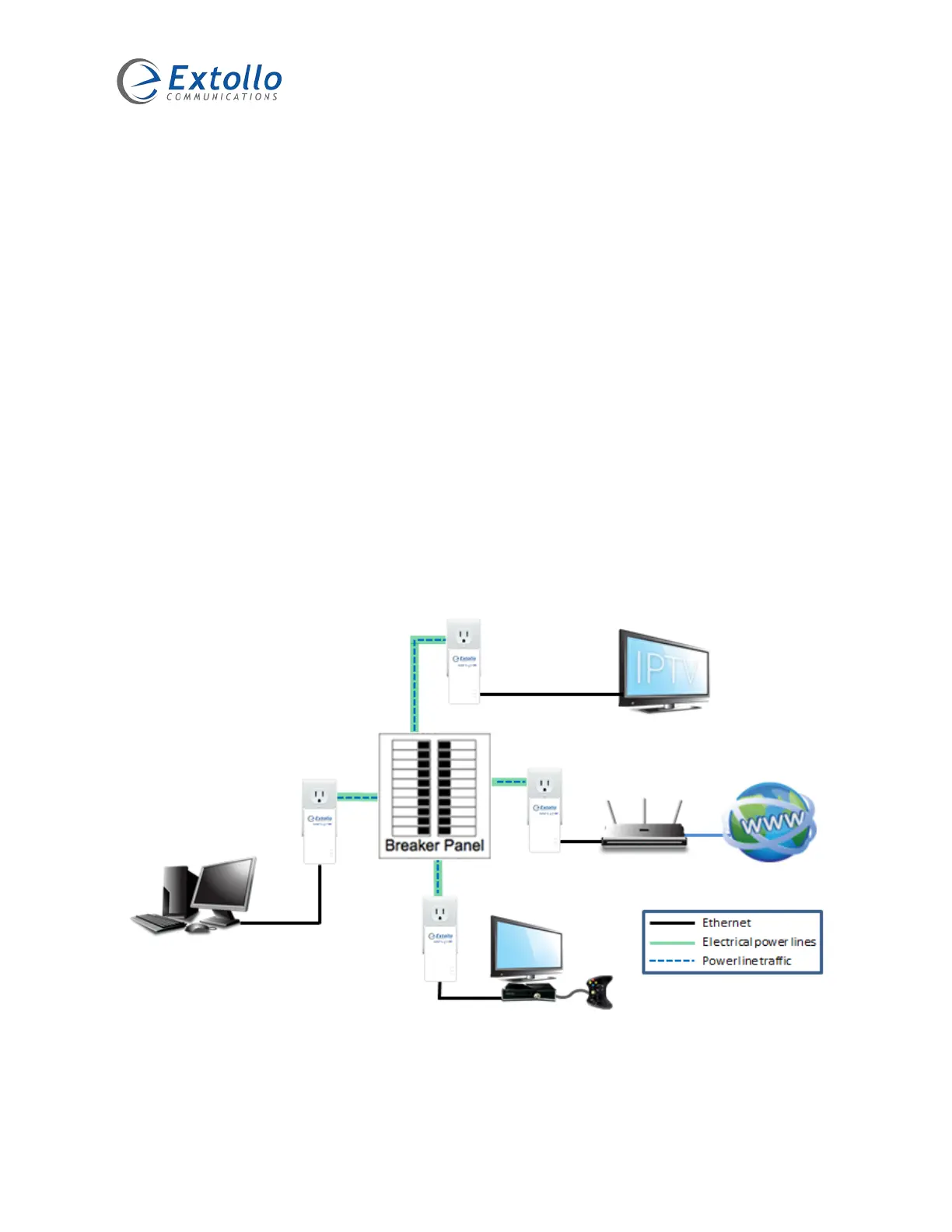
A Powerline network setup consists of two or more LANPlug 2000 Powerline adapters. Connect
one LANPlug 2000 to your Internet router with the provided Ethernet cable and plug it into an
electrical outlet. Plug the second LANPlug 2000 into an electrical outlet close to the device that
requires an Internet connection and connect the device with the Ethernet cable.
Pair the LANPlug 2000’s to establish the Powerline network. Internet traffic now flows across the
electrical power lines to the remote LANPlug 2000. Every other electrical outlet in the home is
now capable of becoming an Internet connection by plugging in and pairing additional LANPlug
2000 Powerline adapters.


 To Next Page