The information contained within this document is confidential and cannot be reproduced
without the approval of Extollo Communications.
29
Device Menu
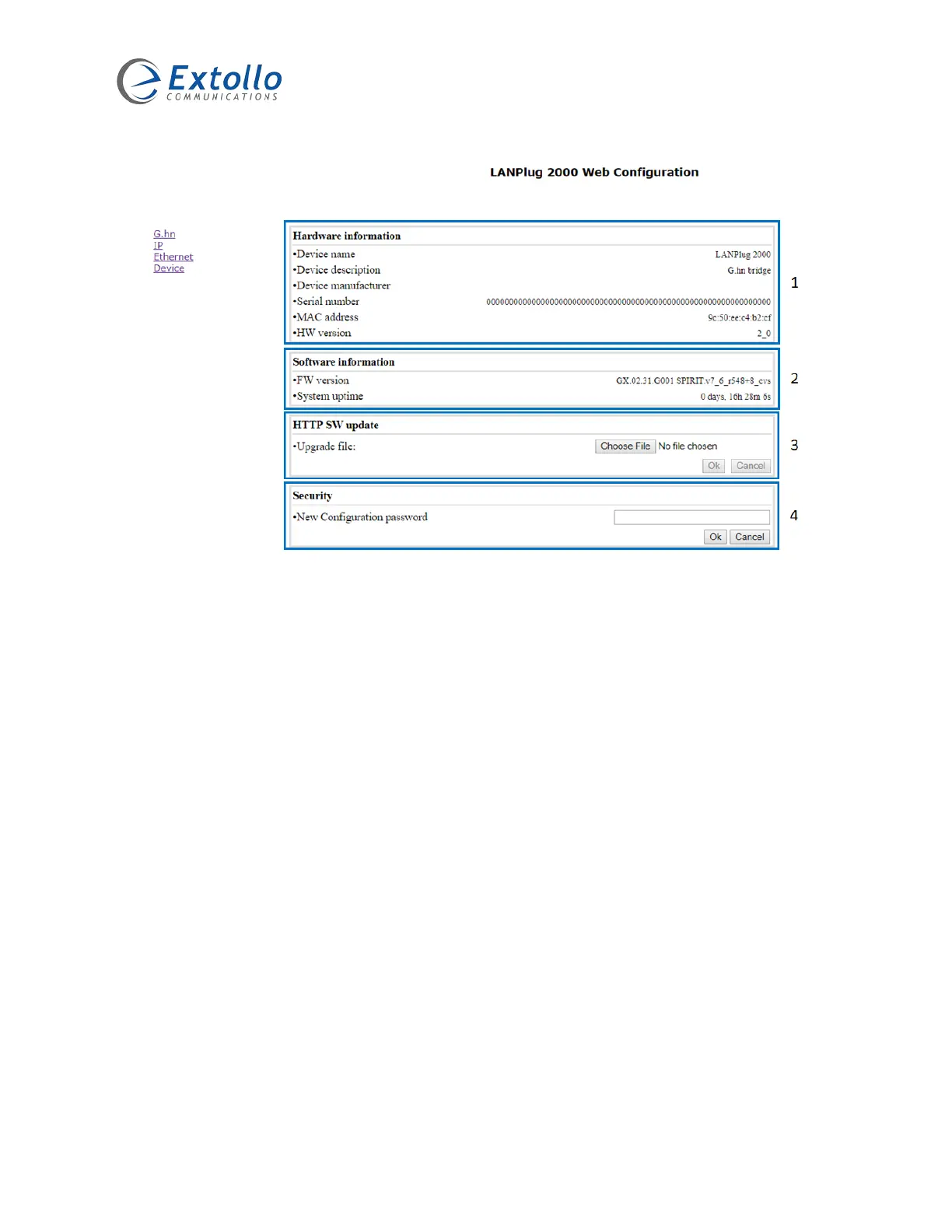
1. Hardware Information
The hardware information section provides an overview of the LANPlug 2000’s hardware.
2. Software Information
The software information section provides an overview of the software release that is running on
the LANPlug 2000.
3. Software Update
Extollo will periodically provide new software for the LANPlug 2000. The software will be made
available for down load from Extollo’s website.
1. Download the latest software for the LANPlug 2000 from Extollo’s website.
2. Save the software on your computer’s local hard drive in a location/directory that you can
remember. Do not change the file name or extension.
3. Select the Choose File button and navigate to the location/directory where the software
was stored and select the file.
4. Select the OK button to initiate the software upgrade.
5. The LANPlug 2000 will load the new software and then reboot its self.
NOTE: Do not unplug the LANPlug 2000 while it’s installing the new software. The LANPlug 2000
will become inoperable.


 To Next Page