The information contained within this document is confidential and cannot be reproduced
without the approval of Extollo Communications.
25
Manage the Settings on the LANPlug 2000
The LANPlug 2000’s software settings are optimized for its hardware. Several of the configurable
options are dynamically created and assigned during the pairing process It’s not recommended
to change the dynamically assigned settings.
G.hn Menu
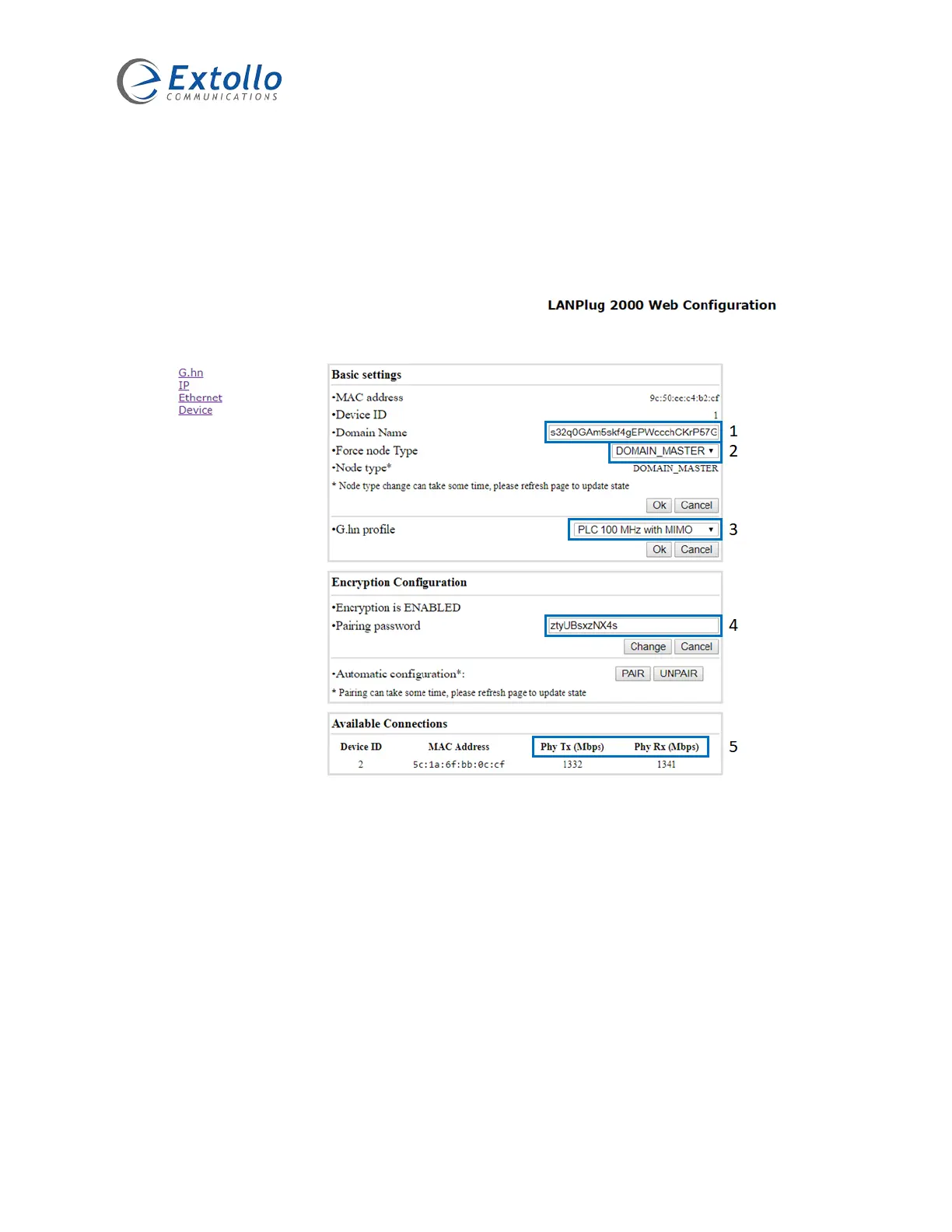
1. Domain Name
The Domain Name is dynamically created during the initial pairing process. All LANPlug 2000’s
being paired will be assigned the same Domain Name. The factory default domain name is
“HomeGrid”.
2. Force Node Type
The Force Node Type is used to change the operational mode of the LANPlug 2000 in the G.hn
domain. The options are “Domain Master” or “End Point”. The LANPlug 2000 that initiates the
pairing process is made the Domain Master. It’s recommended that the LANPlug 2000 attached
to the Internet router initiates the pairing process. The factory default domain name is “Automatic”.


 To Next Page