The information contained within this document is confidential and cannot be reproduced
or shared without the approval of Extollo Communications.
14
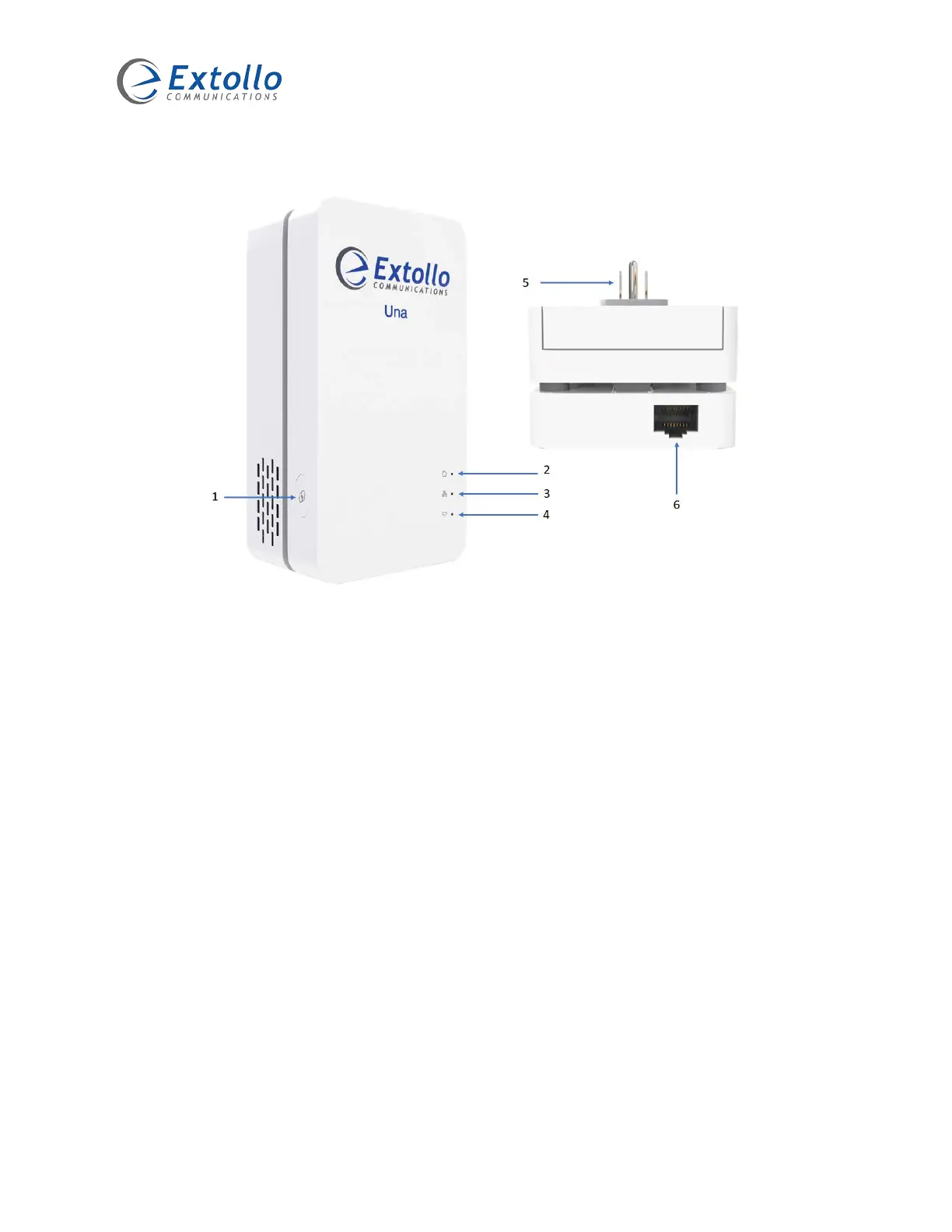
Una Interfaces
1. Paring Button
The paring button can perform several functions. It is used to:
a. Create the Powerline network during initial configuration.
b. Add another Una to the Powerline network.
c. Reset the Una to factory defaults.
2. Powerline LED
The Powerline LED indicates whether Una is pared and part of the Powerline network.
3. Ethernet LED
The Ethernet LED shows the status of the Ethernet connection between Una and the attached
device.
4. Wi-Fi LED
The Wi-Fi LED indicates whether Una’s wireless is enabled or disabled.
5. NEMA 5 120VAC and Powerline Interface
Provides power to Una and is used to transmit the Powerline frames across the electrical
power lines.
6. Ethernet RJ45 Interface
Una supports an auto sensing 10/100/1000Mbps Ethernet wired connection.



 To Next Page