The information contained within this document is confidential and cannot be reproduced
or shared without the approval of Extollo Communications.
22
Wi-Fi Set-up and Initialization
After pairing the Una’s Powerline backhaul network, the next step is to configure the Wi-Fi network
name (SSID) and password for the meshed Wi-Fi network.
Step 1
Turn off and or disable the Wi-Fi on your internet router. Una’s work in conjunction with your
existing router, only taking over your router's Wi-Fi duties.
Step 2
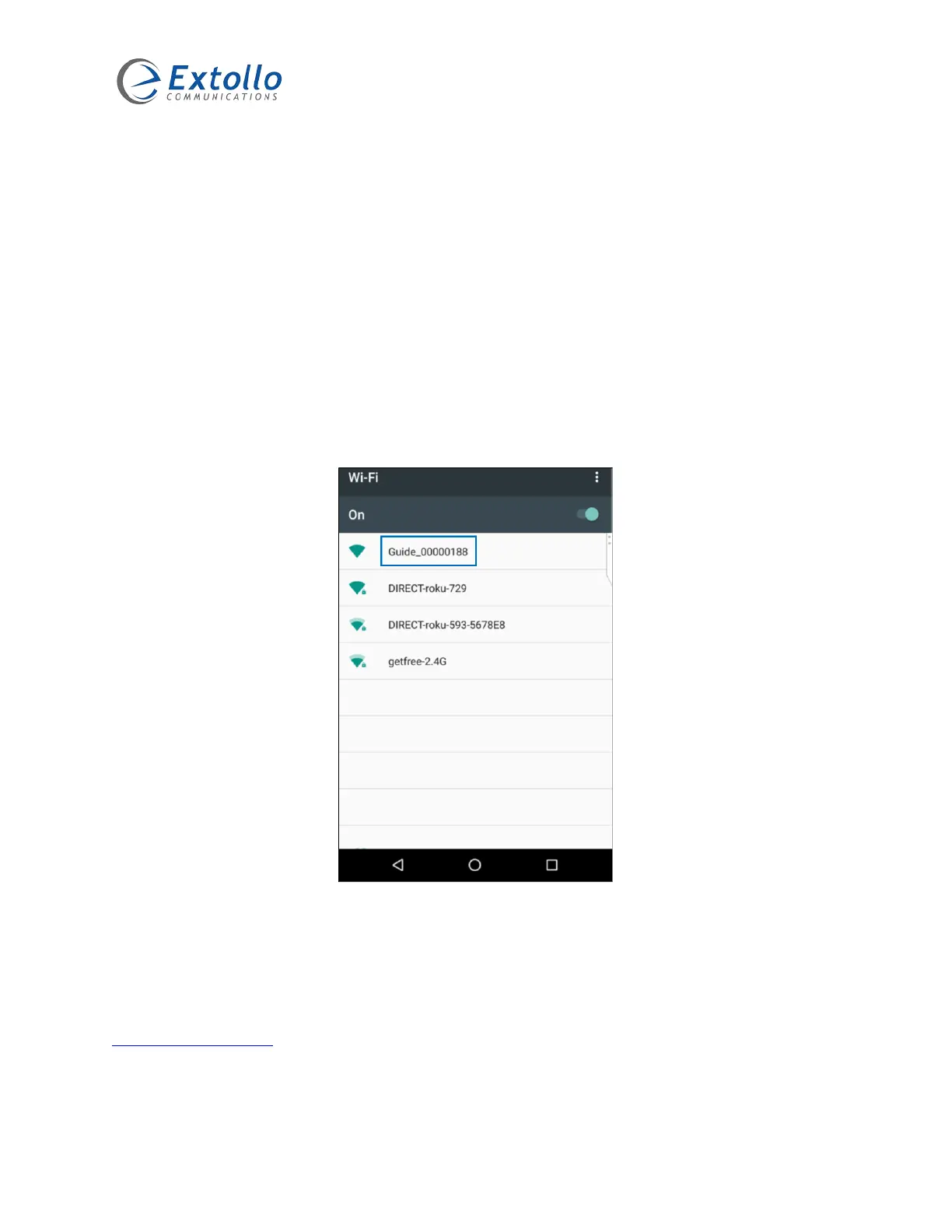
Use a computer, smartphone, or tablet to search and connect to one of the temporary Wi-Fi
network names of Guide_xxxxxxxx (x = a digit). Here is an example of broadcasted Wi-Fi network
(SSID).
Step 3
Once you have selected and are connected to the temporary Wi-Fi network of “Guide_xxxxxxxx”,
the following window pops-up. If not, open an Internet browser and enter any URL address (e.g.,
www.extollocom.com
).
NOTE: make sure that the device’s Wi-Fi that you are using is connected to the temporary Wi-Fi
network of Guide_xxxxxxxx. If it is not, Una’s Wi-Fi network set-up window will not pop-up.



 To Next Page