ELISIR UTENTE PARAMETERS BOARD 002272575
37
Chapter 1
V1ARIA
This parameter allows to adjust the speed of the rst motor dedicated to the hot air ventilation in the
room.
Controls procedure
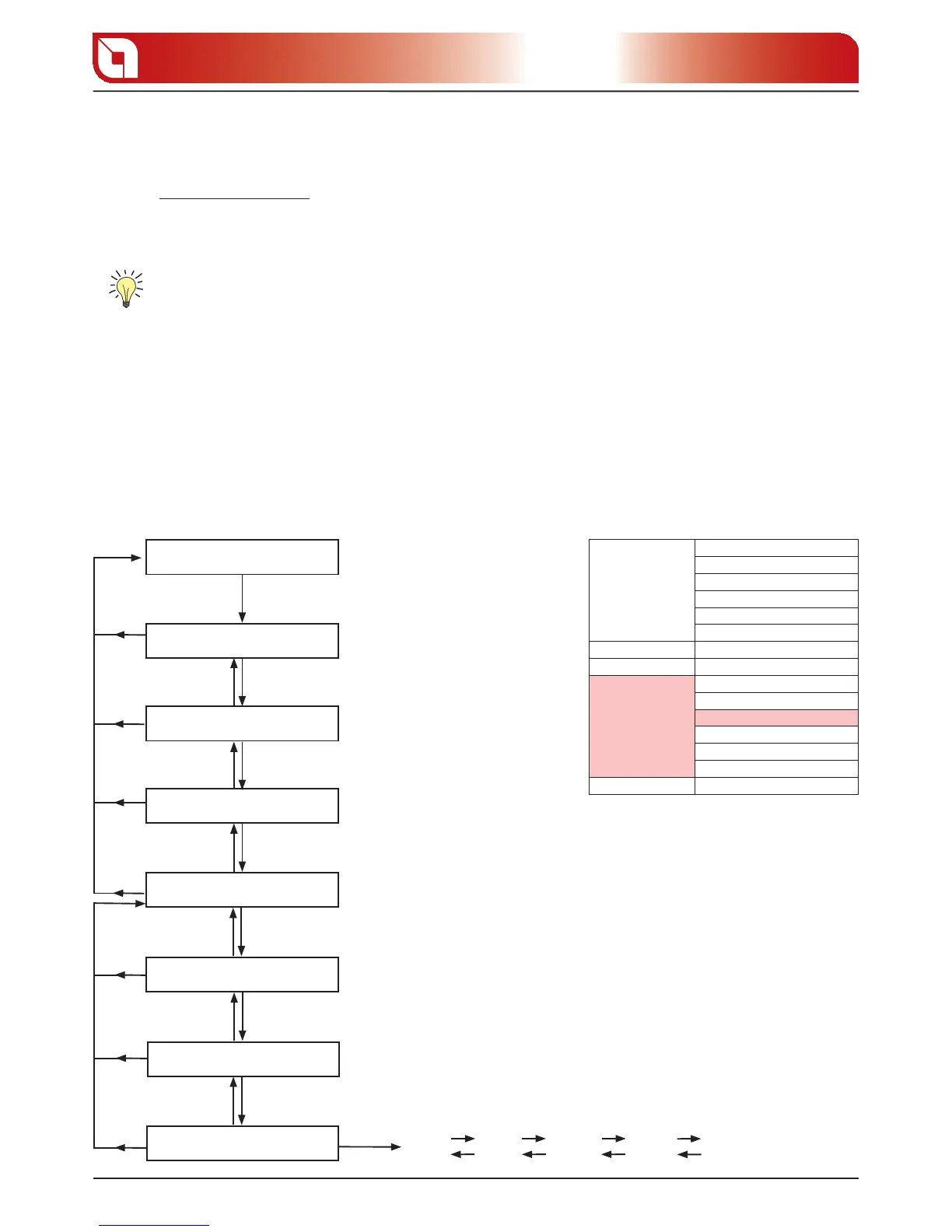
Press button 5 until “1. SET CLOCK“ appears on display D1.
Using buttons 2 and 3 select “2. UTENTE“.
Press button 5 to access the menu.3.
Using buttons 2 and 3 select “4. V1ARIA “.
Press button 5 to access the menu.5.
The following operations can be carried out from the menu:6.
Using buttons 2 and 3 select the increase/decrease as wanted.
Using button 1 con rm and return to the higher menu.
The regulation to be performed is a percentage. Therefore a modi cation of this parameter will lead to a
proportional variation on all motor speeds: the increase/decrease varies by 5 points per time.
FRONT AIR ADJUSTMENT RAPID MODE V1ARIA
INITIAL SCREEN
SET CLOCK
SET CHRONO
LANGUAGE
UTENTE
key 5 for 3 seconds
key 3
key 3key 2
key 3key 2
05
key 3
10
key 2
key 3
key 3
key 2
etc
key 1
key 1
key 1
key 1
key 2
key 5key 1
DISPLAY
key 5key 4
PELLET
key 1
key 5key 4
V1ARIA
key 1
key 1
SET CLOCK
DAY
TIME CLOCK
MINUTES CLOCK
DAY CLOCK
MONTH CLOCK
YEAR CLOCK
SET CHRONO SEE FOLLOWING TABLE
SET LANGUAGE LANGUAGE
REG. UTENTE
DISPLAY
PELLET
V1ARIA
STANDBY
KEYS FROZEN
V2ARIA
SET TECHNIC RESERVED TECHNICIAN





 To Next Page