UK/IRL
52 < < < <
3. The green control lamp will light up and stay on. Repeat this step if it
doesn't;
4. Push a button on the remote control. The control lamp on the
receiver should now go out;
5. Again push a button on the remote control. The lamp
starts flashing and will switch off eventually;
6. The receiver now recognizes the remote control. The
remote control now functions;
7. Check if you can hear a sound and the motor runs when
you push a button on the remote control.
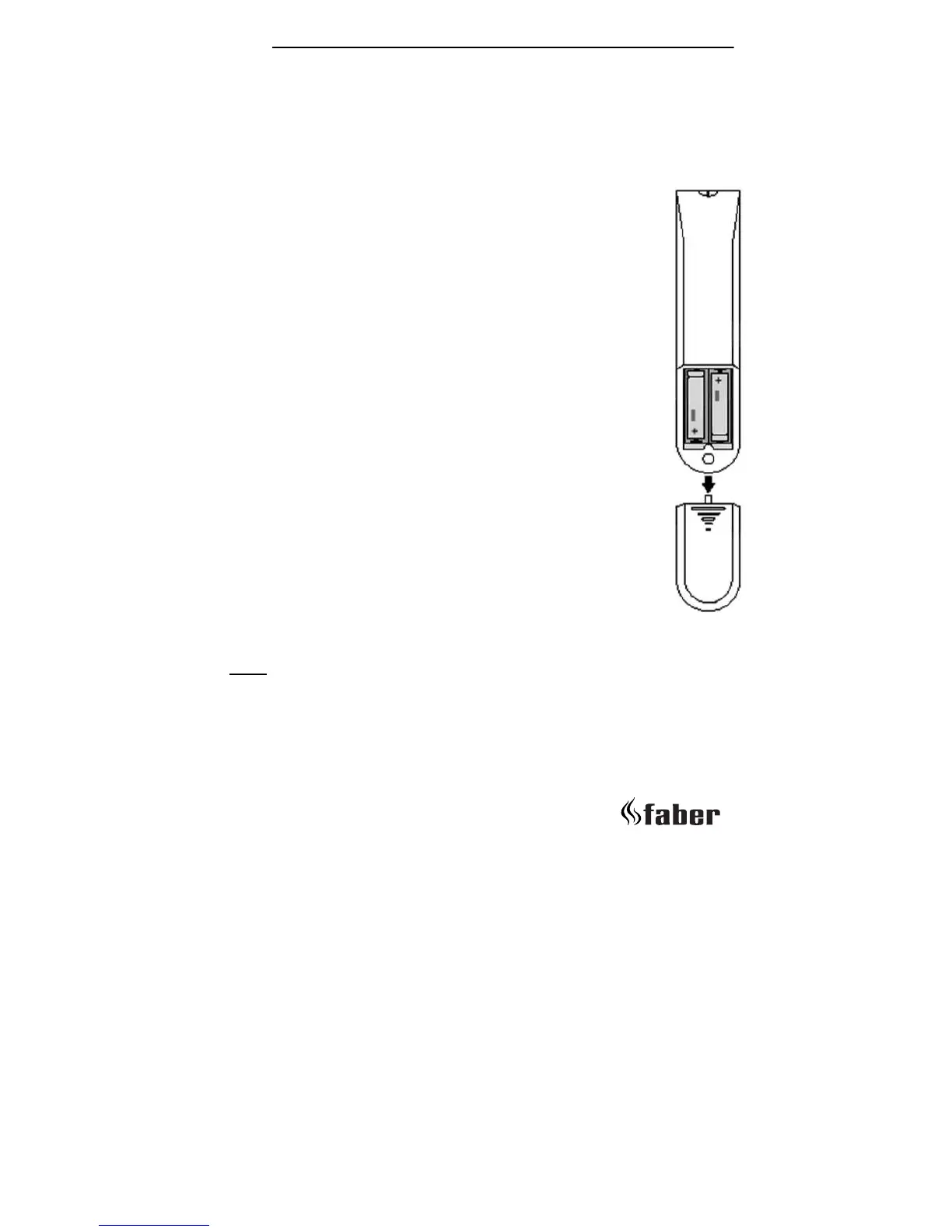
11.4.3 Changing the batteries
The life span of the batteries in the remote control is ±1
year, depending on the frequency of use.There is no risk of
electric shock as the low voltage supply is similar to that
used in torches. Always turn off the appliance before
changing batteries.
Remote control
1. Remove the cover on the back of the remote control;
2. Carefully remove the battery clip along the side. Pay
attention not to pull the wires;
3. If necessary, remove the old batteries and place the new
ones:
2x LR03 /AAA Alkaline long life 1.5 V.
4. Click the battery clip into the remote control and close
the cover;
5. It might be possible that you have to set the transmission
code after changing the batteries (see 10.4.3).
Note:
Batteries are chemical waste and should be disposed in accordance
with local regulations.
fig. 27 Rear of
remote control





 To Next Page