22
7.8 OVEN LIGHT (PUSH BUTTON)
7.8.1 Remove control panel as detailed in Section 7.1.
7.8.2 Disconnect wires from switch.
7.8.3 Undo retaining nut and withdraw switch
7.8.4 Replace in reverse order.
7.9 OVEN ELEMENTS REMOVAL
7.9.1 Remove shelves and back baffle. Undo element fixing screw and withdraw into oven.
7.10 OVEN FAN REMOVAL
7.10.1 Remove oven shelves, back baffle and fan impellor (Note – The nut is LH thread).
7.10.2 Remove fan support plate and tilt forward into oven.
7.10.3 Undo fan support plate fixings and electrical connections.
7.10.4 Fan may now be removed. Replace in reverse order.
7.10.5 Electrical connections to be restored as detailed in wiring diagram.
7.11 SAFETY AND OPERATION RELAY REMOVAL
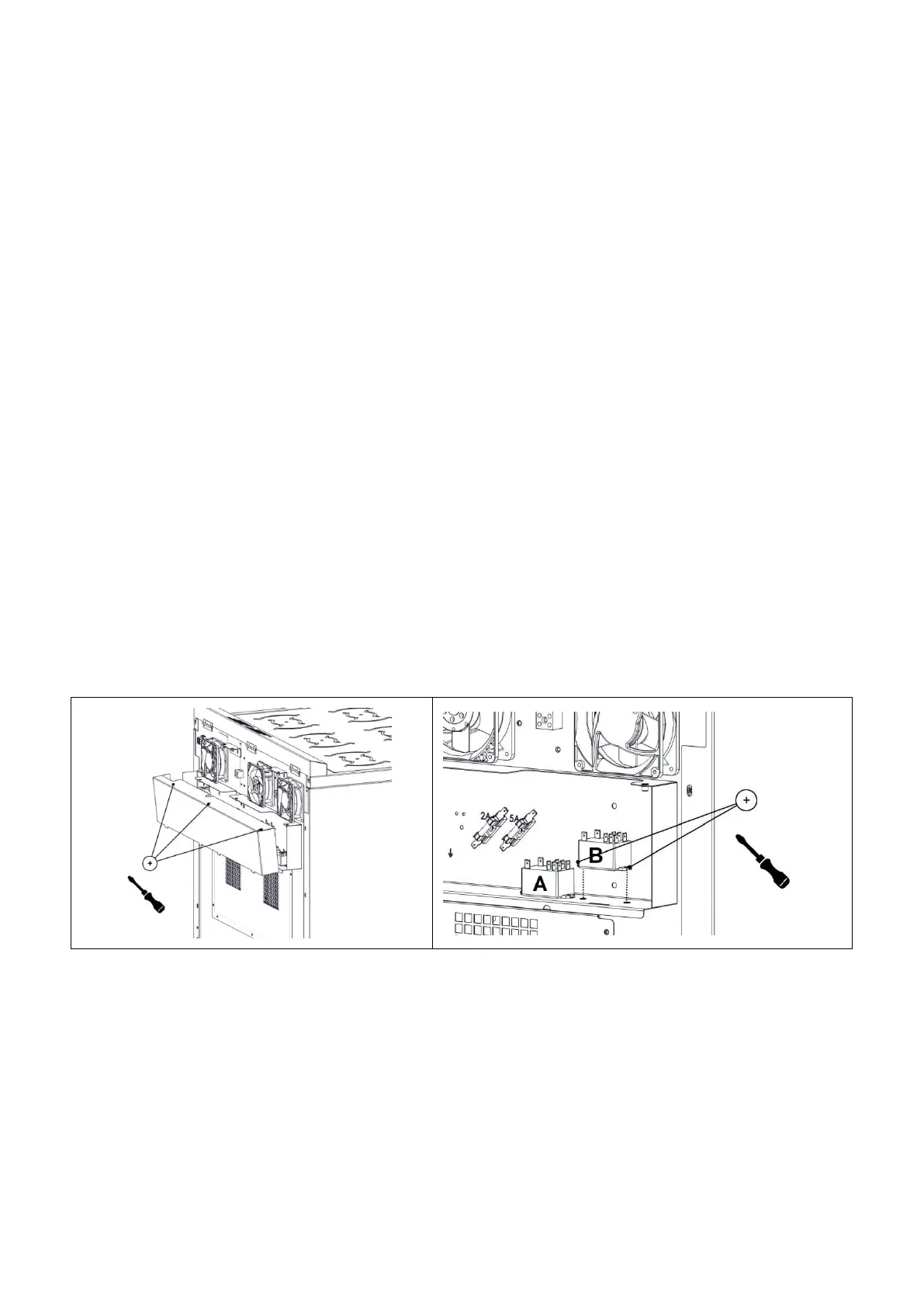
7.11.1 Remove cover plate from outer back panel.
7.11.2 Undo electrical connections from relay and remove fixings.
7.11.3 Replace in reverse order. Electrical connections to be restored as detailed in wiring
diagram.
7.11.4 Unit is fitted with two relays: “A” is the operating relay and “B” is the safety relay.






 To Next Page