Home
FALEEMI
Security Camera
FSC768
Page 54 (Advanced Settings)
FALEEMI FSC768 - Advanced Settings; Image Rotation
90 pages
Manual
Save Page as PDF
To Next Page
To Next Page
To Previous Page
To Previous Page
Loading...
48
www.f
aleemi.com
support@faleemi.com
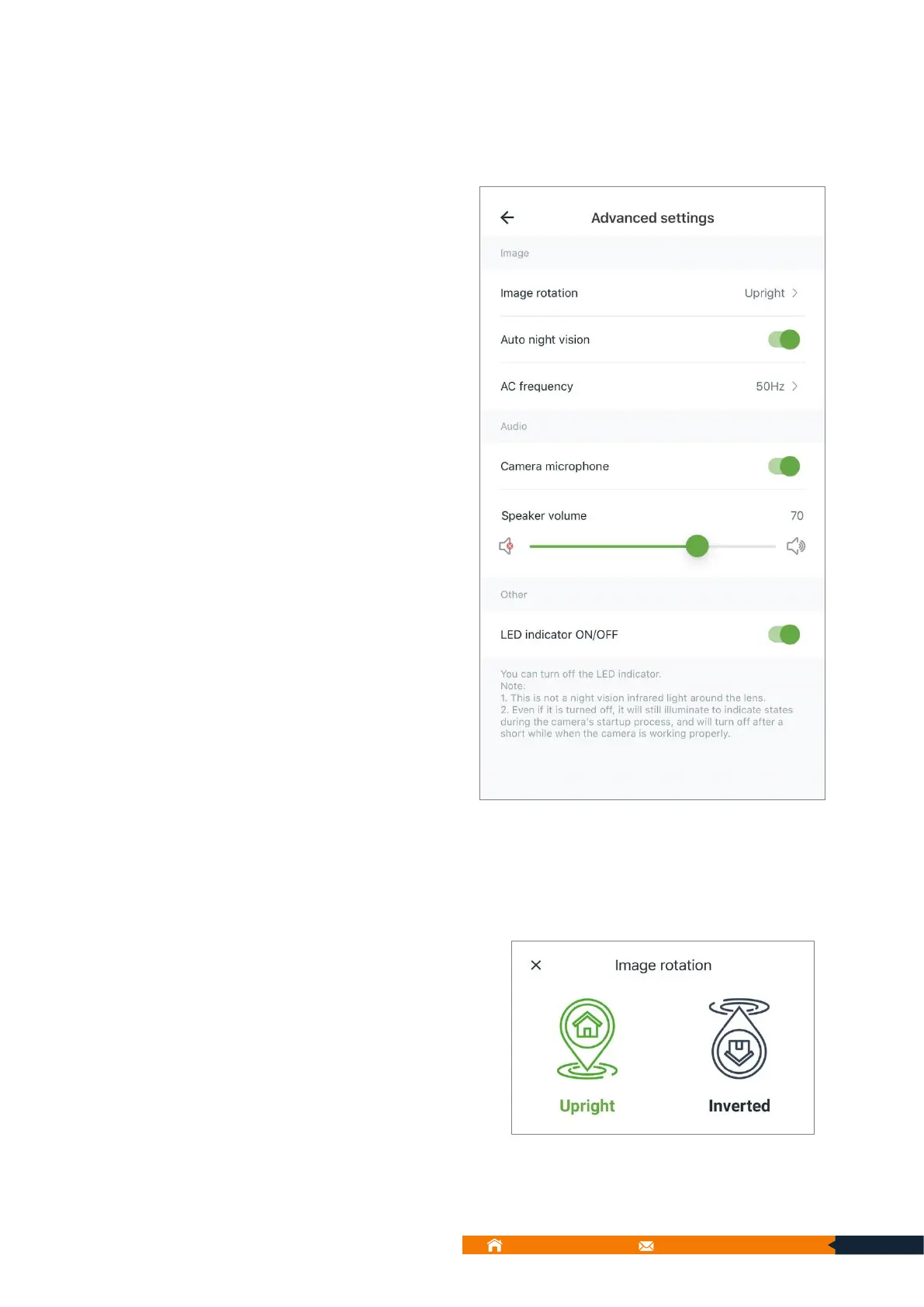
9.5.4.
Advanc
ed
settings
Y
ou
ca
n
do
the
settings
of
Image
r
otation,
Auto
night
vision,
AC
fr
equency
,
Camera
micr
ophone,
Speak
er
volume, and LED indicator
ON/OFF
.
9.5.4.1. Imag
e rota
tion
:
Y
ou
can
r
otat
e
the
image
if
the camer
a
is installed upside down.
53
55
Table of Contents
Main Page
Table of Contents
3
What's in the Box
7
Dome Camera
7
Outdoor Camera
7
Layout and Features
8
Model: FSC776A/FSC776C
8
Model: FSC883
8
Model: FSC886
8
Model: FSC768 (Outdoor)
9
Indicator Lights
10
Indoor Dome Camera
10
Outdoor Camera
10
Download the Faleemi Cloud App
11
Create an Account
12
Sign in to Your Account
14
Connect Your Camera to Your Wi-Fi
15
Connect Dome Cameras
16
Setup Option: Wi-Fi Connection by QR Code
16
Add Outdoor Camera
21
Setup Option 1: Wi-Fi Connection by QR Code (Recommended)
21
Setup Option 2: Eth Connection by Cable
26
Main Interface
33
Devices Page
33
ICON Definitions
34
Alert Page
35
ICON Definitions
35
Cloud Page
36
ICON Definitions
36
Me Page
37
ICON Definitions
37
Multi-View Settings
38
ICON Definitions
38
Add Camera to Quad Screen
39
Camera Functions
40
Live Video Panel
41
Indoor Dome Camera- Live Video Panel
41
Outdoor Camera-Live Video Panel
42
ICON Definitions
42
Console (PTZ Cameras Only)
43
Position (PTZ Cameras Only)
44
Set Presets
45
Delete Presets
45
Alert
46
ICON Definitions
46
View Alert Video
47
Edit Alert Video (Delete or Download Alert Video)
48
Replay
49
ICON Definitions
50
Camera Settings
51
Basic Settings
51
Camera Name
51
Camera On/Off
52
Invite Family Members
52
Advanced Settings
54
Image Rotation
54
Auto Night Vision
55
AC Frequency
55
Camera Microphone
55
Speaker Volume
55
LED Indicator ON/OFF
55
Local Application
56
Local Account
56
Rtsp
57
Onvif
57
Camera Time Zone
58
Home Protection Settings
59
Motion Detection
59
Detection Area
59
Sensitivity Level
60
Motion Alert
60
Schedule Mode 1: 24H
60
Schedule Mode 2: Customize
61
Memory Card Storage
63
Enable Memory Card Storage
63
Schedule Mode 1: 24H
63
Schedule Mode 2: Customize
64
Camera Information
66
Device Information
66
Network
66
Diagnose
66
Device Management
67
Restart Camera
68
Restore Factory Settings
68
Delete Camera
68
Alert Page
69
ICON Definitions
69
Cloud Page
71
Basic Plan
72
Extended Plan
72
Pro Plan
73
Me Page
74
ICON Definitions
74
Album
75
Local Videos
75
Local Photo
76
Downloading
76
Message
77
Account Security
77
Set Touch ID or Face Recognition Quick Sign-In, Gesture Login
77
Change Password
78
Forgot Password? (to Reset Your Account and Password)
78
Gesture Login [Android Device]
79
Touch ID Fingerprint Sign in [Ios Device]
80
Delete Account
81
General Settings
81
Language
82
Reminder of Using Cellular
82
Message Notification
82
Faq
83
About
83
Sign out
84
Frequently Asked Questions (FAQ)
85
Which App Does this Camera Use
85
How to Reset Your Camera (Restore to Factory Default)
85
Indoor Dome Camera
85
Outdoor Camera
86
How to Install Memory Card
86
Indoor Dome Camera
86
Outdoor Camera
87
Cannot Receive the Activated Email When You Sign up a New Account or Change Account Password on App
87
The Memory Card Cannot be Recognized by Camera
87
What Kind of Memory Card that the Cameras Are Compatible with
87
Why Aren't the Recorded Motion Alerts Notifying My Phone
88
I Don't Have Wi-Fi at My House. Would this Camera Work Without It
88
Can the App be Used on Two Devices at the same Time? Like My Iphone and My Family's Iphone
88
Related product manuals
FALEEMI FSC881
10 pages
FALEEMI FSC882
18 pages



 To Next Page