56
Traffic-Control
EN
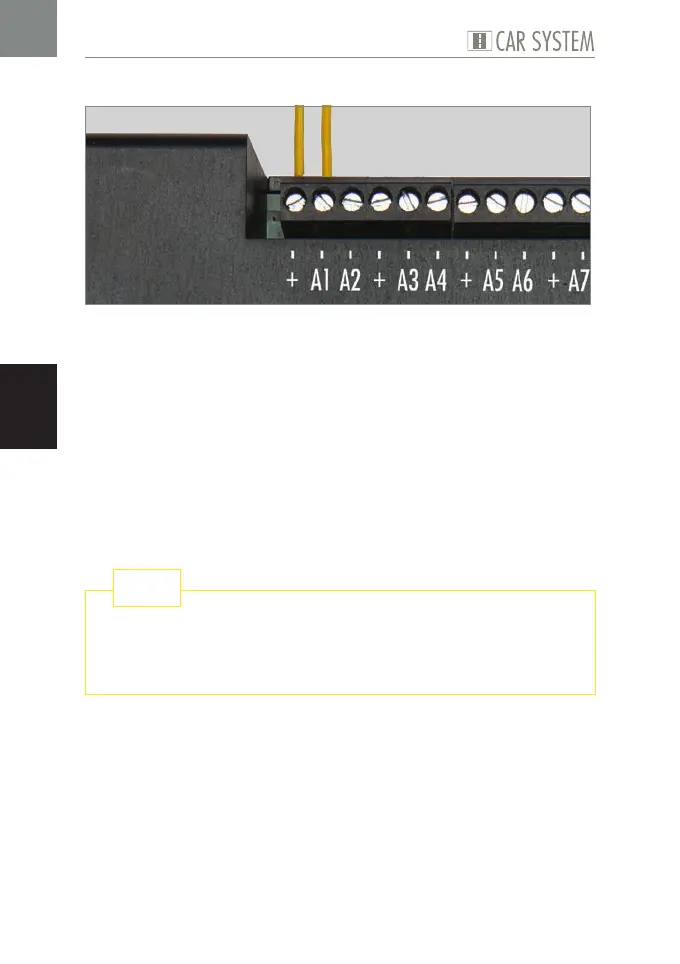
Example of connection: Connecting components to the Traffic-Control
Fig. 4: Connecting components, e.g. a component to A1 and “+”
X
Connect one wire of a component to the required position, see Fig. 4.
X
Connect the second wire of the component to “+”, see Fig. 4.
The component is now connected.
ADVICE: On the »Stop section« component the polarity of the supply
cables is quite relevant. The yellow cable of the stop section must be con-
nected to “+”, the brown cable to the corresponding output, e.g. A1.
In case of reversed polarity just exchange both supply cables. You will
find further advice relating to the elimination of error messages in the
present instruction manual in chapter 7 »How to deal with problems«.
The ideal entry into FALLER Car System’s fascinating world is the
compilation of components in our »Basic Set Components«, Art.
161622.
TIP


 To Next Page