EasyManua.ls Logo

Fanimation SPITFIRE MA6721 Series - User Manual

Fanimation SPITFIRE MA6721 Series
32 pages
Print Icon
To Next Page IconTo Next Page
Loading...
Español p. 17
MODEL #MA6721**
CEILING FAN
Questions, problems, missing parts? Before returning to your retailer, call our customer
service department at 1-888-567-2055, 8 a.m.-5 p.m., EST, Monday-Friday.
ATTACH YOUR RECEIPT HERE
READ AND SAVE THESE INSTRUCTIONS
Purchase Date
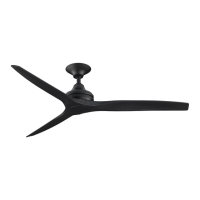
SPITFIRE
Net Weight : 16.34 lbs (7.41 kg)

Questions and Answers

  • C
    Christopher MunozJul 29, 2025
    Why is my Fanimation SPITFIRE MA6721 wobbling excessively?
    • G
      George ShannonJul 29, 2025
      Excessive wobbling in your Fanimation Fan can stem from several issues: * Loose setscrews in the downrod support. Ensure both are tightened securely. * A loose setscrew in the downrod/hanger ball assembly. Tighten it. * Loose screws securing the fan blade to the motor assembly. Check and tighten these screws. * An unsecured hanger bracket or ceiling timber batten. Tighten the hanger bracket screws and secure the outlet box. * Fan blades that are out of balance. Use the balancing kit provided with your fan.
  • K
    kellyhansenAug 7, 2025
    What to do if my Fanimation Fan sounds noisy?
    • K
      knoxwilliamAug 7, 2025
      If your Fanimation Fan is making unusual noises, consider the following: 1. Ensure the blades are properly attached to the fan. 2. Check for loose screws in the motor housing and tighten them (but don't overtighten). 3. Verify that the screws securing the fan blade to the motor assembly are tight. Remember to turn off the main power before checking! 4. See if the lower housing support set screw is loose and tighten it securely.
  • M
    Mrs. Kimberly PittsAug 17, 2025
    How to fix a Fanimation SPITFIRE MA6721 Fan that will not start?
    • C
      coreyramseyAug 17, 2025
      If your Fanimation Fan isn't starting, here's what you can check: * Inspect the main and branch circuit fuses or circuit breakers. * Examine the power line connections to the fan and switch wire connections in the switch housings. Be sure to turn off the main power first! * Replace the remote control battery with a fresh one.

Summary

Important Safety Instructions

Additional Safety Instructions

Provides crucial safety guidelines for fan operation and installation, including electrical codes and warnings.

FCC Compliance

Details the device's compliance with FCC Part 15 rules regarding radio frequency energy.

LIMITED LIFETIME WARRANTY

Energy Efficient Use of Ceiling Fans

Choosing the Appropriate Mounting Location

Guidance on selecting the optimal placement for ceiling fans for best performance.

Turn Off When Not in the Room

Advice on conserving energy by turning off the fan in unoccupied rooms.

Using the Ceiling Fan Year Round

Tips for utilizing the fan effectively during summer and winter seasons.

Electrical and Structural Requirements

Low Profile Box Mounting

Describes the installation requirements for a low profile outlet box (Figure 1).

Deep Box Mounting

Details the installation specifications for a deep outlet box (Figure 2).

Deep Box with Brace Mounting

Explains the mounting using a deep box with a brace for spanning joists (Figure 3).

How to Hang Your Ceiling Fan

Secure Hanger Bracket Installation

Attaching the hanger bracket securely to the outlet box for fan support.

Seating Downrod;Hanger Ball Assembly

Properly seating the downrod/hanger ball onto the hanger bracket.

How to Wire Your Ceiling Fan

Wire Connection Procedure

Steps for connecting wires using connectors and routing them into the outlet box.

Receiver Installation in Hanger Bracket

Sliding the receiver into the hanger bracket without pinching wires.

Installing the Canopy Housing

Securing Canopy to Hanger Bracket

Attaching the canopy by aligning key slots with shoulder screws and tightening.

How to Assemble the Ceiling Fan Blades

Attaching Blades to Motor Assembly

Securing fan blades using screws and washers to the motor assembly.

How to Operate Your Remote Control

Remote Button Functions

Explanation of functions for Light ON/OFF, Light Dimmer, and fan speed controls.

Remote Control Pairing Process

Pairing Receiver and Transmitter

Steps for matching the receiver and transmitter for remote operation.

Remote Control Installation

Installing Wall Plate

Attaching the wall plate for the remote control using provided screws.

Maintenance

Periodic Cleaning

Guidance on cleaning the ceiling fan using soft materials to avoid damage.

Blade Holder Screw Check

Recommendation to periodically check and tighten blade holder screws.

How to Clean Your Ceiling Fan Blades

Trouble Shooting

Fan Will Not Start

Identifies causes like blown fuses or dead remote batteries and suggests remedies.

Fan Sounds Noisy

Addresses issues like loose screws or improperly attached blades causing noise.

Fan Wobbles Excessively

Covers loose setscrews, insecure brackets, or unbalanced blades as causes of wobbling.

Not Enough Air Movement

Suggests checking downrod length or balance kit for insufficient airflow.

Fanimation SPITFIRE MA6721 Series Specifications

General IconGeneral
ModelSPITFIRE MA6721 Series
Control TypeRemote Control
Light KitOptional
Motor Voltage120V
Motor Frequency60Hz
ReversibleYes
CategoryFan
TypeCeiling Fan
Finish OptionsBrushed Nickel, Matte Black, Oil-Rubbed Bronze
FinishBrushed Nickel, Matte Black, Oil-Rubbed Bronze
Indoor/OutdoorYes

Related product manuals