14
fantech
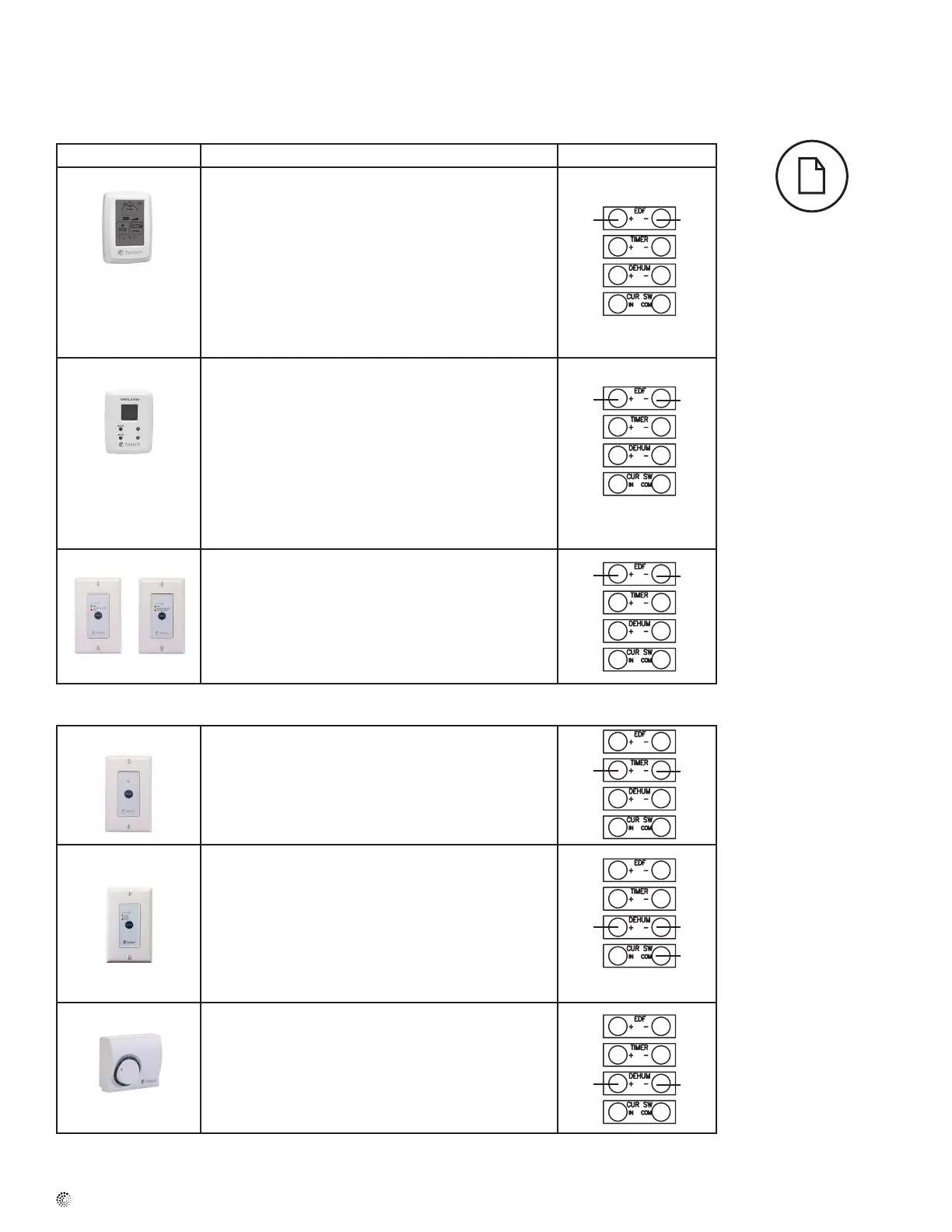
Low Voltage Control Systems
* Please see instruction manuals for individual controls for proper wiring and set up of control systems.
CENTRAL CONTROLS – These control options can only be used individually
CONTROLS FEATURES CONNECT TO
ECO-Touch • Our most complete, yet easy to use control system
• Sleek design with backlight touchscreen LCD
• ECO mode selects the best operating mode and speed for the
season, minimizing energy use associated with ventilation
• Set preferred indoor relative humidity range and ventilation
mode for day and night conditions
• No battery to replace, all programmed settings are retained
during power outage
• Maintenance reminder indicator
• Error code messages reduce troubleshooting time
EDF7
• MODE button provides 3 modes of operations: Ventilation ,
Recirculation and Standby
• User selected fan speed: Low, Medium, Normal and 20
minutes per hour
• AUTO setting allows the homeowner to deactivate the
dehumidistat
• When the humidity exceeds the desired setpoint, the venti-
lation system operates at Normal speed.
• Once the desired humidity level is achieved, your ventilation
system resumes to its previous mode of operation
EDF1/1R • Press button once for continuous LOW speed
• Press button twice and the unit will cycle 20 minutes ON/
40 minutes OFF and repeat
• EDF1 - Press button a third time and the system will run
continuously on HIGH speed
• EDF1R - Press button a third time and the system will run
recirculation on HIGH speed
AUXILIARY CONTROL – These controls can be paired
RTS2*
• 20- minute timer with LED light
• Boosts system to high speed with the touch of a button
• Up to 5 can be used in one system
• Use in bathroom, kitchen, laundry room
RTS3
• Press button once and unit will operate in continuous mode
on HIGH speed for 20 minutes (Green).
• Press button a second time and unit will operate in continu-
ous mode on HIGH speed for 40 minutes (Yellow).
• Press button a third time and unit will operate in continuous
mode on HIGH speed for 60 minutes (Red).
• Press button a fourth time to cancel the timer (LED turns
off).
MDEH1
• Rotary dial Dehumidistat
• Multiple units can be used
• We recommend setting the relative humidity above 80%
during the summer
1. Ensure that unit is not
plugged when connecting
the control
2. Recirculation mode is
only available with the
“R” sufx at the end of
the model number.
*Maintain polarity
between control
and HRV
(+ → + ; - → -)
EDF EDF
EDF EDF
EDF EDF
+T -T
D D
D D
COM



 To Next Page