37X INSTALLATION & OPERATION MANUAL
372/373 MODELS
17
7. MENUS AND NAVIGATION
7.1 Keypad
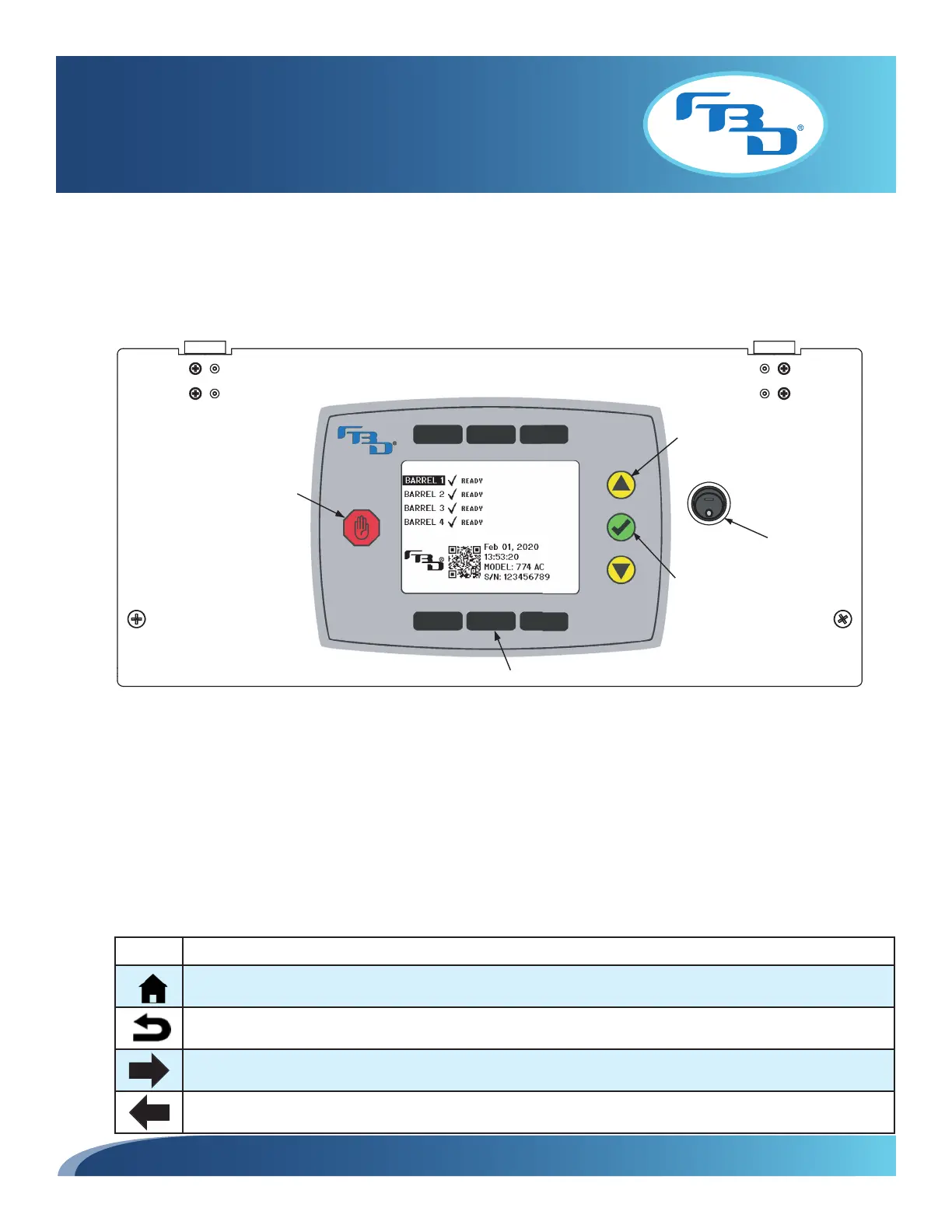
The keypad is the user interface point and allows for control of the dispenser and navigation of the menus. Please review
the keypad layout (Figure 7.1) to familiarize yourself with the interface.
• Select Button (green): This button confirms the current selection or action.
• Stop All Button (red): This button will turn off all barrels. A confirmation by the green select button is required.
• Up/Down Arrow Buttons (yellow): These buttons move the highlighted selection up and down. Press the select
button to confirm the selection.
• Soft Key (screen-labeled) Buttons (black): These buttons change function depending on the menu currently
being displayed. The function will be displayed below the top buttons and above the lower buttons.
• Main Control Board Interrupt: This switch controls power to the main control board. When OFF ( O), the dispenser
will remain powered, but the board will not. When ON (—), both the dispenser and board will be powered.
Figure 7.1 Keypad
ICON ACTION
Returns the display to the home menu.
Returns the display to the previous menu.
Moves the selection cursor to the right.
Moves the selection cursor to the left.
Screen Icon Legend
Stop-All
Button
Select Button
Soft Key (screen-labeled) Buttons
Up/Down
Navigation
Buttons
Main Control
Board Interrupt



 To Next Page