DIGITAL MERCHANDISER
56X/77X MODELS
10
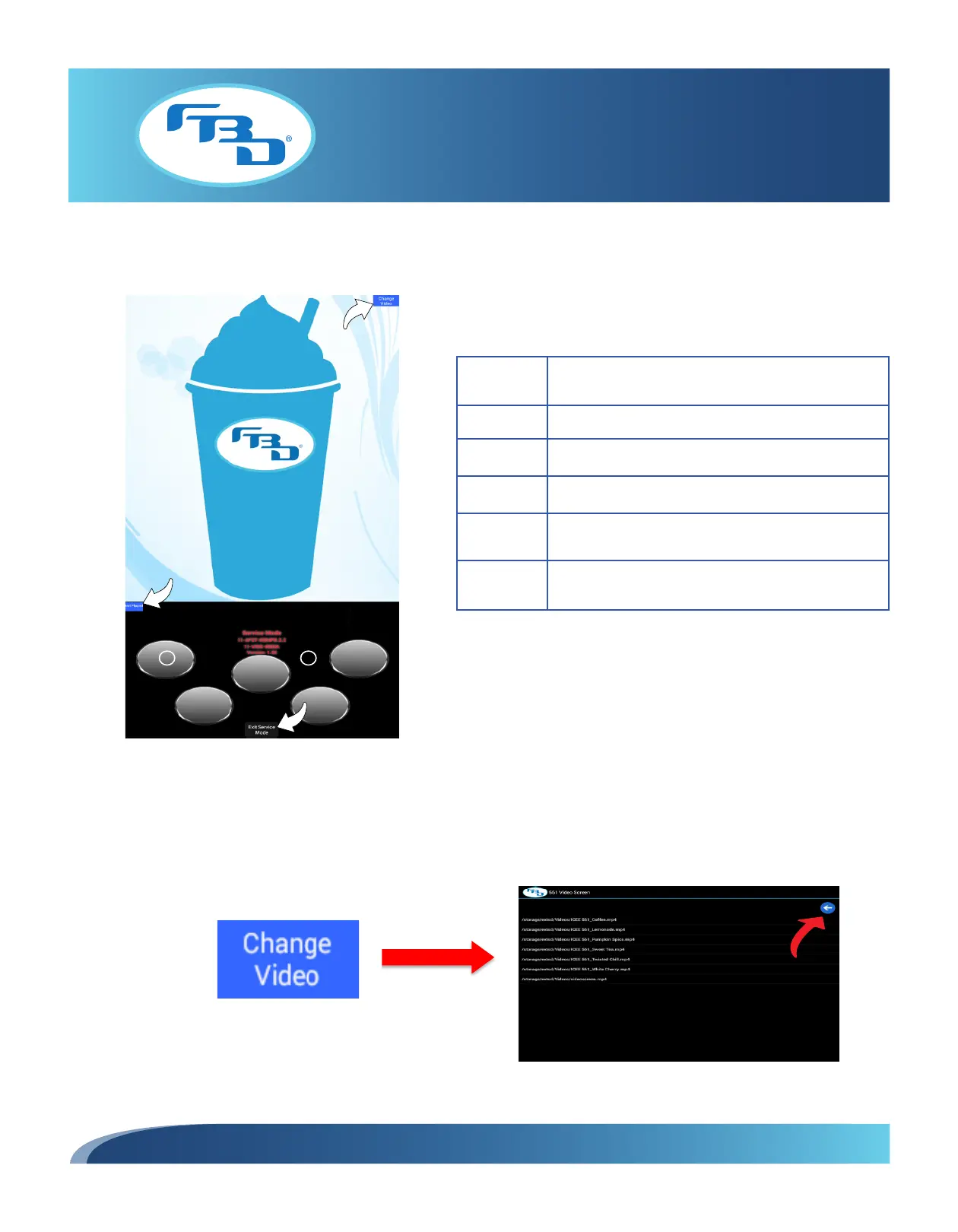
6.5 Menu Layout for 561 Merchandiser
Figure 6.7 illustrates the menu displayed after a successful unlock as well as the menu options.
6.6 Changing Video on 561 Merchandiser
Tap the “Change Video” button to open the video menu (Figure 6.8). Tap the desired video to select it, then press the blue
arrow to return to the previous screen.
Figure 6.7
Item Description
1
Change Video: Opens video selection menu.
2
Flipped/Not Flipped: Rotates screen orientation.
3
Flavor Button: Displays syrup or add-in flavors.
4
Flavor Background: Background behind the flavor
bubbles.
5
Exit Service Mode: Closes service mode and saves
any changes.
Content can be changed.
Figure 6.8



 To Next Page