DIGITAL MERCHANDISER
56X/77X MODELS
15
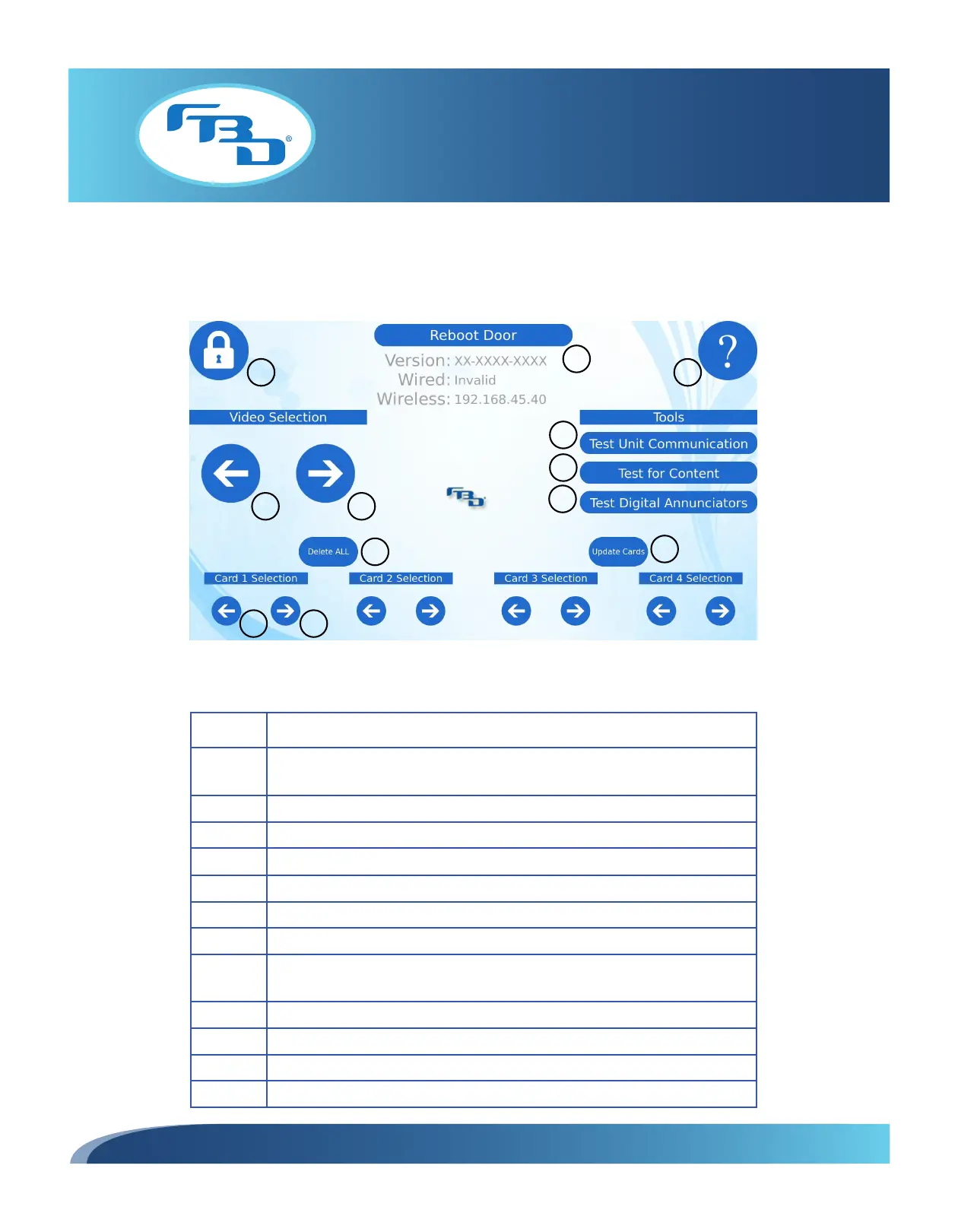
7.3 Menu Layout for Four-Barrel Merchandiser
Figure 7.4 illustrates the menu displayed after a successful “unlock” as well as the menu items.
4
1
2
3
5
6
7
8
9
10
11 12
Item Description
1
Locks the screen, exits the controls screen, saves settings, and starts the
video.
2 Reboots the screen.
3 Provides access to additional information through a quick reference guide.
4 Changes to the previous video.
5 Changes to the next video.
6 Tests the connection between the merchandiser and the dispenser.
7 Tests for video content loaded on the USB drive.
8
Tests the digital annunciator overlays for flavor cards (verifies if harness and
communication is valid and stable).
9 Deletes all flavor card images from each digital flavor card screen.
10 Loads new flavor cards onto the merchandiser from the USB drive.
11 Changes to the previous flavor.
12 Changes to the next flavor.
Figure 7.4



 To Next Page