INSTALLATION & OPERATION MANUAL
MULTI-FLAVOR MERCHANDISERS
13
5.6 Alternative Flavor Lockout
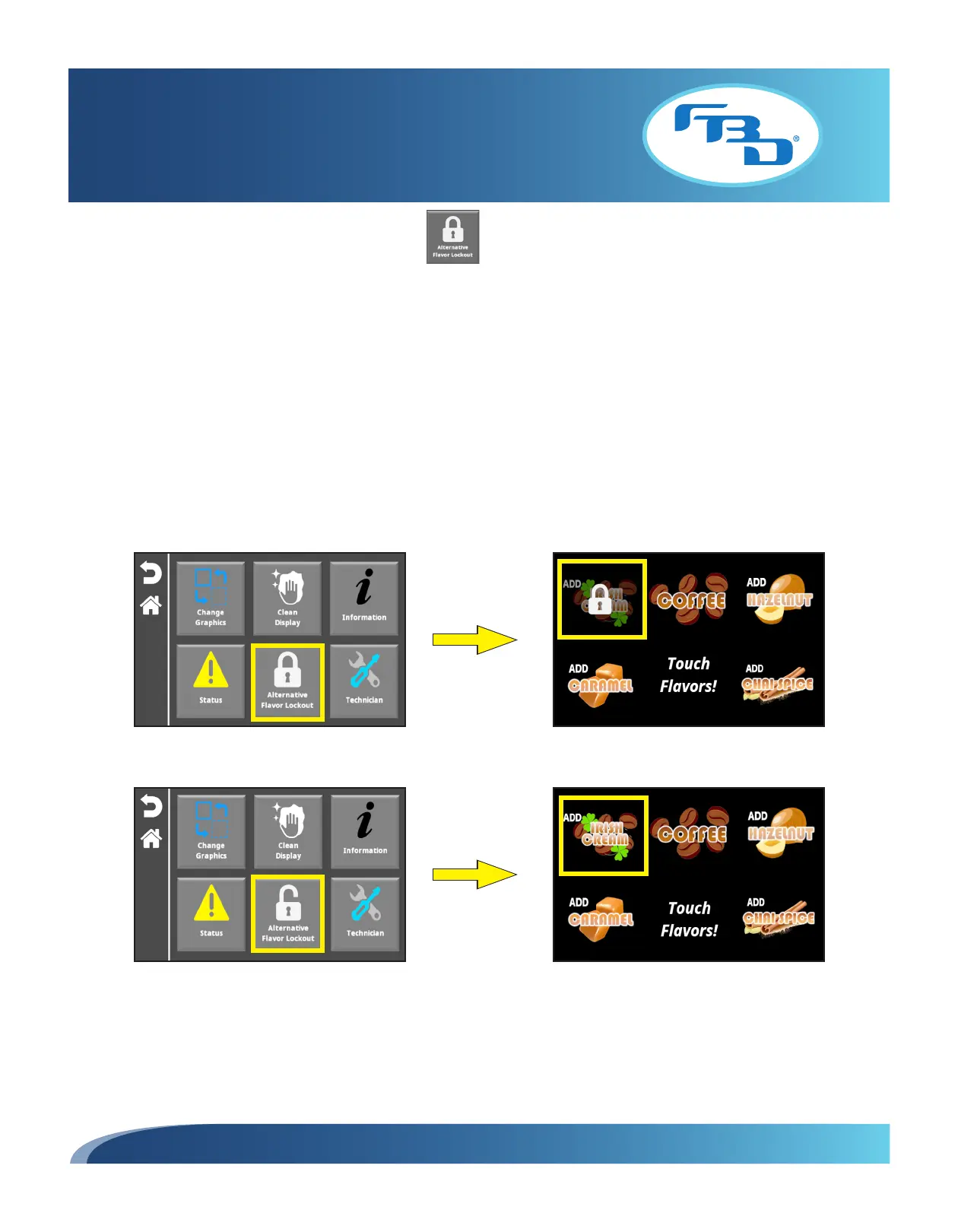
The "Alternative Flavor Lockout" can prevent any flavor set up as an "alternative" flavor from being dispensed. This icon
will only be shown in the menu when at least one alternative flavor has been set up under the "Configure Flavors" menu
option (please refer to Section 5.7 for additional information on setting up flavor types).
This option is available only to the store manager and service technician. The icon will appear for store operators if there
are any alternative flavors set up and, when selected, the screen will prompt for a password to be entered. Only the store
manager or service technician passwords can engage or disengage the lock.
When the lockout is engaged (closed lock) any flavor set up as an alternative flavor will appear as locked on the main
screen and cannot be selected to dispense with the base product. When the lockout is disengaged (open lock), the
alternative flavors can be dispensed as normal. To engage, simply select the icon; the image will change from an open lock
to a closed lock. To disengage, select the closed lock icon and the image will change to an open lock.
Engaged Lock
Disengaged Lock



 To Next Page